
Nissan Armada 2025-2026 Owner's Manual: Biometric cooling
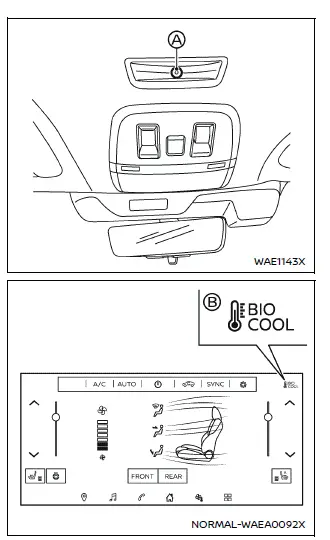
Example
The Nissan Armada features an advanced Biometric Cooling system that utilizes an infrared (IR) sensor to intelligently monitor passenger surface temperature and automatically adjust airflow for enhanced comfort. This innovative technology allows the Nissan Armada to dynamically adapt cabin climate conditions in real time, ensuring optimal cooling performance based on passenger needs.
- When the front passenger seat in the Nissan Armada is occupied (seat belt fastened) and the system detects an elevated facial surface temperature, airflow toward the front passenger is automatically increased to provide faster and more efficient cooling.
- If a second-row seat is occupied, the rear climate control system of the Nissan Armada will automatically activate (provided the front air conditioning system is already running), improving overall cabin climate distribution.
- When passengers are detected in the second row and the system identifies higher body temperature levels, the Nissan Armada increases airflow not only for second-row passengers but also extends cooling to the third row for balanced comfort throughout the cabin.
Turning the biometric cooling on/off:
To enable or disable the Biometric Cooling function in your Nissan Armada, follow these steps:
- Touch the "
 "
key on the touchscreen display.
"
key on the touchscreen display. - Select the "
 "
key.
"
key. - Tap the "Biometric Cooling (BIO COOL)" option and choose ON or OFF.
When the Biometric Cooling system in the Nissan Armada is active, the indicator key (B) will be displayed in white, confirming that the feature is enabled.
NOTE:
- Accessories such as sunglasses, facial hair, or other obstructions may reduce the accuracy of facial temperature detection, potentially affecting system responsiveness in the Nissan Armada.
- The system does not identify individual passengers, and all temperature readings remain within the vehicle without external transmission.
Air conditioner settings
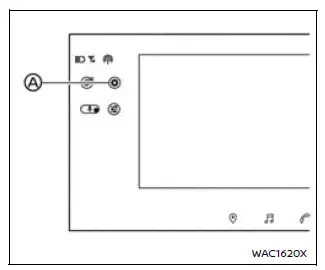
Example
Additional air conditioning settings in the Nissan Armada can be configured through the touchscreen interface. Refer to the NissanConnect Owner’s Manual for detailed instructions on system navigation and operation.
1. Touch the "
 "
key on the touchscreen to open the "All Settings" menu.
"
key on the touchscreen to open the "All Settings" menu.
2. Select the "Vehicle" option.
3. Choose "Climate" to access advanced climate control configurations in the Nissan Armada.
Operating tips
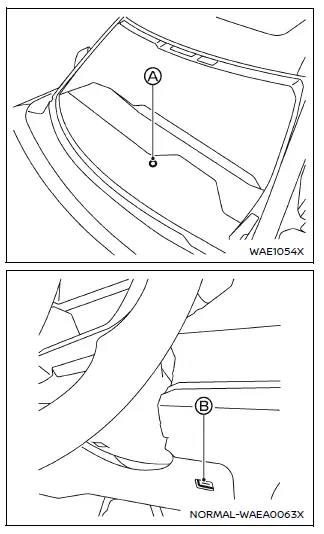
In the Nissan Armada, when both engine coolant temperature and outside air temperature are low, airflow from the foot outlets may be temporarily limited. This is a normal operating condition and not a system malfunction. Once the engine reaches optimal temperature, airflow will resume as expected.
The built-in sensors (A and B) located on the instrument panel continuously monitor cabin conditions to maintain a stable temperature. To ensure accurate readings and optimal performance of the Nissan Armada climate system, avoid placing objects near or over these sensors.
Linking Intelligent Key
The Nissan Armada allows climate control preferences to be stored and linked to individual Intelligent Keys. This feature ensures that personalized comfort settings are automatically restored for each driver.
In-cabin microfilter
The Nissan Armada climate control system includes an in-cabin microfilter designed to trap dust, pollen, and other airborne particles, improving air quality inside the vehicle.
To maintain optimal heating, cooling, and defogging performance, it is important to replace the filter according to the recommended maintenance schedule outlined in the vehicle documentation. If necessary, consult an authorized Nissan dealer for professional replacement.
The filter should be replaced if airflow decreases noticeably or if window fogging becomes more frequent during operation of the heating or air conditioning system.
Servicing climate control
The climate control system in the Nissan Armada uses an environmentally friendly refrigerant that does not harm the ozone layer. However, proper servicing requires specialized equipment and approved lubricants.
Using incorrect refrigerants or servicing methods may cause serious damage to the Nissan Armada climate system. For this reason, all maintenance and repairs should be performed by a qualified technician at an authorized Nissan service center.
WARNING
The air conditioning system contains high-pressure refrigerant. To prevent injury, any service work on the Nissan Armada climate system must only be carried out by trained professionals using proper tools and equipment.
 Rear automatic air conditioning system
Basic information
The rear automatic climate control system in the Nissan Armada is engineered
to provide enhanced comfort for all passengers, especially those seated in the second
and third rows ...
 Driving recorder
...
Other materials:
Rear window defroster and outside mirror defroster
Example
In the Nissan Armada, the rear window and outside mirror defroster switch is
conveniently located on the front climate control panel for quick and easy access.
To clear fog or frost from the rear window and outside mirrors in the Nissan
Armada, start the engine and press the defros ...
Event Data Recorders (EDR)
Basic information
Your Nissan Armada is equipped with an Event Data Recorder (EDR), a system designed
to capture critical vehicle data during specific crash or near-crash situations.
These events may include airbag deployment or impact with road obstacles. The
primary function of the EDR is to ...
Vehicle load capacity
Basic information
Before operating a loaded Nissan Armada, always verify that the total vehicle
weight does not exceed the specified Gross Vehicle Weight Rating (GVWR) or the Gross
Axle Weight Rating (GAWR). These critical limits are clearly indicated on the F.M.V.S.S./C.M.V.S.S.
certificatio ...

0.0035