Work Flow
OVERALL SEQUENCE
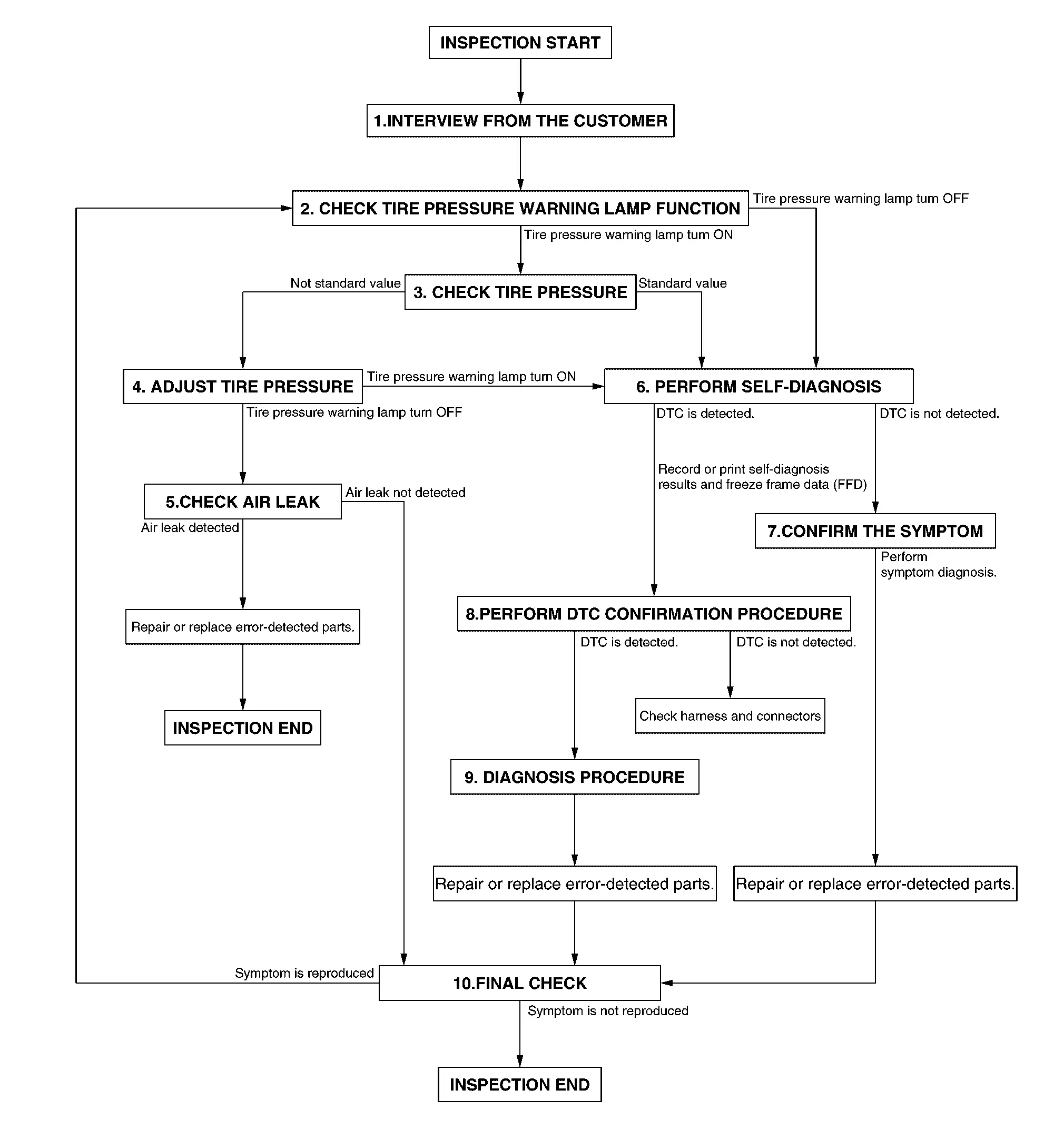
DETAILED FLOW
INTERVIEW FROM THE CUSTOMER
Clarify customer complaints before inspection. To do so, reproduce the symptom before hand and fully understand it. Then interview the customer thoroughly. Check the symptoms by driving vehicle with the customer, if necessary.
CAUTION:
Customers are not professional. Never guess easily like “maybe the customer means that...,” or “ maybe the customer mentions this symptom”.
>>
GO TO 2.
CHECK TIRE PRESSURE WARNING LAMP FUNCTION
Check that tire pressure warning lamp in combination meter.
Tire pressure warning lamp turn ON?
YES>>GO TO 3.
NO>>GO TO 6.
CHECK TIRE PRESSURE
Check the tire pressure of all wheels. Refer to TIRE AIR PRESSURE : Service Data.
 NOTE:
NOTE:
Check the tire pressure of cold condition.
Is the inspection standard value?
YES>>GO TO 6.
NO>>GO TO 4.
ADJUST TIRE PRESSURE
-
Check and adjust the tire pressure for all wheels specified to the value. Refer to TIRE AIR PRESSURE : Service Data.
-
Drive the vehicle at 25 km/h (16 MPH) or more reaches 10 minuets in total.
Tire pressure warning lamp turn OFF?
YES>>GO TO 5.
NO>>GO TO 6.
CHECK AIR LEAK
Using soapsuds etc., check air leak.
NOTE:
Check air valve.
Is air leak detected?
YES>>Repair or replace error-detected parts. Replace the valve. Perform tire pressure sensor ID registration. Refer to Description.
NO>>INSPECTION END
PERFORM SELF-DIAGNOSIS
With CONSULT
Perform self-diagnosis for "AIR PRESSURE MONITOR” of “BCM”.
Is DTC detected?
YES>>Record or print self-diagnosis results and freeze frame data (FFD). GO TO 8.
NO>>GO TO 7.
CONFIRM THE SYMPTOM
Perform symptom diagnosis. Refer to Symptom Table.
>>
Repair or replace error-detected parts. GO TO 10.
PERFORM DTC CONFIRMATION PROCEDURE
With CONSULT
Perform DTC confirmation procedures for the detected DTC, and then check that DTC is detected again.
Is DTC detected?
YES>>GO TO 9.
NO>>Check harness and connectors based on the information obtained by interview. Refer to Intermittent Incident.
DIAGNOSIS PROCEDURE
Perform DTC Diagnosis Procedure.
>>
Repair or replace error-detected parts. GO TO 10 .
FINAL CHECK
Recheck the symptom and check that the symptom is not reproduced on the same conditions.
Is the symptom reproduced?
YES>>GO TO 2.
NO>>INSTPECTION END
Other materials
Change of System Mode
Description
CAUTION:
When the following operations are performed, always use CONSULT, for performing "System mode change" of "Work support". Refer to Work Procedure.×: Required —: not required Procedure System mode change
Removing/installing ABS actuator and electric unit (control unit)
†...
Rear Seat Belt Warning (information Display) Does Not Operate
Diagnosis Procedure
CHECK DTC OF AIR BAG DIAGNOSIS SENSOR UNIT
Check DTC in “Self Diagnosis Result” mode of “AIR BAG” using CONSULT.
Is DTC detected?
YES>>
Perform trouble diagnosis related to the detected DTC. Refer to DTC Index.
NO>>
GO TO 2.
CHECK COMBINATION METER
Check com ...
Front Air Conditioner
Description
Symptom
Insufficient heating
No warm air comes out. (Air flow volume is normal.)
Diagnosis Procedure
NOTE:
Perform self-diagnoses with CONSULT before performing symptom diagnosis. If any DTC is detected, perform the corresponding diagnosis.CHECK COOLING SYSTEM
Check engine coolant ...