
Nissan Armada 2025-2026 Owner's Manual: I-FCW system operation
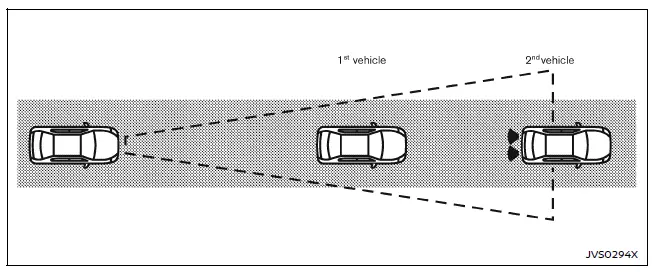
The Nissan Armada I-FCW system becomes active at speeds above approximately 3 MPH (5 km/h), ensuring functionality during most driving scenarios.
When a potential forward collision risk is detected, the Nissan Armada system immediately alerts the driver by flashing the vehicle-ahead detection indicator and emitting a clear audible warning signal, prompting timely driver response.
Turning the I-FCW system ON/OFF
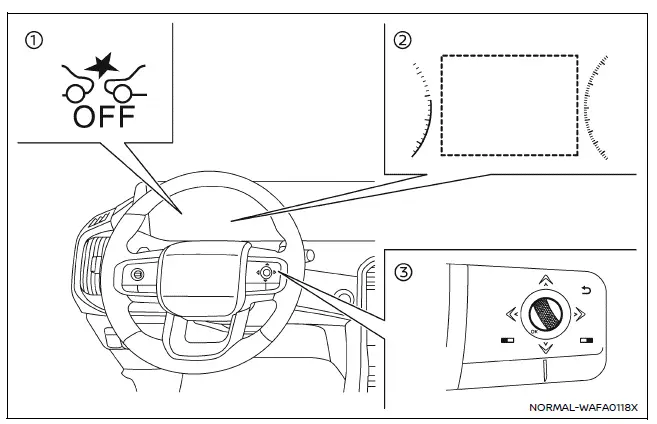
- AEB system OFF warning light (instrument panel)
- Vehicle information display
- Steering-wheel-mounted controls (right side)
Follow these steps to enable or disable the I-FCW system in the Nissan Armada:
1. Press the
 button until "Settings" appears on the vehicle information display, then confirm
using the scroll dial.
button until "Settings" appears on the vehicle information display, then confirm
using the scroll dial.
Use the scroll dial to navigate to "Driver Assistance," then press to confirm your selection.
2. Select "Emergency Brake" and press the scroll dial to turn the system ON or OFF according to your preference.
When the I-FCW system is disabled, the Nissan Armada AEB system OFF warning light (orange) will illuminate to inform the driver.
NOTE:
- The I-FCW system in the Nissan Armada automatically reactivates each time the engine is restarted.
- The I-FCW system is fully integrated with the AEB system and cannot
be controlled independently.
Disabling the AEB system will also disable the I-FCW functionality.
- The I-FCW system cannot be switched ON or OFF while the Nissan Armada is in motion.
 Basic information
WARNING
Failure to carefully follow all warnings and operating instructions related
to the I-FCW system in the Nissan Armada may lead to serious injury or even fatal
accidents.
The Intelligen ...
 I-FCW system limitations
Illustration A
Illustration B
Illustration C
Illustration D
WARNING
The following limitations apply to the Nissan Armada I-FCW system. Ignoring
these limitations may result in s ...
Other materials:
Differential lock mode switch
The rear differential lock (DIFF-LOCK) in the Nissan Armada is designed to evenly
distribute engine torque between the left and right rear wheels, improving traction
in low-grip conditions.
To activate the differential lock in the Nissan Armada, reduce speed below 4
MPH (7 km/h), switch t ...
MOD system operation
The Nissan Armada MOD system activates automatically under the following conditions:
When the transmission is shifted into R (Reverse).
When the CAMERA/
button is pressed to enable the Around View Monitor display.
When the Nissan Armada vehicle speed drops below approximately 5 MPH (8 ...
Lane Change Assist (ProPILOT Assist 2.1)
Basic information
Lane Change Assist in the Nissan Armada is an advanced feature of ProPILOT Assist
2.1, designed to support the driver during lane changes under appropriate conditions.
Before using this system, it is recommended to fully understand the ProPILOT Assist
functionality and its o ...

0.0044