Inspection
CHECK SHIFT BUTTON OPERATION
-
When pressing each shift button of electric shift selector, check that each button is not twisted, stuck, or does not make noise and can be operated smoothly.
-
After pressing each shift button, check that all buttons return to original positions without sticking.
Is the inspection result normal?
YES>>GO TO 2.
NO>>Repair or replace the electric shift selector. Refer to Removal and Installation.
CHECK SHIFT POSITION
Check the following during engine running.
-
When pressing each shift button while depressing brake pedal, check shift position is changed according to the shift button.
-
When pressing each shift button without depressing brake pedal during P position, check that shift position is not changed from P position.
-
When pressing R button while depressing brake pedal, check that the reverse lamp turns on and the single tone sounds to notify the driver.
-
When pressing D/M button during D position, check that the mode is switched to manual mode (shift position is displayed numerically).
-
When pressing D/M button during manual mode, check that shift position is changed to D position.
-
When the ignition switch turns off, the shift position automatically changes into the P position. (The indicator lamp of the P button turns ON.)
Is the inspection result normal?
YES>>END
NO>>Check the electric shift system.
How to Erase Pearmanent Dtc
Description
WHEN A DTC IS STORED IN TCM
When a DTC is stored in TCM and MIL is ON, a permanent DTC is erased with MIL shutoff if the same malfunction is not detected after performing the driving pattern for MIL shutoff three times in a raw.
 NOTE:
NOTE:
The following timing chart is for DTC of two trip detection diagnosis.
In case of DTC of one trip detection diagnosis, when NG is detected at one trip, MIL turns ON and permanent DTC is displayed.
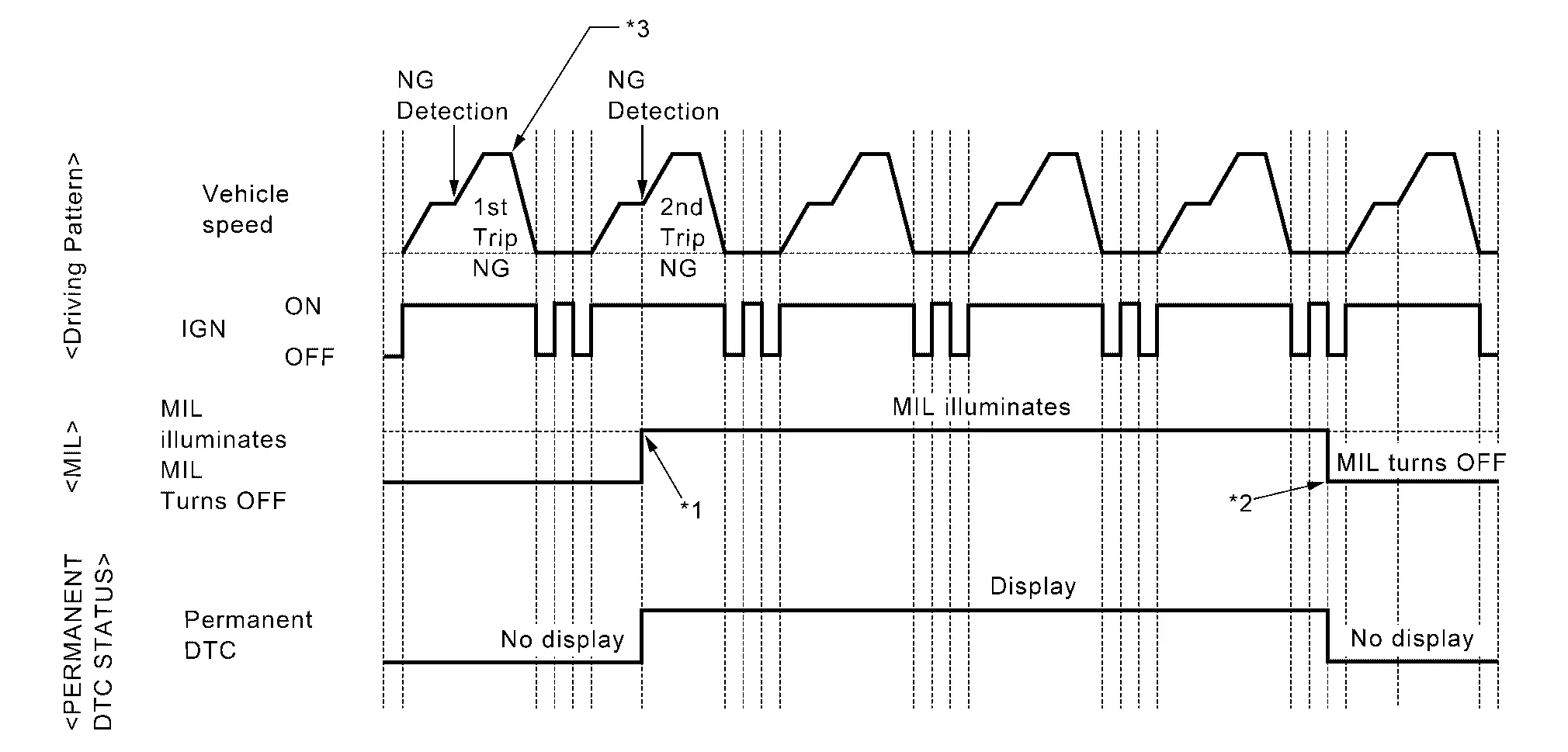
| *1: | When the same malfunction is detected in two consecutive trips, MIL will illuminate. | *2: | MIL will turn off after vehicle is driven 3 times (driving pattern B) without any malfunctions. | *3: |
Diagnosis condition *A and diagnosis delay time *A for each DTC are satisfied. (*A: For details of these, refer to DTC/CIRCUIT DIAGNOSIS >> DTC (Pxxxx or Uxxx) >> DTC Description >> DTC DETECTION LOGIC.) |
WHEN A DTC IS NOT STORED IN TCM
The erasing method depends on a permanent DTC stored in TCM.
For erase procedure of permanent DTC, refer to Work Procedure.
PERMANENT DTC ITEM
For permanent DTC items, MIL turns ON. Refer to DTC Index.
Work Procedure
CHECK DTC
Check DTC.
Is any DTC detected?
YES>>Repair malfunction(s) and erase DTC.
NO>>GO TO 2.
CHECK PERMANENT DTC
With CONSULT
-
Ignition switch OFF and wait at least 60 seconds.
-
Ignition switch ON.
-
Ignition switch OFF and wait at least 60 seconds.
-
Ignition switch ON.
-
Select “PERMANENT DTC STATUS” mode with CONSULT.
 With GST
-
Ignition switch OFF and wait at least 60 seconds.
-
Ignition switch ON.
-
Ignition switch OFF and wait at least 60 seconds.
-
Ignition switch ON.
-
Select Service $0A with GST.
Is any permanent DTC detected?
YES>>GO TO 3.
NO>>END
HOW TO ERASE PERMANENT DTC
CAUTION:
Always drive at a safe speed.
-
Perform "DTC CONFIRMATION PROCEDURE "of detected permanent DTC.
-
Drive the vehicle following to driving pattern.
-
The state of driving at 40 km/h (25 MPH) reaches 300 seconds or more in total.
-
Idle speed lasts 30 seconds or more.
-
A lapse of 600 seconds or more after engine start.
-
>>
GO TO 4.
CHECK PERMANENT DTC
With CONSULT
-
Ignition switch OFF and wait at least 60 seconds.
-
Ignition switch ON.
-
Ignition switch OFF and wait at least 60 seconds.
-
Ignition switch ON.
-
Select “PERMANENT DTC STATUS” mode with CONSULT.
With GST
-
Ignition switch OFF and wait at least 60 seconds.
-
Ignition switch ON.
-
Ignition switch OFF and wait at least 60 seconds.
-
Ignition switch ON.
-
Select Service $0A with GST.
Is any permanent DTC detected?
YES>>GO TO 1.
NO>>END
Other materials
Supplemental air bag warning light
In the Nissan Armada, the supplemental air bag warning light, identified by the
symbol
displayed in the instrument cluster, continuously monitors the integrity of the
air bag systems, pretensioners, and all associated wiring circuits.
When the ignition switch of the Nissan Armada is tur ...
Fog light switch
Front fog lights
Front fog lights (example)
In the Nissan Armada, the front fog lights are designed to improve visibility
in challenging weather conditions such as fog, rain, or snow by illuminating the
road surface at a lower angle.
To activate the fog lights in the Nissan Armada, first ...
Basic information
WARNING
Ensure that the Nissan Armada liftgate is fully closed and securely latched
before driving to prevent it from opening unexpectedly.
Never drive the Nissan Armada with the liftgate open, as harmful exhaust
gases may enter the cabin.
To reduce the risk of injury or fatal incident ...