
Nissan Armada 2025-2026 Service and Repair Manual: Work Flow
OVERALL SEQUENCE
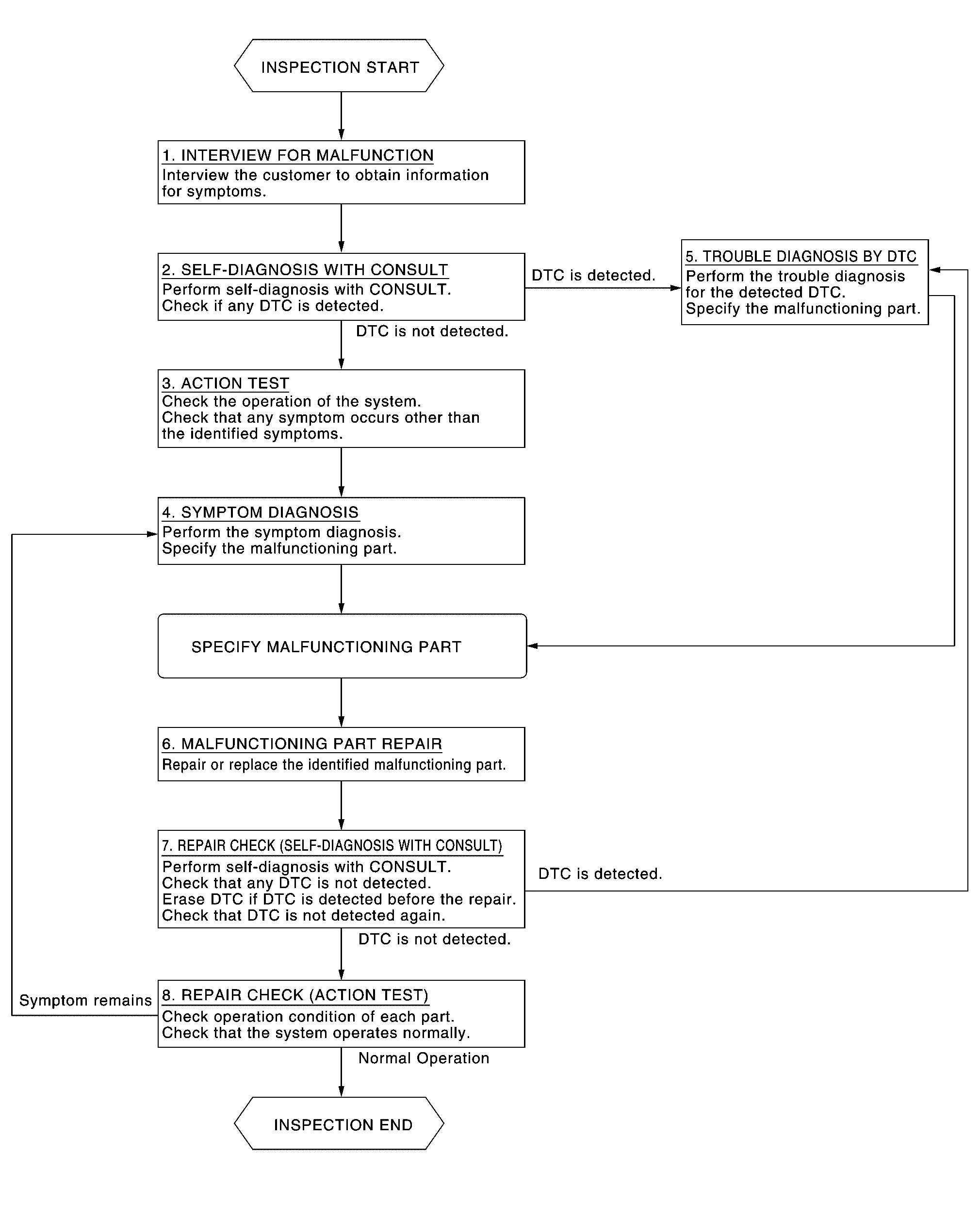
DETAILED FLOW
INTERVIEW FOR MALFUNCTION
 NOTE:
NOTE:
GO TO 2.
SELF-DIAGNOSIS WITH CONSULT
Perform “All DTC Reading� with CONSULT.
Check if any DTC is detected in self-diagnosis results of “LASER/RADAR�, “LANE CAMERA� and “ICC/ADAS 2�.
Is any DTC detected?
YES>>Record or print self-diagnosis results and freeze frame data (FFD). GO TO 5.
NO>>GO TO 3.
ACTION TEST
Perform the ProPILOT Assist 1.1 system action test to check the operation status. Refer to Work Procedure.
Check if any other malfunctions occur.
>>GO TO 4.
SYMPTOM DIAGNOSIS
>>GO TO 6.
TROUBLE DIAGNOSIS BY DTC
Erase self-diagnostic results.
Ignition switch OFF → ON.
CAUTION:
Be sure to wait of 10 seconds after turning ignition switch OFF or ON.
Check the DTC in the self-diagnosis results.
Perform trouble diagnosis for the detected.
LASER/RADAR: Refer to DTC Index.
LANE CAMERA: Refer to DTC Index.
ICC/ADAS 2: Refer to DTC Index.
NOTE:
If Network-DTC is detected, first diagnose the CAN communication system.
>>GO TO 6.
MALFUNCTIONING PART REPAIR
Repair or replace the identified malfunctioning parts.
>>GO TO 7.
REPAIR CHECK (SELF-DIAGNOSIS WITH CONSULT)
Erases self-diagnosis results.
Perform “All DTC Reading� again after repairing or replacing the malfunctioning parts.
LASER/RADAR: Refer to DTC Index.
LANE CAMERA: Refer to DTC Index.
ICC/ADAS 2: Refer to DTC Index.
Is any DTC detected?
YES>>GO TO 5.
NO>>GO TO 8.
REPAIR CHECK (ACTION TEST)
Perform the ProPILOT Assist 1.1 system action test. Check if the malfunction symptom is solved or no other symptoms occur.
Is there any malfunction symptom?
YES>>GO TO 4.
NO>>INSPECTION END

 Action Test
...
Other materials:
Removal and Installation
WARNING:
REMOVAL
CAUTION:
Front Washer Tube A
Remove washer tank assembly. Refer to Removal and Installation.
Remove front fender drip cover RH. Refer to Removal and Installation.
Disconnect front washer tube A form connector.
Remove front washer tube A fixing clip, and then remove front washer tube ...
Wireless charger
Lid
Charging pad
The Nissan Armada wireless charger is conveniently located beneath a lid in the
center console. Press the lid to open it, then place your smartphone on the charging
pad with the screen facing upward.
Once positioned correctly, the Nissan Armada wireless charging sys ...
Intelligent Key operating range
The Nissan Armada Intelligent Key system functions only when the key is located
within the defined operating range of the request switches 1 and 2 (if equipped).
For optimal performance, the Nissan Armada Intelligent Key must be within approximately
80 cm (31.50 in) of each request switch.
...

0.0074