
Nissan Armada 2025-2026 Owner's Manual: Basic information
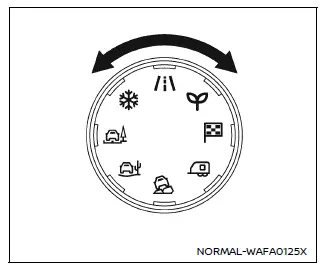
Drive Mode Selector (example)
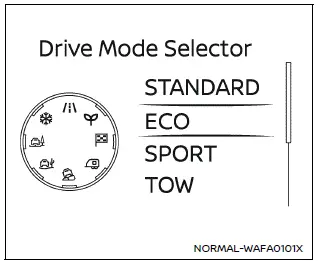
Vehicle information display (example)
The Nissan Armada features a versatile Drive Mode Selector system that allows the driver to tailor vehicle performance to different driving conditions. By rotating the selector dial to the left or right, you can quickly switch between available driving modes.
The selected mode is displayed clearly in the Nissan Armada vehicle information display, where a list of available modes briefly appears for easy selection.
NOTE:
- When selecting a drive mode in the Nissan Armada, the change may not occur instantly. This is normal system behavior and does not indicate a malfunction.
- Each time the ignition is turned ON, the Nissan Armada defaults to STANDARD mode.
NOTE:
The mode selection menu will automatically disappear after a few seconds. You can also manually clear it by pressing the scroll dial on the steering wheel.
If the Nissan Armada drive mode cannot be changed while the ignition is ON, have the system inspected by an authorized Nissan dealer.
WARNING
Do not focus your attention on the Drive Mode Selector or display while driving your Nissan Armada. Always keep your full attention on the road to ensure safe vehicle operation.

 STANDARD mode
The symbol of this Nissan Armada mode is
.
STANDARD mode is the default setting in the Nissan Armada and is optimized for
everyday driving. It provides a balanced combination of performance, comfo ...
Other materials:
Fog light switch
Front fog lights
Front fog lights (example)
In the Nissan Armada, the front fog lights are designed to improve visibility
in challenging weather conditions such as fog, rain, or snow by illuminating the
road surface at a lower angle.
To activate the fog lights in the Nissan Armada, first ...
LDW system operation
The Nissan Armada LDW and I-LI systems utilize a forward-facing camera mounted
behind the windshield to continuously monitor lane markings and road boundaries.
Example
I-LI ON indicator (displayed in the vehicle information screen)
LDW/I-LI alert indicator (vehicle information displ ...
BSW system operation
Side indicator light
BSW indicator (vehicle information display)
Vehicle information display
Steering-wheel-mounted controls (right side)
The Nissan Armada BSW system becomes active at speeds above approximately 20
MPH (32 km/h), ensuring effective operation during typical driving ...

0.0036