
Nissan Armada 2025-2026 Owner's Manual: Checking engine coolant level
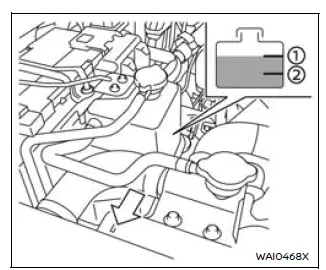
For optimal performance and reliability of your Nissan Armada, always check the engine coolant level when the engine is completely cold.
Inspect the coolant level in the reservoir tank. If the level is below the MIN 2 mark, carefully open the reservoir cap and add the appropriate coolant until it reaches the MAX 1 level.
If the reservoir tank is empty, it is important to also check the coolant level directly in the radiator. When the engine is cold, remove the radiator cap and fill the radiator up to the filler neck. Then add coolant to the reservoir tank up to the MAX level 1.
After adding coolant, securely tighten all caps to ensure proper pressure is maintained within the Nissan Armada cooling system.
If you notice that your Nissan Armada requires frequent coolant refilling, this may indicate a leak or system issue. In such cases, it is strongly recommended to have the system inspected by a NISSAN dealer.
WARNING
When refilling coolant in your Nissan Armada, open only the coolant reservoir cap. Never open both the radiator cap and reservoir cap at the same time, as this may lead to dangerous pressure release.
Major maintenance or repairs involving the Nissan Armada cooling system should always be performed by a qualified technician. Refer to the official NISSAN Service Manual for proper procedures.
Improper servicing of the Nissan Armada cooling system may lead to reduced heating efficiency and potential engine overheating.
WARNING
- To prevent serious burns, never attempt to check or replace coolant while the Nissan Armada engine is hot.
- Do not remove the radiator or reservoir cap when the system is under pressure. Hot coolant may spray out and cause injury.
- Avoid direct contact with used coolant. If contact occurs, wash thoroughly with soap or appropriate cleaner.
- Always keep coolant safely stored and out of reach of children and animals.
Engine coolant must be disposed of properly.
Always follow local environmental regulations when disposing of coolant from your Nissan Armada.
Changing engine coolant
1. Park your Nissan Armada on a flat, stable surface and apply the parking brake securely.
2. Start the engine and allow it to reach normal operating temperature.
3. Turn the engine off and wait at least 10 minutes to allow fluids to settle and components to cool.
4. Remove the dipstick and wipe it clean with a lint-free cloth.
Reinsert the dipstick fully into its tube.
5. Remove the dipstick again to check the oil level. The oil level should be within the designated range 1. If the level is below mark 2, remove the oil filler cap and add the recommended engine oil through the filler opening. Do not overfill beyond mark 3.
6. Reinsert the dipstick and check the level again to confirm proper oil quantity.
It is normal for the Nissan Armada to consume small amounts of oil between service intervals or during the engine break-in period, especially under demanding driving conditions.
CAUTION
Regularly monitor the engine oil level in your Nissan Armada to ensure proper lubrication.
Operating the Nissan Armada engine with insufficient oil can cause severe engine damage, which may not be covered under warranty.
Routine checks of both coolant and engine oil are essential to maintaining the long-term durability and performance of your Nissan Armada.
 Basic information
The engine cooling system of the Nissan Armada is factory-filled with a precisely
balanced mixture consisting of 50% Genuine NISSAN Long Life Antifreeze/Coolant (blue)
and 50% water. This formulat ...
 Engine oil
Checking engine oil level
Vehicle set-up
To ensure accurate engine oil level readings in your Nissan Armada, follow the
proper preparation steps below.
1. Park the Nissan Armada on a flat, ...
Other materials:
System temporarily unavailable
When any of the following messages appear on the vehicle information display,
a chime will sound and the I-BSI system will be turned off automatically.
"Unavailable Slippery Road": When the VDC system (except traction control
system function) or ABS operates.
"Currently Una ...
If your vehicle overheats
CAUTION
Never continue driving your Nissan Armada if the engine temperature rises
excessively. Doing so may result in severe engine damage or even a vehicle fire.
To prevent burns, never remove the radiator cap or coolant reservoir
cap while the Nissan Armada engine is hot. Pressurized h ...
Lights
Basic information
Example
Front parking light / daytime running light / front turn signal
Map light
Headlight (low beam)
Front fog light (if equipped)
Headlight (high beam)
Front side marker light
Puddle light (if equipped)
Side turn signal (if equipped)
Rear personal light
...

0.0049