Nissanconnect
Work Flow
OVERALL SEQUENCE
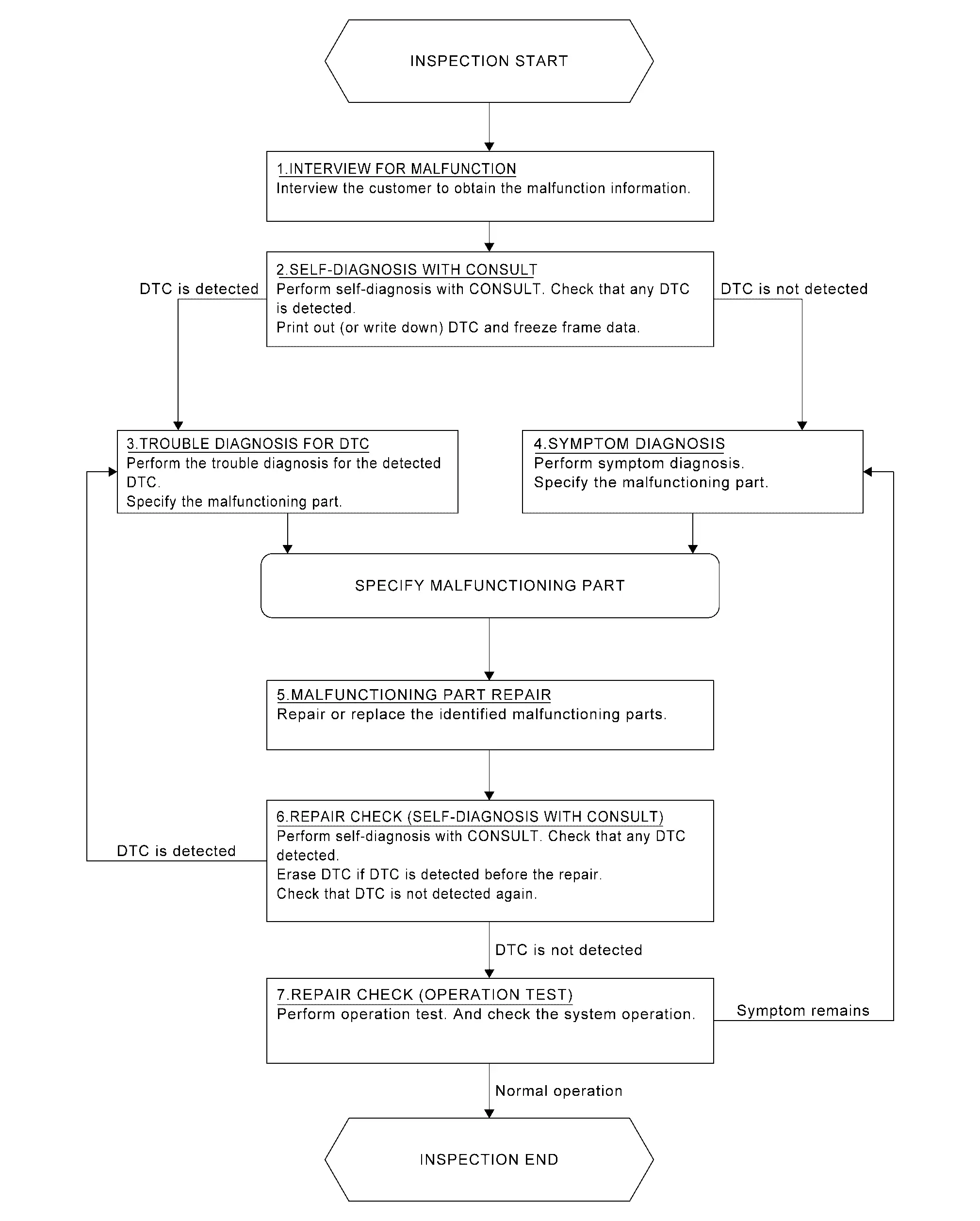
DETAILED FLOW
INTERVIEW FOR MALFUNCTION
It is also important to clarify the customer concerns before starting the inspection. Interview the customer about the concerns carefully and understand the symptoms fully.
 NOTE:
NOTE:
The customers are not professionals. Never assume that “maybe the customer means···” or “maybe the customer mentioned this symptom”.
>>
GO TO 2.
SELF-DIAGNOSIS WITH CONSULT
With CONSULT
Perform self-diagnosis of “MULTI AV” using CONSULT. Refer to CONSULT Function.
NOTE:
Skip to step 4 of the diagnosis procedure if “MULTI AV” is not displayed.
Is any DTC detected?
YES>>GO TO 3.
NO>>GO TO 4.
TROUBLE DIAGNOSIS FOR DTC
-
Check the DTC indicated in the “Self Diagnostic Result”.
-
When DTC is detected, follow the instructions below:
-
Record DTC
-
Freeze Frame Data (FFD)
-
-
Perform the relevant diagnosis referring to the DTC Index. Refer to DTC Index.
>>
GO TO 5.
SYMPTOM DIAGNOSIS
Perform the applicable diagnosis according to the diagnosis chart by symptom. Refer to Symptom Table.
>>
GO TO 5.
MALFUNCTIONING PART REPAIR
Repair or replace the identified malfunctioning parts.
>>
GO TO 6.
REPAIR CHECK (SELF-DIAGNOSIS WITH CONSULT)
With CONSULT
-
Erases self-diagnosis results.
-
Perform self-diagnosis of “MULTI AV” again after repairing or replacing the specific items.
-
Check if any DTC is detected in self-diagnosis results of “MULTI AV” .
Is any DTC detected?
YES>>GO TO 3.
NO>>GO TO 7.
REPAIR CHECK (OPERATION TEST)
Perform operation test. Check that the malfunction symptom is solved or no other symptoms occur.
Is there a malfunction symptom?
YES>>GO TO 4.
NO>>INSPECTION END
Other materials
Cab Mounting Insulator
Exploded View
Cab mounting insulator (1st)
Cab mounting insulator (2nd)
Cab mounting insulator (3rd)
Cab mounting insulator (4th)
Front bumper cross member
Rear engine mounting cross member
Chipping protector
: N·m (kg-m, ft-lb)
Removal and I ...
Rear Rh
Description
Rear door RH door does not lock/unlock using door lock and unlock switch.
Diagnosis Procedure
CHECK DOOR LOCK ACTUATOR
Check door lock actuator (rear RH).
Refer to Diagnosis Procedure.
Is the inspection result normal?
YES>>
GO TO 2.
NO>>
Repair or replace the malfunctioning ...
Bcm
Removal and Installation
CAUTION:
When replacing the BCM, always replace it with a new one. The functions controlled by the BCM does not operate properly in case of reuse of the BCM from another vehicle.
Be sure to perform the following items must be performed when replacing BCM.
Writing vehic ...