Exploded View
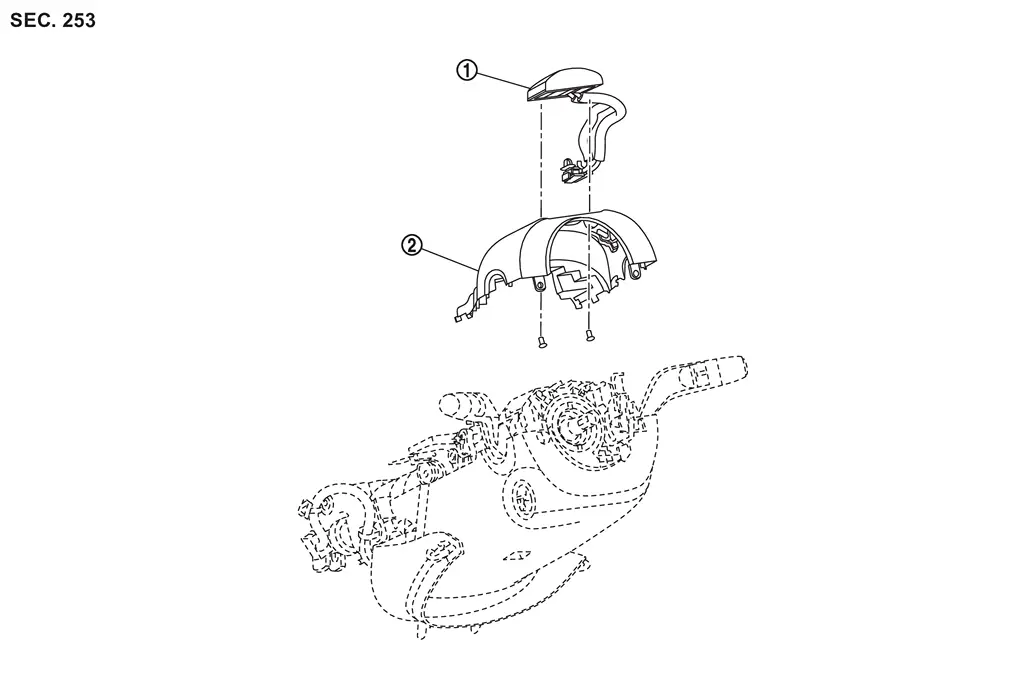
 |
Driver monitor camera |  |
Steering column cover upper |
Removal and Installation
REMOVAL
Remove the steering column cover upper. Refer to Removal and Installation.
Disconnect the driver monitor camera connector.
Remove the driver monitor camera mounting screws  , and remove the driver monitor camera from the steering column cover upper .
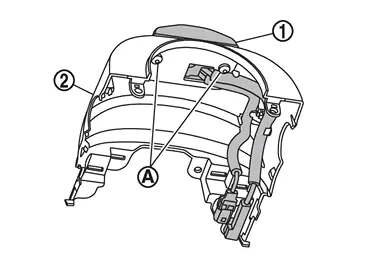
INSTALLATION
Installation is in the reverse order of removal.
CAUTION:
Make sure that check that the value of "Face" in "DATA MONITOR" of "Driver Monitor Camera" is "In range" after replacing or removing the driver monitor camera.
Other materials
Headlight and turn signal switch
Headlight switch
Basic information
CAUTION
In the Nissan Armada, always operate the headlights with the engine running
to prevent unnecessary battery discharge and ensure reliable electrical system performance.
Example
Lighting
Type A (if so equipped):
Rotate the switch to the
...
Intelligent Around View Monitor system operation
The Nissan Armada Intelligent Around View Monitor utilizes multiple strategically
positioned cameras 1, including units mounted in the front grille, beneath the outside
mirrors, and above the rear license plate, to create a comprehensive multi-angle
view of the vehicle surroundings.
Basic ...
Diagnosis and Repair Work Flow
Work Flow
OVERALL SEQUENCEDETAILED FLOWGET INFORMATION FOR SYMPTOM
Get detailed information from the customer about the symptom (the condition and the environment when the incident/malfunction occurs).
Check operation condition of the function that is malfunctioning.
>>
GO TO 2.
CHECK ...