Exploded View
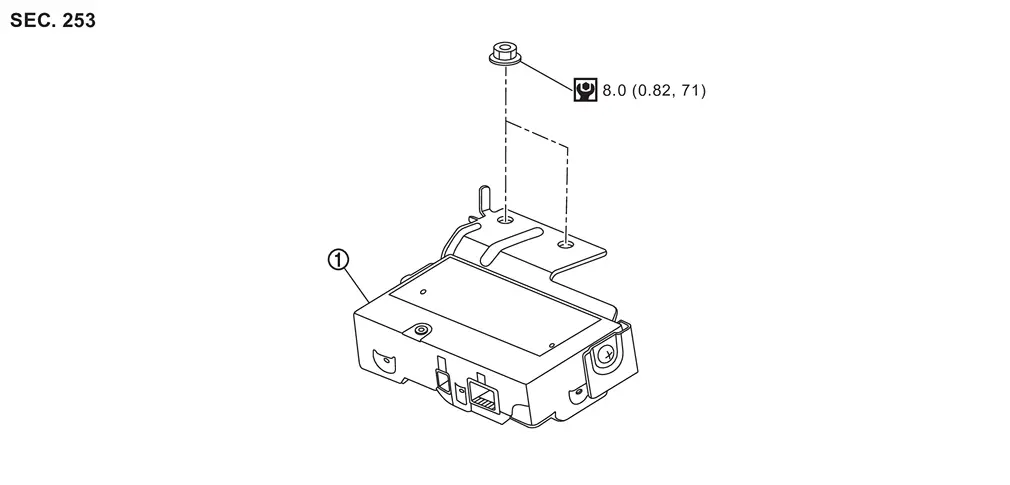
 |
Driver monitor camera control unit | ||||
 |
: N·m (kg-m, in-lb) | ||||
Removal and Installation
REMOVAL
Remove the front speaker grille. Refer to Removal and Installation.
Remove the mounting nuts, and remove the driver monitor camera control unit.
Disconnect the driver monitor camera control unit connector.
INSTALLATION
Installation is in the reverse order of removal.
CAUTION:
Make sure that check that the value of "Face" in "DATA MONITOR" of "Driver Monitor Camera" is "In range" after replacing or removing the driver monitor camera.
Other materials
How to enable/disable the TSR system
Vehicle information display
Steering-wheel-mounted controls (right side)
To configure the Nissan Armada TSR system, follow these steps:
1. Press the
button until "Settings" appears on the vehicle information display. Then press the
scroll dial.
2. Navigate to "Driv ...
Abs Actuator and Electric Unit (control Unit)
Exploded View
ABS actuator and electric unit (control unit)
Bracket
ABS actuator and electric unit (control unit) harness connector
To electrical brake control unit primary side
To electrical brake control unit secondary side
To front RH caliper
To front LH calipe ...
Back Door Hinge
Removal and Installation
REMOVALRemove back door assembly. Refer to Removal and Installation.
Remove back door hinge mounting nuts, and then remove back door hinge.INSTALLATIONNote the following items, and then install in the reverse order of removal.CAUTION:
Before installation, apply anticorrosi ...