Exploded View
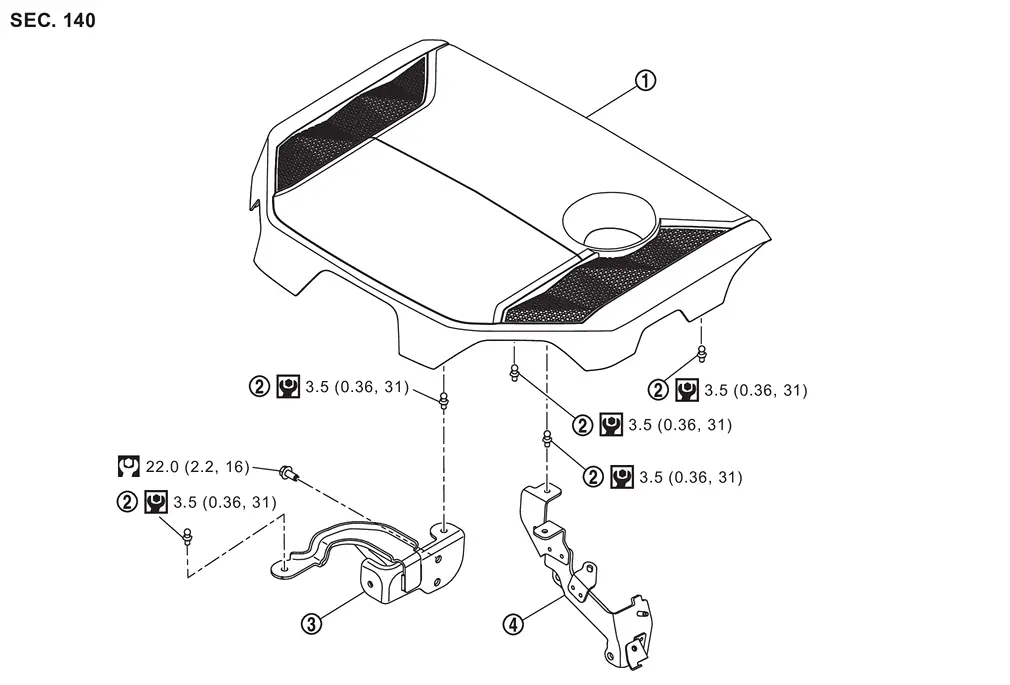
 |
Engine cover |  |
Stud bolt |  |
Engine cover bracket 1 |
 |
Engine cover bracket 2 | ||||
 |
: N·m (kg-m, in-lb) | ||||
 |
: N·m (kg-m, ft-lb) |
Removal and Installation
REMOVAL
Remove engine cover.
If necessary remove the bracket.
CAUTION:
Never damage or scratch engine cover when installing or removing.
INSTALLATION
Installation is the reverse order of removal.
Other materials
Noise, Vibration and Harshness (nvh) Troubleshooting
NVH Troubleshooting Chart
Use the chart below to find the cause of the symptom. If necessary, repair or replace these parts. Possible cause and SUSPECTED PARTS Symptom Reference
Noise
Gear tooth rough
×
Inspection, Inspection
Gear contact improper
×
Adjustment
Tooth surfaces wo ...
Rab System Symptoms
Symptom Table
CAUTION:
Perform the self-diagnosis with CONSULT before the symptom diagnosis. Perform the trouble diagnosis if any DTC is detected. Symptom Confirmation item Reference page
RAB system display does not display
Combination meter
On Board Diagnosis Function
...
Facial Recognition Check
Work Procedure
If system detects that driver is not facing forward even though driver is facing forward, perform face recognition check.PREPARATION BEFORE FACE RECOGNITION CHECK
Make sure that all of the following conditions are satisfied
vehicle speed is 0 km/h (stopped).
Shift position is "P" ...