
Nissan Armada 2025-2026 Owner's Manual: How to activate/deactivate the automatic brake hold function
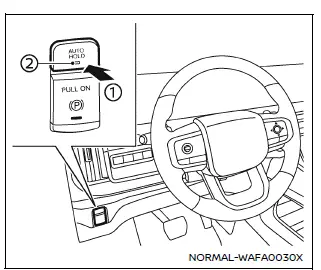
To enable the automatic brake hold feature in your Nissan Armada, ensure the ignition switch is in the ON position, then press the automatic brake hold switch 1. Once activated, the indicator light on the switch 2 will illuminate, confirming that the system is ready for operation.
When the Nissan Armada automatic brake hold system enters standby mode, the corresponding indicator light (white) will illuminate, signaling that the function is available for use.
How to activate the automatic brake hold function
Before the Nissan Armada automatic brake hold function can actively maintain braking force, the following conditions must be met:
- The driver’s seat belt must be securely fastened.
- The electronic parking brake must be released.
- The Nissan Armada must not be in the P (Park) position.
- The vehicle must not be positioned on a steep incline.
NOTE:
The Nissan Armada automatic brake hold system retains its last selected state even after the ignition is turned off, unless manually changed by the driver.
How to deactivate the automatic brake hold function
To turn off the Nissan Armada automatic brake hold feature, press the automatic brake hold switch again. The indicator light will turn off, confirming that the system has been deactivated.
If the braking force is currently being held by the Nissan Armada automatic brake hold system, first press and hold the brake pedal, then deactivate the function using the switch.
WARNING
Always press and hold the brake pedal firmly when deactivating the automatic brake hold function while braking force is applied. Once the function is turned off, braking force will be released immediately, which may cause the Nissan Armada to move unexpectedly.
Failure to properly secure the vehicle may result in unintended movement, leading to serious injury or property damage.
 Basic information
The Nissan Armada is equipped with an advanced automatic brake hold function
designed to enhance driving convenience in stop-and-go traffic conditions. This
system automatically maintains braking ...
 How to use the automatic brake hold function
Basic information
For optimal use of the Nissan Armada automatic brake hold system, follow the
operational guidelines outlined below to ensure safe and effective performance.
To maintain braking f ...
Other materials:
Seat belt extenders
If, due to body size or seating position, the standard lap-shoulder belt in the
Nissan Armada cannot be comfortably or properly fastened, a compatible seat belt
extender is available. This accessory is specifically designed to work with the
original seat belt system installed in the Nissan Arm ...
Basic information
WARNING
In the Nissan Armada, radio frequency signals emitted by the Intelligent
Key system may interfere with certain medical devices.
Individuals using pacemakers or similar medical equipment should consult
the device manufacturer to determine possible effects before using the Nissa ...
Hazard warning flasher switch
Press the hazard warning flasher switch in the Nissan Armada to alert other drivers
when your vehicle must stop or is parked under emergency conditions. Once activated,
all turn signal lights will flash simultaneously to increase visibility.
WARNING
In an emergency, always move the Niss ...

0.0039