
Nissan Armada 2025-2026 Owner's Manual: How to enable/disable the TSR system
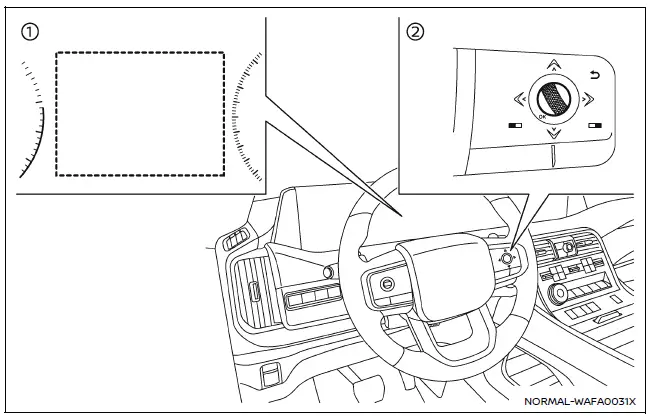
- Vehicle information display
- Steering-wheel-mounted controls (right side)
To configure the Nissan Armada TSR system, follow these steps:
1. Press the
 button until "Settings" appears on the vehicle information display. Then press the
scroll dial.
button until "Settings" appears on the vehicle information display. Then press the
scroll dial.
2. Navigate to "Driver Assistance" using the scroll dial and confirm selection.
3. Select "Traffic Sign Assist", then choose either "Speed Limit Sign" or "Speed Limit Warning" (if equipped). Toggle the desired setting ON or OFF using the scroll dial.
System temporarily unavailable
Under certain conditions, such as when the Nissan Armada is parked under direct sunlight in high temperatures (above approximately 104ºF / 40ºC), the TSR system may automatically deactivate. In this case, a warning message such as "Unavailable Camera Temperature High" will appear.
Action to take:
Once the interior temperature of the Nissan Armada decreases, the TSR system will resume normal operation automatically.
System malfunction
If the TSR system in the Nissan Armada detects a malfunction, it will deactivate automatically and display a "Malfunction See Owner's Manual" warning message.
Action to take:
If this message appears, safely stop the vehicle, turn off the engine, and restart it. If the warning persists, the Nissan Armada should be inspected by an authorized dealer.
System maintenance
The Nissan Armada TSR system shares its multi-sensing front camera with other driver assistance technologies such as Lane Departure Warning (LDW). This camera is mounted near the interior mirror and must be kept clean and unobstructed to ensure optimal system performance. Regular inspection and maintenance are essential for reliable operation of the Nissan Armada TSR system. :contentReference[oaicite:0]{index=0}
 System operation
The Nissan Armada TSR system is capable of recognizing and displaying key traffic
signs, including the following:
Latest detected speed limit
No passing zone indication
CAUTION
...

Other materials:
Hill Start Assist system
WARNING
Never depend solely on the Hill Start Assist system in the Nissan Armada
to prevent rollback when starting on an incline. Always remain attentive and
keep full control of the vehicle. When stopped on a steep hill, firmly press
the brake pedal. Extra caution is required on icy, m ...
Basic information
WARNING
Incorrect use of the Nissan Armada AEB with Pedestrian Detection system can
lead to serious injury or fatal accidents.
The Nissan Armada AEB system is designed as an additional safety feature
and does not replace attentive and responsible driving. The driver must always
remain a ...
Maintenance precautions
When performing inspection or maintenance tasks on your Nissan Armada, always
take appropriate precautions to prevent injury and avoid damaging the vehicle.
The following safety guidelines should always be observed when working on your
Nissan Armada:
WARNING
Park the Nissan Armada on a lev ...

0.0058