
Nissan Armada 2025-2026 Owner's Manual: How to use the HUD
Basic information
To activate the Head Up Display in the Nissan Armada, press the HUD switch. Press it again to turn the system off.
If the HUD is turned off, it will remain disabled even after restarting the Nissan Armada, maintaining the last selected setting.
The following HUD settings in the Nissan Armada can be customized via the vehicle information display:
- Brightness
- Height
- Rotation
- Contents selection
- Navigation
- Driving Assist
- Speed Limit Sign
- Audio
- TEL/SMS
- Reset
NOTE:
- Critical alerts may still appear in the Nissan Armada HUD even if the system is turned off.
- When Driving Assist systems are active, the HUD may automatically display ProPILOT Assist information regardless of manual settings.
This Nissan Armada system incorporates multiple types of software:
(1) Panasonic Corporation software or software developed specifically for Panasonic Corporation
(2) Third-party licensed software integrated into the Nissan Armada system
(3) Open source software components
For open source software (OSS) details, refer to the official license information website.
Refer to the license web site at: http:// car.panasonic.jp/oss/j03llnna
Display brightness
The brightness of the Nissan Armada HUD can be manually adjusted through the vehicle settings menu.
Additionally, the system automatically adapts brightness based on external lighting conditions to maintain optimal visibility.
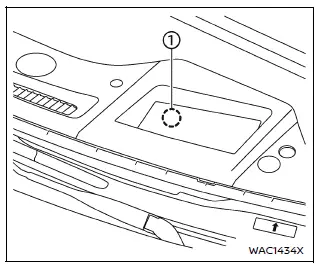
Avoid exposing the Nissan Armada HUD sensor to strong light sources, as this may interfere with proper operation.
NOTE:
- The Nissan Armada HUD includes an integrated sensor 1 that automatically adjusts display brightness. Blocking this sensor may reduce visibility and make the projection harder to read.
 Basic information
Example
Example
WARNING
In the Nissan Armada, improper adjustment of the HUD brightness or position
may obstruct the driver’s forward visibility through the windshield, increasi ...
 Driver Assistance/Navigation/Traffic Sign/Audio/TEL/SMS/Message for Driver Assistance
linking
Driver Assistance/Navigation/Traffic Sign/Audio/TEL/SMS/Message for Driver Assistance
linking
In the Nissan Armada, the Head-Up Display (HUD) integrates multiple systems to
present critical driving information directly within the driver’s field of view,
enhancing safety and convenience.
...
Other materials:
System temporarily unavailable
When any of the following messages appear on the vehicle information display,
a chime will sound and the I-BSI system will be turned off automatically.
"Unavailable Slippery Road": When the VDC system (except traction control
system function) or ABS operates.
"Currently Una ...
Intelligent Cruise Control (ICC)
Basic information
The Intelligent Cruise Control (ICC) system in the Nissan Armada is an integral
component of the advanced ProPILOT Assist suite. Before using this feature, it is
strongly recommended to carefully review the entire ProPILOT Assist section to fully
understand system operation, ...
Driver Monitor (ProPILOT Assist 2.1)
Basic information
In the Nissan Armada equipped with ProPILOT Assist 2.1, the Driver Monitor system
plays a critical role in ensuring driver awareness and safety. Using a driver-facing
camera mounted on the steering column, the system continuously evaluates the driver’s
attentiveness by ana ...

0.005