
Nissan Armada 2025-2026 Service and Repair Manual: Removal and Installation
WARNING:
REMOVAL
Remove the drain plug to drain the transfer fluid. Refer to Draining.
Remove the rear propeller shaft. Refer to Removal and Installation.
Remove the rear oil seal.
CAUTION:
Never damage rear case and output shaft.
INSTALLATION
Install rear oil seal with a drift (commercial service tool) until metal flange part  reach the surface of rear case
  .
.
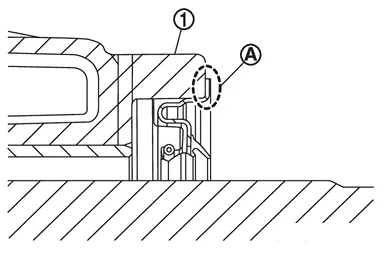
CAUTION:
Never reuse rear oil seal.
Apply transfer fluid onto circumference of oil seal.
When installing, never incline rear oil seal.
Never handle the oil seal inner periphery and oil seal lip.
Install the rear propeller shaft. Refer to Removal and Installation.
Fill with new transfer fluid. Refer to Refilling.
 Exploded View
Transfer assembly Rear oil seal : Vehicle front : Always replace after every disassembly. : Apply transfer fluid. ...
 Inspection
INSPECTION AFTER INSTALLATION
Check fluid leakage and the fluid level. Refer to Inspection. ...
Other materials:
Diagnosis Procedure
CHECK SYMPTOM
Check symptom (A or B)
Symptom A Display does not turn ON B Display is normal
Which symptom is detected?
A>>
GO TO 2.
B>>
GO TO 3.
CHECK POWER SUPPLY AND GROUND CIRCUIT
Check power supply and ground circuit. Refer to Diagnosis Procedure.
Is the inspection result nor ...
Exploded View
Rear emblem Emblem A Emblem B Tail lamp RH Rear emblem bracket Double-sided tape
[t: 1.2 mm (0.047 in)] : Clip : Pawl : Always replace after every disassembly. ...
Precautions for Removing Battery Terminal
NOTE:
NOTE:
NOTE:
The removal of 12V battery may cause a DTC detection error.
HOW TO DISCONNECT 12V BATTERY TERMINAL
Disconnect 12V battery terminal according to instruction described below.
Open the hood.
Turn ignition switch to the ON position.
Turn ignition switch to the OFF position with the d ...

0.0052