
Nissan Armada 2025-2026 Service and Repair Manual: Removal and Installation
REMOVAL
Remove back door inner finisher. Refer to Removal and Installation.
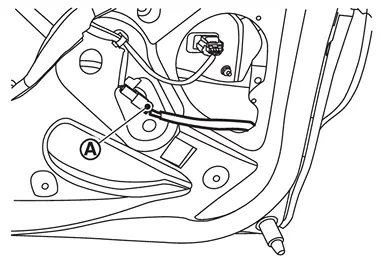
Disconnect back door touch sensor harness connector  .
.
Remove back door touch sensor fixing clips.
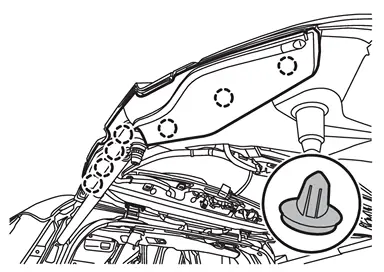
 | : Clip |
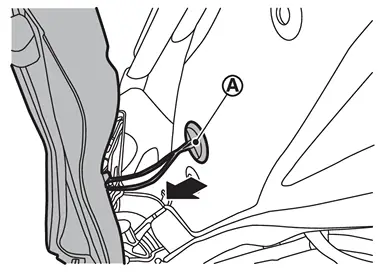
Remove harness grommet from back door panel, and then pull out back door touch sensor harness from back door panel and remove back door touch sensor.
INSTALLATION
Note the following items, and then install in the reverse order of removal.
CAUTION:
After installing, check that there is no clearance between back door touch sensor and back door panel.
After installation, check that back door turns over normally by back door touch sensor.
After installation, check door lock. Refer to Inspection.


Other materials:
Diagnosis Procedure
PERFORM SELF-DIAGNOSIS
With CONSULT
Pull the parking brake switch.
NOTE:
Check to make sure that the parking brake switch indicator is turned ON.
Ignition switch OFF.
Get out of the vehicle and close all doors.
Wait 65 seconds.
NOTE:
Check to make sure that the parking brake switch indicator is turn ...
Special Service Tools
Tool number
(TechMate No.)
Tool name Description ST3127S000
(NI-25765-A)
Preload gauge
Measuring rotating torque of ball joint KV401110S0
( - )
Rear shock absorber service kit
KV40111000
(NI-53363)
Soket 18
KV40111100
(NI-53362)
Rod lock handle
Shock absorber mounting braket
Loosening piston ...
Touch screen display
Basic information
In the Nissan Armada, many vehicle systems and advanced features can be conveniently
controlled through the intuitive touch screen display, providing a modern and user-friendly
interface for drivers.
For a complete overview of touch screen operation in the Nissan Armada, refe ...

0.0054