Removal and Installation
REMOVAL
-
Remove the door mirror finisher. Refer to Disassembly and Assembly.
-
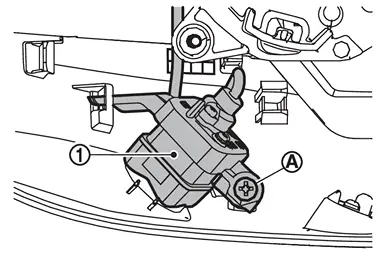
Remove the side camera mounting screw
 , and then remove the side camera
  .
.
INSTALLATION
Install in the reverse order of removal.
Perform parameter writing. (With ProPILOT Assist 2.1) Refer to Work Procedure.
Perform camera image calibration. Refer to Work Procedure.
CAUTION:
Perform the calibration and perform the writing to the around view monitor control unit when removing and replacing each camera, removing the camera mounting parts (front grille, door mirror, etc.) and replacing the around view monitor control unit.
Other materials
Warning/indicator lights (yellow)
Anti-lock Braking System (ABS) warning light
or
In the Nissan Armada, the Anti-lock Braking System (ABS) warning light is an
essential diagnostic indicator that confirms the proper operation of the braking
assistance system. When the ignition switch is turned to the ON position, this li ...
Steering Assist
Basic information
Steering Assist in the Nissan Armada is an integral component of the ProPILOT
Assist system, designed to enhance driving comfort and stability during highway
travel. Before using this feature in the Nissan Armada, it is essential to carefully
review the entire ProPILOT Assis ...
Front Combination Lamp
Exploded View
Radiator core support
Front combination lamp
Front fender assembly
: N·m (kg-m, in-lb)
Removal and Installation
CAUTION:
Disconnect the battery negative terminal or remove power circuit fuse when performing the operation for preventing electric leakage. Refer to Precaut ...