Description
CAUTION:
-
When replacing the BCM, always replace it with a new one. The functions controlled by the BCM does not operate properly in case of reuse of the BCM from another vehicle.
-
When before pairing of BCM and Intelligent Key unit, always writing the BCM configuration. Or not doing so, BCM control function does not operate normally.
Perform the following operations when replacing BCM. For details, refer to Work Procedure.
AFTER REPLACEMENT
CAUTION:
When after replacing BCM, the following items must be performed. Or not doing so, BCM control function does not operate normally.
-
Writing vehicle specification
-
Pairing of BCM and Intelligent Key unit
-
Register of vehicle identification number
-
Writing MAC key
-
Tire pressure sensor ID registration
-
Remote engine start function activation
Work Procedure
REPLACE BCM
Replace BCM. Refer to Removal and Installation.
>>
GO TO 2.
WRITING vehicle SPECIFICATION
Perform configuration (BCM). Refer to Description.
>>
GO TO 3.
PAIRING OF BCM AND INTELLIGENT KEY UNIT
CAUTION:
When before pairing of BCM and Intelligent Key unit, always writing the BCM configuration. Or not doing so, BCM control function does not operate normally.
Perform the pairing of BCM and Intelligent Key unit. Press UNLOCK button of Intelligent Key.
>>
GO TO 4.
REGISTER OF vehicle IDENTIFICATION NUMBER
With CONSULT
-
Select “VIN registration” of BCM (BCM) work support item.
-
Refer to CONSULT and follow the on-screen instructions.
>>
GO TO 5.
WRITING MAC KEY
Perform MAC key writing. Refer to Description.
>>
GO TO 6.
TIRE PRESSURE SENSOR ID REGISTRATION
Perform the initialization and registration of tire pressure sensor ID. Refer to Description.
>>
GO TO 7.
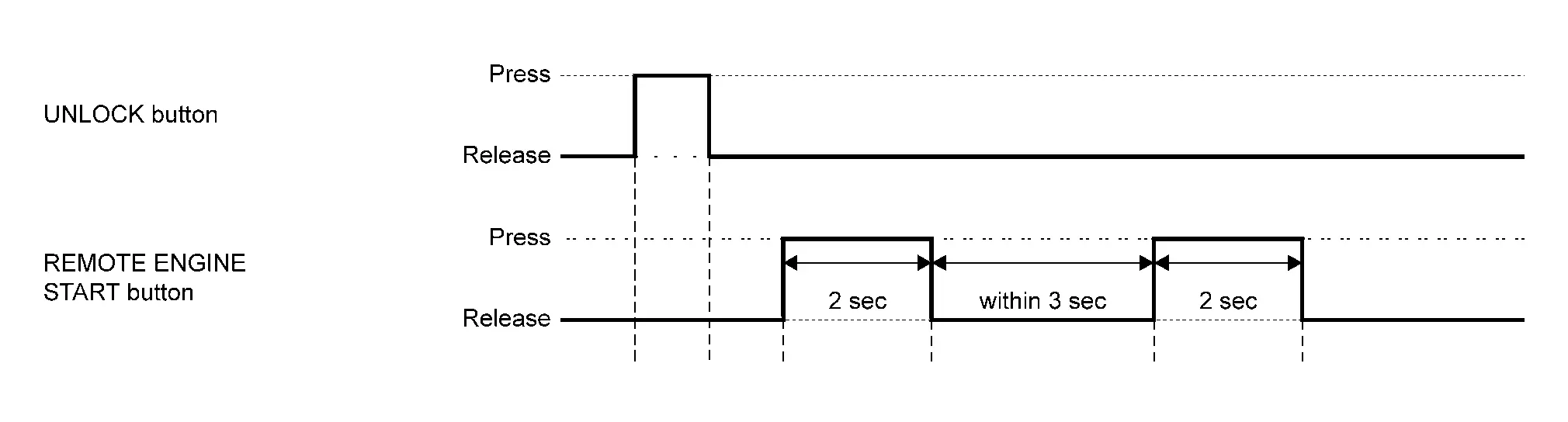
REMOTE ENGINE START FUNCTION ACTIVATION
-
Press the UNLOCK button of Intelligent Key.
-
Press REMOTE ENGINE START button of Intelligent Key for 2 seconds.
-
Release REMOTE ENGINE START button, and press REMOTE ENGINE START button of Intelligent key again within 3 seconds for 2 seconds.
>>
WORK END
Other materials
Precautions
Precaution for Supplemental Restraint System (SRS) "AIR BAG" and "SEAT BELT PRE-TENSIONER"
The Supplemental Restraint System such as “AIR BAG” and “SEAT BELT PRE-TENSIONER”, used along with a front seat belt, helps to reduce the risk or severity of injury to the driver and front passenger fo ...
Transfer Control Actuator
Exploded View
Transfer assembly
Transfer control actuator
bracket
: N·m (kg-m, in-lb)
Removal and Installation
WARNING:
Jacking up or lift up the vehicle may the vehicle height to go down which cause a personal injury and/or damage to the air suspension component parts. Refer t ...
Front Washer Nozzle
Removal and Installation
REMOVALCAUTION:
When washer tube is disconnected/removed, washer fluid may come out so prepare a container to receive washer fluid and never allow washer fluid to be sprinkled.Remove cowl top cover. Refer to Removal and Installation.
Remove front washer nozzle tube LH and RH ...