WARNING
Improper use or failure to follow the safety instructions for the Nissan Armada Blind Spot Warning (BSW) system may result in serious injury or even fatal accidents.
- The Nissan Armada BSW system is a supplemental driving aid and must not be relied upon as a substitute for safe driving practices. It is not designed to prevent collisions. Always check mirrors, look over your shoulder, and confirm that the adjacent lane is clear before changing lanes. Never depend solely on the Nissan Armada BSW system.
The Nissan Armada Blind Spot Warning (BSW) system is engineered to enhance driver awareness by detecting vehicles traveling in adjacent lanes and providing timely alerts when a lane change may be unsafe.
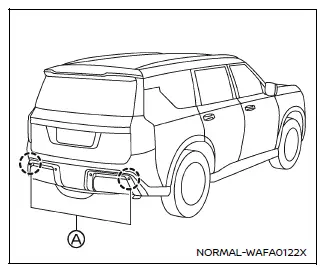
Example
The Nissan Armada BSW system uses radar sensors (A) mounted near the rear bumper to monitor surrounding traffic conditions and identify vehicles approaching or traveling within blind spots.
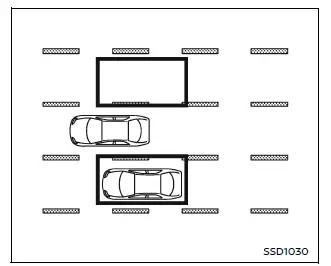
Detection zone
The detection zone of the Nissan Armada BSW system extends outward from the side mirrors and covers approximately 10 ft (3.0 m) behind the rear bumper and about 10 ft (3.0 m to each side. This range increases when another vehicle approaches quickly from behind, allowing the Nissan Armada to provide earlier warnings.
Other materials
Cup holders
Basic information
CAUTION
In the Nissan Armada, avoid sudden acceleration or braking when using
the cup holders to prevent spills. Hot liquids may cause burns to you or your
passengers.
Use only soft or flexible containers in the Nissan Armada cup holders.
Hard objects may become haz ...
A/t Fluid
Inspecton
WARNING:
Jacking up or lift up the vehicle may the vehicle height to go down which cause a personal injury and/or damage to the air suspension component parts. Refer to Precaution for when Jacking and Lifting Up the vehicle with Electronic Air Suspension System.
Check transmission ...
The Steering Switches Are Inoperative
Diagnosis Procedure
If any of the following malfunctions is found for the steering switch operation.
All switches are inoperative
The specified switch cannot be operated
CHECK STEERING SWITCH SIGNAL CIRCUIT
Check the steering switch signal circuit. Refer to Component Function Check.
Is the inspe ...