Example
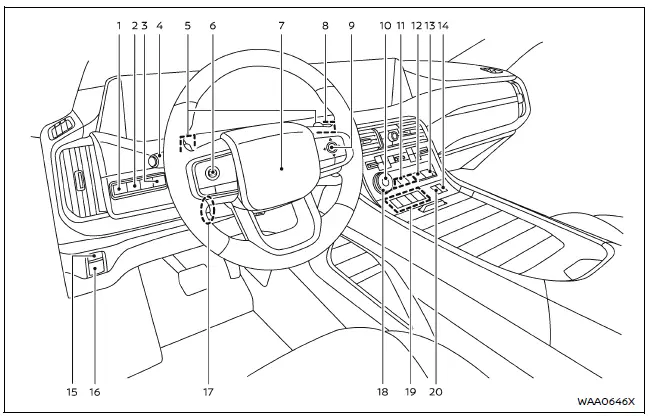
The cockpit of the Nissan Armada is thoughtfully designed to provide intuitive control, comfort, and accessibility for the driver. Every switch, button, and control element is positioned to enhance driving convenience and ensure that essential functions are always within easy reach.
- Steering Assist switch — allows activation of advanced driving assistance features in the Nissan Armada.
- Head Up Display (HUD) switch* — enables projection of key driving information directly onto the windshield.
- Power liftgate switch* — provides quick and effortless operation of the rear liftgate.
- Headlight and turn signal switch / Fog light switch* — controls exterior lighting systems for improved visibility.
- Paddle shifters — allow manual gear selection for a more dynamic driving experience in the Nissan Armada.
- Steering-wheel-mounted controls (left side)
- ProPILOT Assist switch — activates advanced driver assistance features.
- Volume control** — adjusts audio output easily without taking hands off the wheel.
- Steering wheel
- Horn — provides audible signaling when required.
- Wiper and washer switch — manages windshield cleaning functions for clear visibility.
- Steering-wheel-mounted controls (right side)
- Vehicle information display control — navigates onboard data and system menus.
- Touch screen display control** — integrates multimedia and system access.
- Audio control** — manages entertainment system settings.
- Bluetooth Hands-Free Phone System switches** — enables safe communication while driving.
- Voice Recognition system switch** — allows voice command interaction with the Nissan Armada.
- Hill descent control switch* — assists with controlled descents on steep terrain.
- 4WD shift switch* — adjusts drivetrain settings for different driving conditions.
- Differential lock mode switch* — enhances traction in challenging off-road environments.
- Vehicle Dynamic Control (VDC) OFF switch — allows temporary deactivation of stability control systems.
- Idling Stop OFF switch — disables automatic engine stop/start functionality.
- Automatic brake hold switch — maintains braking force without continuous pedal pressure.
- Parking brake switch — electronically engages or releases the parking brake.
- Tilt and telescopic steering wheel control* / lock lever* — enables precise adjustment of steering wheel position.
- Drive mode selector* — allows selection of various driving modes tailored to road conditions.
- Shift buttons — provide modern gear selection control in the Nissan Armada.
- Air suspension AUTO switch* — automatically adjusts suspension height for comfort and performance.
*: if so equipped
**: Refer to the separate NissanConnect Owner's Manual (if so equipped).
Other materials
Differential lock mode switch
The rear differential lock (DIFF-LOCK) in the Nissan Armada is designed to distribute
engine torque evenly between the left and right rear wheels, ensuring balanced traction
in demanding driving conditions.
When the Nissan Armada becomes stuck in challenging environments such as sand,
sno ...
Diagnosis and Repair Work Flow
Work Flow
DETAILS OF TROUBLE DIAGNOSIS FLOWCHARTCOLLECT THE INFORMATION FROM THE CUSTOMER
It is also important to clarify customer concerns before starting the inspection. First of all, perform an interview utilizing Diagnostic Work Sheet and reproduce the symptom as well as fully understand it. Dep ...
Driver Air Bag Module
Exploded View
Steering wheel
Driver air bag module
Removal and Installation
WARNING:
Always observe the following items for preventing accidental activation.
Before servicing, ignition switch OFF, disconnect 12V battery negative terminal and wait for 3 minutes or more (discha ...