Around View Monitor
Work Flow
OVERALL SEQUENCE
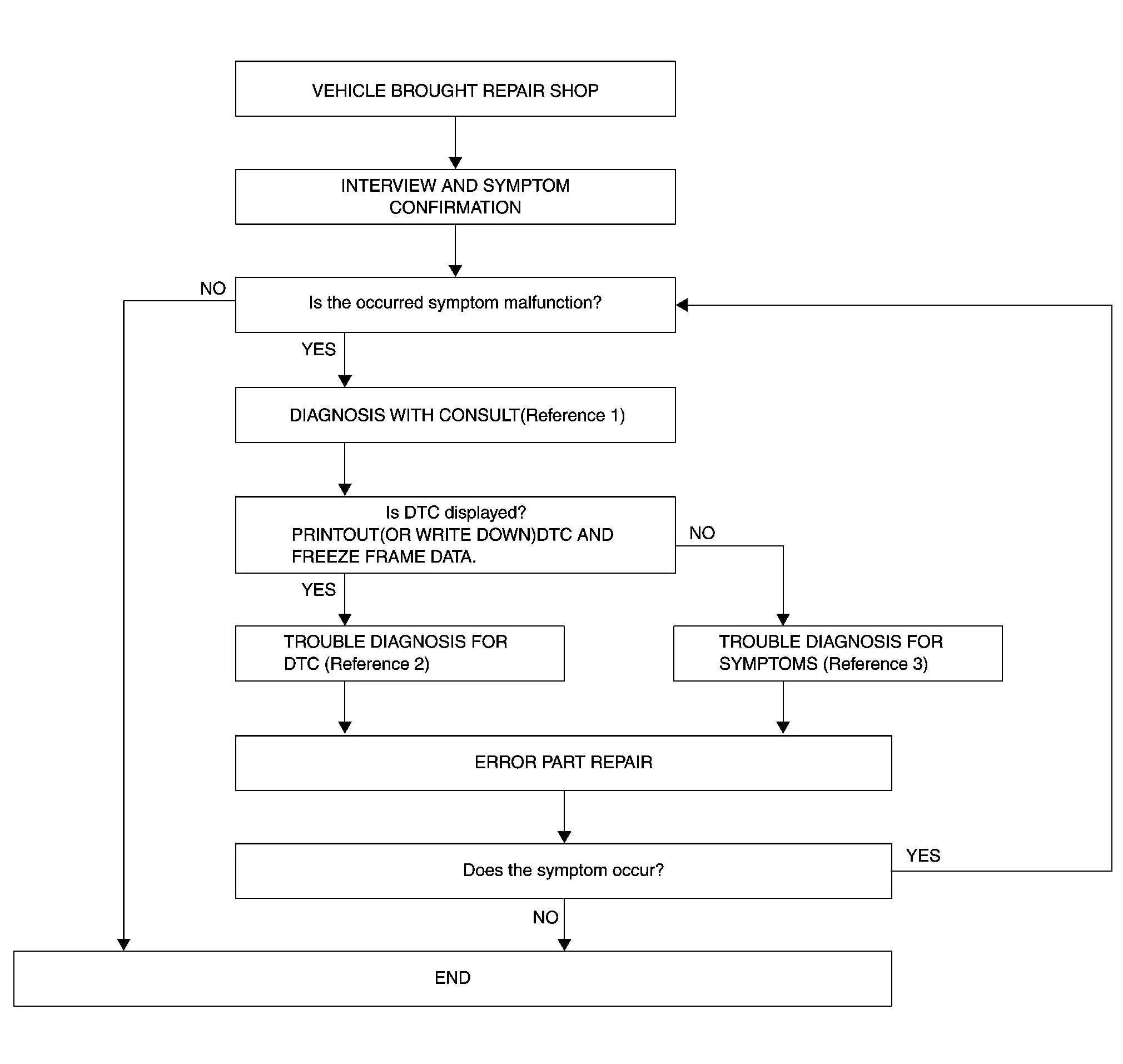
-
Reference 1··· Refer to Consult Function.
-
Reference 2··· Refer to DTC Index.
-
Reference 3··· Refer to Symptom Table.
DETAILED FLOW
INTERVIEW AND SYMPTOM CONFIRMATION
Check the malfunction symptoms by performing the following items.
-
Interview the customer to obtain the malfunction information (conditions and environment when the malfunction occurred).
-
Check the symptom.
Is the occurred symptom malfunction?
YES>>GO TO 2.
NO>>INSPECTION END
DIAGNOSIS WITH CONSULT
-
Connect CONSULT and perform a self-diagnosis for “AROUND VIEW MONITOR”. Refer to Consult Function.
 NOTE:
NOTE:
Skip to step 4 of the diagnosis procedure if “AROUND VIEW MONITOR” is not displayed.
-
When DTC is detected, follow the instructions below:
-
Record DTC and Freeze Frame Data.
-
Is DTC displayed?
YES>>GO TO 3.
NO>>GO TO 4.
TROUBLE DIAGNOSIS FOR DTC
-
Check the DTC indicated in the “Self-Diagnosis Results”.
-
Perform the relevant diagnosis referring to the DTC Index. Refer to DTC Index.
>>
GO TO 5.
TROUBLE DIAGNOSIS FOR SYMPTOMS
Perform the relevant diagnosis referring to the diagnosis chart by symptom. Refer to Symptom Table
>>
GO TO 5.
ERROR PART REPAIR
-
Repair or replace the identified malfunctioning parts.
-
Perform a self-diagnosis for “AROUND VIEW MONITOR” with CONSULT.
NOTE:
Erase the stored self-diagnosis results after repairing or replacing the relevant components if any DTC has been indicated in the “Self-Diagnosis Results”.
-
Check that the symptom does not occur.
Does the symptom occur?
YES>>GO TO 1.
NO>>INSPECTION END
Other materials
RearView Monitor system operation
The Nissan Armada RearView Monitor system utilizes a rear-mounted camera 1, positioned
just above the license plate, to provide a clear and wide-angle view behind the
vehicle.
To activate the Nissan Armada RearView Monitor, turn the ignition switch to the
ON position and shift the transmi ...
Changing wheels and tires
Tire rotation
To maintain optimal performance and extend tire life on your Nissan Armada, it
is strongly recommended to rotate the tires at regular intervals of approximately
10,000 miles (16,000 km).
Consistent tire rotation helps ensure even tread wear, improves ride comfort,
and contr ...
Normal Operating Condition
Symptom Description
Symptom Result
The brake pedal may occasionally vibrate slightly while braking.
This occurs when the electrical brake control unit is operating normally and is not a malfunction.
Operating noise may occur from the electrical brake control unit.
Depending on vehicle co ...