Removal and Installation
CAUTION:
Disconnect the battery negative terminal or remove power circuit fuse when performing the operation for preventing electric leakage. Refer to Precautions for Removing Battery Terminal.
REMOVAL
Remove driver knee air bag module mounting bolts, and then move driver knee air bag module to secure workspace. Refer to Removal and Installation.
Disconnect harness connector.
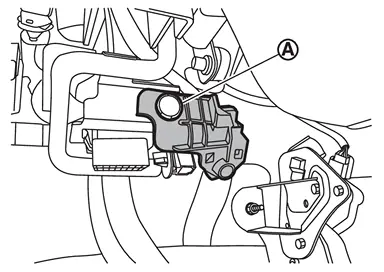
Remove fixing clip  , and then remove front foot lamp bracket (LH).
Disengage front foot lamp (LH) fixing pawls using a remover tool (A), and then remove front foot lamp (LH).
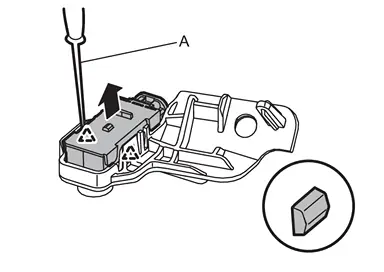
 |
: Pawl |
INSTALLATION
Install in the reverse order of removal.
Replacement
CAUTION:
-
Disconnect the battery negative terminal or remove power circuit fuse when performing the operation for preventing electric leakage. Refer to Precautions for Removing Battery Terminal.
-
Replacement of bulb is not possible due to the adoption of LED. When replacement, replace front foot lamp (LH) as a single part. Refer to Removal and Installation.
Other materials
Rear-facing child restraint installation using LATCH
Before installing a child restraint in the Nissan Armada, carefully review all
warnings and precautions provided in the "Child safety" and "Child restraints" sections
of this manual.
Do not use the LATCH lower anchors if the combined weight of the child and the
child restr ...
Intelligent Key Battery
Removal and Installation
Release the lock knob at the back of the Intelligent Key and remove the mechanical key.
Insert remover tool (A) wrapped with a cloth into the slit 1 of the corner and twist 2 it to separate the upper part from the lower part.
CAUTION:
Never touch the circuit board or ...
Microphone
Removal & Installation
REMOVALRemove the map lamp assembly. Refer to Removal and Installation.
Remove the microphone harness connector .
Use a suitable tool to release pawls and remove the switch finisher .
: Pawls
CAUTION:
Do not damage pawls.
Use a suitable tool to release pawl and re ...