Removal and Installation
-
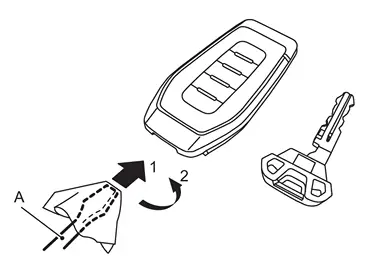
Release the lock knob at the back of the Intelligent Key and remove the mechanical key.
-
Insert remover tool (A) wrapped with a cloth into the slit 1 of the corner and twist 2 it to separate the upper part from the lower part.
CAUTION:
-
Never touch the circuit board or battery terminal.
-
The Intelligent Key is water-resistant. However, if it does get wet, immediately wipe it dry.
-
-
Replace the battery with new one.
Battery replacement :Coin-type lithium battery (CR2032) -
Upper and lower parts fixing pawls, and then push them together until it is securely closed.
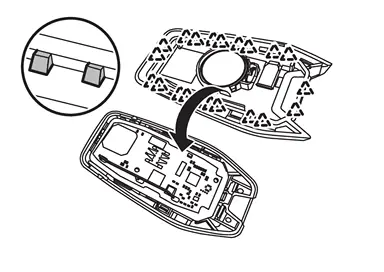

: Pawl CAUTION:
-
When replacing battery, keep dirt, grease, and other foreign materials off the electrode contact area.
-
After replacing the battery, check that all Intelligent Key functions work normally.
-
Other materials
Safety information
WARNING
Always stop the Nissan Armada in a safe place and engage the parking
brake before operating the system. Using the system while driving can distract
the driver and increase the risk of accidents.
Maintain full attention on driving at all times. If the Nissan Armada
system respo ...
Basic information
WARNING
Failure to properly follow all warnings and operating instructions for the
Rear Automatic Braking (RAB) system in the Nissan Armada may result in serious injury
or even fatal accidents.
The Nissan Armada RAB system is designed as a supplemental driver assistance
feature and shoul ...
Radiator Core Support
Removal and Installation
REMOVALRemove radiator air guide upper. Refer to Removal and Installation.
Remove front combination lamp. Refer to Removal and Installation.
Remove active grille shutter upper side mounting bolts. Refer to Removal and Installation.
Remove hood lock assembly. Refer to Removal ...