Exploded View
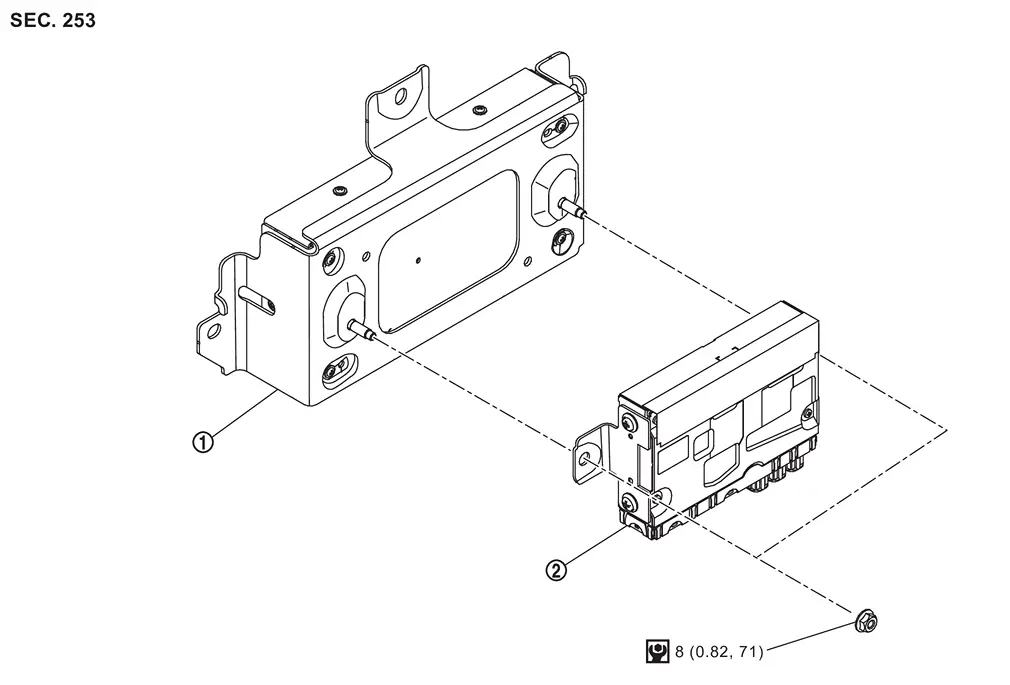
 |
Front camera unit |  |
HD map module | ||
 |
: N·m (kg-m, in-lb) | ||||
Removal and Installation
REMOVAL
Remove luggage side lower finisher LH. Refer to Removal and Installation.
Remove front camera unit. Refer to Removal and Installation.
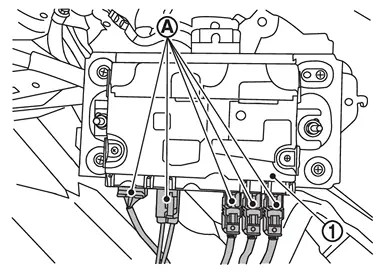
Disconnect HD map module harness connectors  from HD map module .
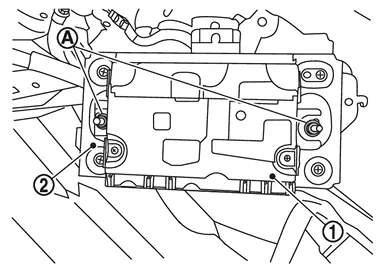
Remove mounting nuts , and remove HD map module from front camera unit .
INSTALLATION
Note the following, and install in the reverse order of removal.
CAUTION:
Be sure to perform “ADDITIONAL SERVICE WHEN REPLACING HD MAP MODULE” when replacing HD map module. Refer to Work Procedure.
Other materials
About microSD card
WARNING
Never allow children to handle or play with the microSD card used in your
Nissan Armada. Due to its small size, accidental swallowing may occur, which can
lead to choking, serious injury, or even life-threatening situations.
NOTE:
If the microSD card is removed from the Nissan Armada ...
Rear Door Sash Inner Cover
Removal and Installation
CAUTION:
Never damage rear door panel.REMOVALRemove rear door finisher. Refer to Removal & Installation.
Remove inside seal according to numerical order 1→2 indicated by arrows as shown in the figure.
Apply protective tapes (A) on rear door panel to protect it from d ...
Headlining
Removal and Installation
CAUTION:
Never damage the roof panel.
Two workers are required for removal or installation in order to prevent damage.
Never bend headlining assembly when removing or installing.
REMOVALCAUTION:
When removing, always use a remover tool that is made of plastic to prevent dam ...