
Nissan Armada 2025-2026 Owner's Manual: About microSD card
WARNING
Never allow children to handle or play with the microSD card used in your Nissan Armada. Due to its small size, accidental swallowing may occur, which can lead to choking, serious injury, or even life-threatening situations.
NOTE:
If the microSD card is removed from the Nissan Armada driving recorder during recording or playback, stored data may become corrupted or permanently lost.
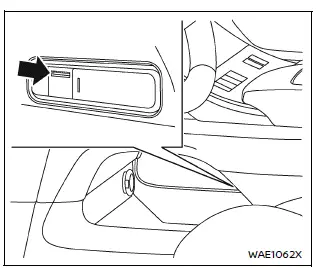
In the Nissan Armada, the microSD card slot is conveniently located in the lower console tray beneath the center console, allowing easy access for installation, removal, and maintenance.
- All videos and still images captured by the Nissan Armada driving recorder are stored directly on the microSD card inserted into this slot.
- Data may not be saved correctly in the following situations:
- If the microSD card is initialized using a device other than the Nissan Armada system
- If files from external devices are mixed with files recorded by the Nissan Armada
- If recorded file names are modified manually
- If a non-compatible or unsupported microSD card is used instead of the recommended one
- If the microSD card is not inserted properly into the slot
About copyright
- Unauthorized copying, distribution, public performance, or rental of copyrighted content recorded by the Nissan Armada driving recorder is strictly prohibited by law.
- Except for personal use, any recorded videos or images must not be used without obtaining permission from the respective rights holders. In some cases, even personal use may be subject to legal restrictions.
- Avoid recording or sharing images of individuals without their consent, as this may violate privacy or portrait rights.
- Improper or malicious use of the Nissan Armada driving recorder that causes public disturbance may result in legal consequences under applicable regulations.
 Basic information
The Nissan Armada driving recorder system is designed to capture high-quality
video and photo footage from both the front and rear of the vehicle, providing an
additional layer of safety, document ...
 Driving recorder system interface
Touch "
"
on the Launch Bar to access the applications menu.
Select the "Dash Cam" key to open the Nissan Armada driving recorder interface.
The "Dash Cam" shortcut ...
Other materials:
Flexible seating
Basic information
The flexible seating system in the Nissan Armada is designed to deliver exceptional
versatility, allowing you to quickly adapt the interior layout for passengers or
cargo. Whether transporting people or maximizing storage space, the Nissan Armada
ensures both safety and conv ...
Cockpit
Example
The cockpit of the Nissan Armada is thoughtfully designed to provide intuitive
control, comfort, and accessibility for the driver. Every switch, button, and control
element is positioned to enhance driving convenience and ensure that essential functions
are always within easy reac ...
Vehicle Dynamic Control (VDC) OFF switch
The Nissan Armada should normally be driven with the Vehicle Dynamic Control
(VDC) system enabled, as it helps maintain vehicle stability and traction.
In situations such as being stuck in mud, snow, or sand, the Nissan Armada VDC
system may reduce engine power to limit wheel spin. This can ...

0.0046