Exploded View
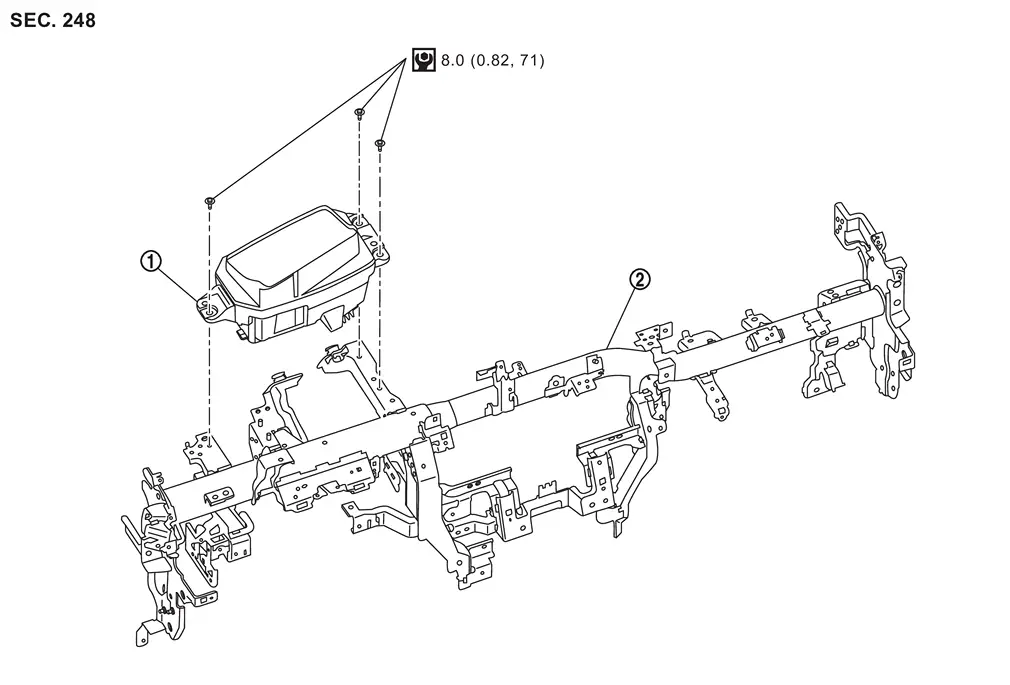
 |
Head Up Display unit |  |
Steering member |
 |
:Nï½¥m (kg-m, in-lb) |
Removal and Installation
REMOVAL
-
Remove instrument panel assembly. Refer to Removal and Installation.
-
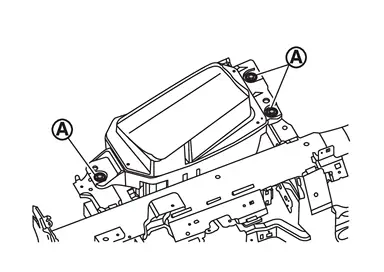
Remove Head Up Display unit mounting bolts
 .
.
-
Disconnect the Head Up Display unit harness connector.
-
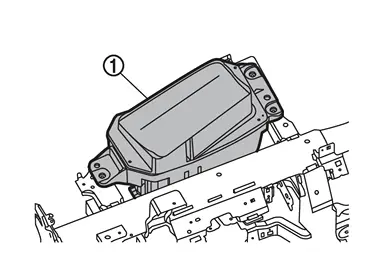
Remove Head Up Display unit
.
INSTALLATION
Installation is in the reverse order of removal.
CAUTION:
-
Never damage Head Up Display unit. if damaged for Head Up Display unit., replace it.
-
If replacing Head Up Display unit, be sure to remove protective sheet from the glass surface.
-
Be sure to perform “ADDITIONAL SERVICE WHEN REPLACING HEAD UP DISPLAY UNIT� when replacing Head Up Display. For details, Refer to Work Procedure.
Other materials
Overview
The Nissan Armada ProPILOT Assist system is an advanced driver assistance technology
designed specifically for controlled-access highways. It is not intended for urban
streets or rural roads. This system supports the driver by helping maintain lane
centering and keeping a preset following dist ...
Oil Filter
Removal and Installation
WARNING:
Jacking up or lift up the vehicle may the vehicle height to go down which cause a personal injury and/or damage to the air suspension component parts. Refer to Precaution for when Jacking and Lifting Up the vehicle with Electronic Air Suspension System.
REMOVA ...
Precautions
Precaution for Supplemental Restraint System (SRS) "AIR BAG" and "SEAT BELT PRE-TENSIONER"
The Supplemental Restraint System such as “AIR BAG� and “SEAT BELT PRE-TENSIONER�, used along with a front seat belt, helps to reduce the risk or severity of injury to the driver and front passenger fo ...