Exploded View
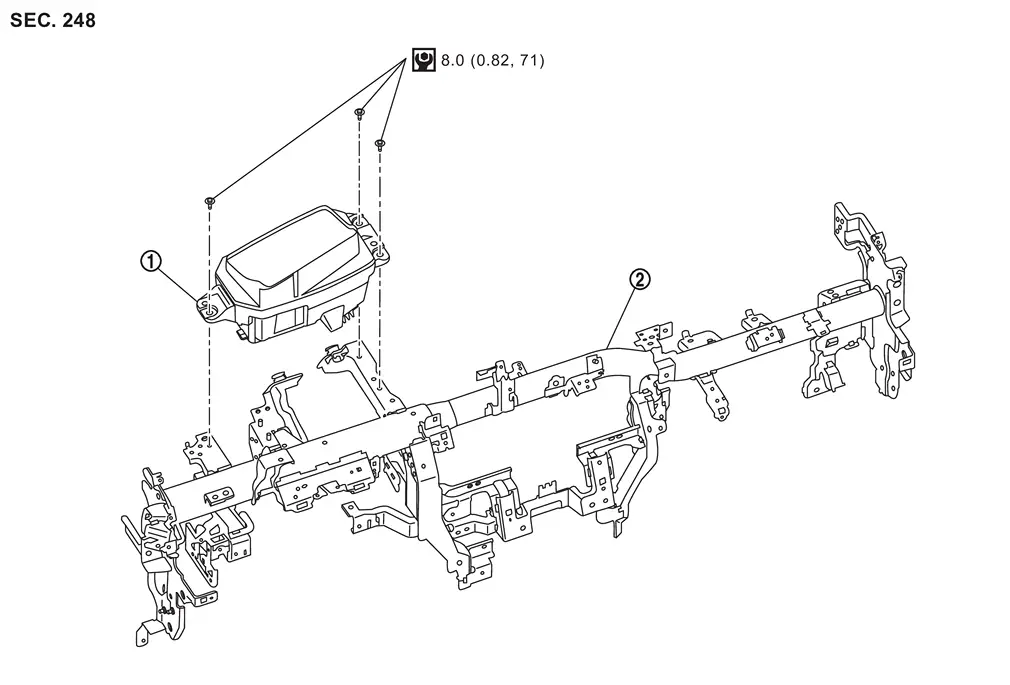
 |
Head Up Display unit |  |
Steering member |
 |
:N・m (kg-m, in-lb) |
Removal and Installation
REMOVAL
-
Remove instrument panel assembly. Refer to Removal and Installation.
-
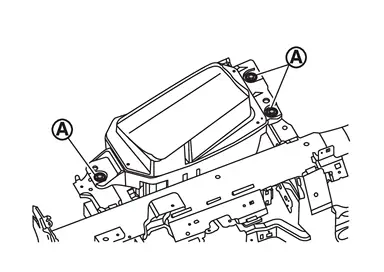
Remove Head Up Display unit mounting bolts
 .
.
-
Disconnect the Head Up Display unit harness connector.
-
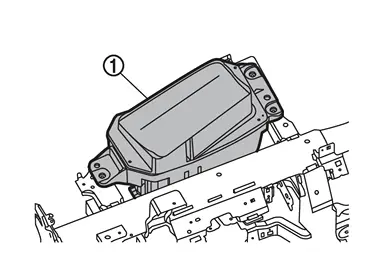
Remove Head Up Display unit
.
INSTALLATION
Installation is in the reverse order of removal.
CAUTION:
-
Never damage Head Up Display unit. if damaged for Head Up Display unit., replace it.
-
If replacing Head Up Display unit, be sure to remove protective sheet from the glass surface.
-
Be sure to perform “ADDITIONAL SERVICE WHEN REPLACING HEAD UP DISPLAY UNIT” when replacing Head Up Display. For details, Refer to Work Procedure.
Other materials
Cockpit
Example
The cockpit of the Nissan Armada is thoughtfully designed to provide intuitive
control, comfort, and accessibility for the driver. Every switch, button, and control
element is positioned to enhance driving convenience and ensure that essential functions
are always within easy reac ...
Rear Rh
Description
Rear door RH door does not lock/unlock using door lock and unlock switch.
Diagnosis Procedure
CHECK DOOR LOCK ACTUATOR
Check door lock actuator (rear RH).
Refer to Diagnosis Procedure.
Is the inspection result normal?
YES>>
GO TO 2.
NO>>
Repair or replace the malfunctioning ...
Reservoir Tank Cap
Inspection
Check valve seat of reservoir tank cap.
: Metal plunger
Check if valve seat is swollen to the extent that the edge of the metal plunger cannot be seen when watching it vertically from the top.
Check if valve seat has no soil and damage.
Pull negative-pressure valve to ...