
Nissan Armada 2025-2026 Owner's Manual: How to enable/disable the I-BSI system
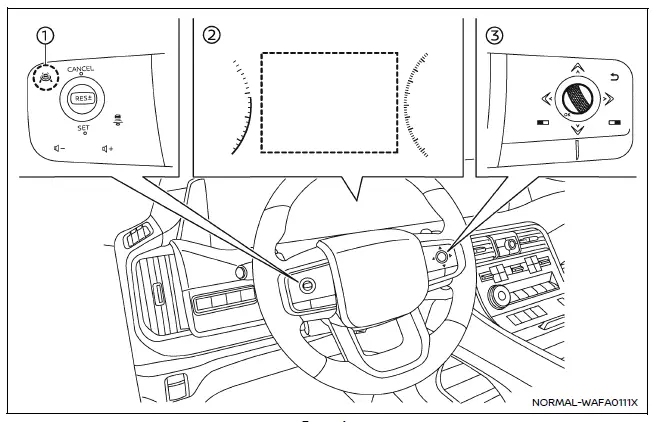
Example
- ProPILOT Assist switch (design may vary depending on the Nissan Armada model)
- Vehicle information display
- Steering-wheel-mounted control (right side)
To configure the Nissan Armada Intelligent Blind Spot Intervention (I-BSI) system, follow these steps:
1. Press the
 button repeatedly until "Settings" appears in the vehicle information display, then
confirm using the scroll dial.
button repeatedly until "Settings" appears in the vehicle information display, then
confirm using the scroll dial.
Use the scroll dial to navigate to "Driver Assistance" and confirm your selection.
2. Select "Blind Spot Assist" and press the scroll dial.
3. Choose "Intervention" and confirm to access I-BSI settings.
4. Press the ProPILOT Assist switch to activate or deactivate the Nissan Armada I-BSI system as needed.
NOTE:
- Activating ProPILOT Assist in the Nissan Armada automatically enables both the I-BSI and Intelligent Lane Intervention (I-LI) systems simultaneously.
- The Nissan Armada retains the selected system settings even after the engine is turned off and restarted, ensuring consistent driver preferences.
 I-BSI system operation
Example
Side indicator light
I-BSI ON indicator (vehicle information display)
I-BSI indicator (vehicle information display)
ProPILOT Assist switch (design may vary depending on Nissan Ar ...
 I-BSI system limitations
WARNING
The following limitations apply to the Nissan Armada Intelligent Blind Spot
Intervention (I-BSI) system. Failure to operate the vehicle within these limitations
may result in serious inju ...
Other materials:
Warning/indicator lights (red)
Brake warning light
or
In the Nissan Armada, the brake warning light is a critical safety indicator
that helps monitor the condition of the braking system. When the ignition switch
is turned to the ON position, this light should illuminate briefly for a few seconds
and then turn off, ...
Electric power steering
WARNING
If the Nissan Armada engine is turned off while driving, power steering
assist will be disabled, making the steering wheel significantly harder to operate.
If the electric power steering warning light illuminates while the Nissan
Armada engine is running, the steering assist will ...
Basic information
WARNING
Never operate the push-button ignition switch in your Nissan Armada while
the vehicle is in motion, except in an emergency. Pressing the ignition switch three
consecutive times or holding it for more than 2 seconds will stop the engine. If
the engine shuts off while driving, this may ...

0.0035