WARNING
Never operate the push-button ignition switch in your Nissan Armada while the vehicle is in motion, except in an emergency. Pressing the ignition switch three consecutive times or holding it for more than 2 seconds will stop the engine. If the engine shuts off while driving, this may result in loss of control, increasing the risk of a crash and serious injury.
Before using the push-button ignition system in your Nissan Armada, always ensure the vehicle is securely shifted into the P (Park) position by pressing the park button.
Operating range for engine start function
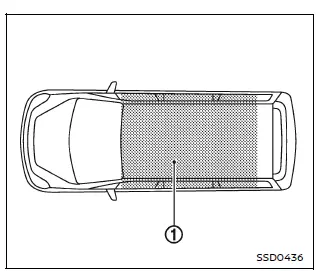
The Nissan Armada Intelligent Key system allows the engine to start only when the key is within the designated operating range 1. This ensures convenience while maintaining security.
If the Intelligent Key battery is low or if strong electromagnetic interference is present, the operating range may be reduced, and the system may not function as expected.
Even when the Intelligent Key is inside the Nissan Armada operating range, it is possible for another person inside the vehicle to start the engine without physically holding the key.
- The cargo area is generally outside the defined operating range, although the Intelligent Key may still function under certain conditions.
- If the Intelligent Key is placed on the instrument panel, inside the glove box, or in a door pocket, it may not be detected properly by the Nissan Armada system.
- If the Intelligent Key is positioned close to a door or window outside the vehicle, it may still be detected and function.
Other materials
How to enable/disable the LDW system
Vehicle information display
Steering-wheel-mounted controls (right side)
Basic information
To activate or deactivate the Nissan Armada LDW system, follow these steps:
1. Press the
button until "Settings" appears in the vehicle information display, then press the
scroll ...
Second Heated Seat System
Symptom Table
Symptom Possible causeInspection item
Second heated seat system does not operate
Display unit and rear A/C control operation does not operate
Fuse
Second seat heater power supply/ground/LIN signal circuit
Second seat cushion heater
Second seatback heater
A/C auto amp.
Check second ...
Back Door Lock
Exploded View
Back door touch sensor*1
Back door lock & closure assembly
Back door panel
Back door stay lower bracket
Spindle unit*1
Spindle unit bracket upper*1
Bracket cover*2
Hands free control unit*2
Hands free sensor bracket*2
Hands free sensor upper*2
Hands free ...