
Nissan Armada 2025-2026 Owner's Manual: I-BSI system operation
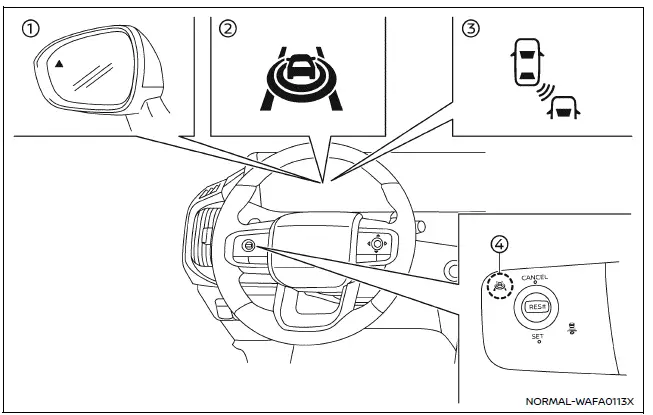
Example
- Side indicator light
- I-BSI ON indicator (vehicle information display)
- I-BSI indicator (vehicle information display)
- ProPILOT Assist switch (design may vary depending on Nissan Armada model)
The Nissan Armada I-BSI system becomes active at speeds above approximately 37 MPH (60 km/h), ensuring effective operation during highway driving and higher-speed conditions.
When a vehicle is detected within the blind spot area, the side indicator light illuminates to notify the driver.
If the driver activates the turn signal while another vehicle is present in the detection zone, the Nissan Armada I-BSI system responds with two audible chimes and flashes both the side indicator and I-BSI indicators as a warning.
Additionally, if the Nissan Armada approaches a lane marker while another vehicle is still within the detection zone, the system provides a more urgent alert with three chimes and flashing indicators.
In such situations, the Nissan Armada I-BSI system may actively assist by applying subtle steering input to help guide the vehicle back toward the center of the lane, reducing the likelihood of an unsafe lane departure. This intervention can occur regardless of turn signal usage.
To activate the Nissan Armada I-BSI system, press the ProPILOT Assist switch on the steering wheel after starting the engine. The I-BSI ON indicator will appear in the vehicle information display. Press the switch again to deactivate the system.
NOTE:
- The Nissan Armada I-BSI warning and intervention functions will only activate if the side indicator light is already illuminated before the vehicle approaches a lane marker. If another vehicle enters the detection zone after the lane marker has been crossed, the system will not activate.
- The Nissan Armada I-BSI system typically responds earlier than the Intelligent Lane Intervention (I-LI) system when detecting potential lane departure risks.
The Nissan Armada Intelligent Blind Spot Intervention system provides an advanced level of support during lane changes, combining visual alerts, audible warnings, and steering assistance. However, the driver remains fully responsible for safe vehicle operation at all times.
 Basic information
WARNING
Failure to properly follow the safety guidelines and operating instructions
for the Nissan Armada Intelligent Blind Spot Intervention (I-BSI) system may result
in serious injury or even f ...
 How to enable/disable the I-BSI system
Example
ProPILOT Assist switch (design may vary depending on the Nissan Armada model)
Vehicle information display
Steering-wheel-mounted control (right side)
To configure the Nissan Arm ...
Other materials:
Rear-facing child restraint installation using LATCH
Before installing a child restraint in the Nissan Armada, carefully review all
warnings and precautions provided in the "Child safety" and "Child restraints" sections
of this manual.
Do not use the LATCH lower anchors if the combined weight of the child and the
child restr ...
How to park with predictive course lines
Basic information
WARNING
If the Nissan Armada is equipped with tires of a different size than
standard, the predictive course lines may become inaccurate.
On slippery or snow-covered roads, the Nissan Armada predictive course
lines may not correspond precisely to the actual path of the ...
Hazard warning flasher switch
Press the hazard warning flasher switch in the Nissan Armada to alert other drivers
when your vehicle must stop or is parked under emergency conditions. Once activated,
all turn signal lights will flash simultaneously to increase visibility.
WARNING
In an emergency, always move the Niss ...

0.006