Exploded View
Refer to Exploded View.
Removal and Installation
REMOVAL
Remove glove box lid inner. Refer to Removal and Installation.
Disengage fixing pawls, and then remove filter cover.
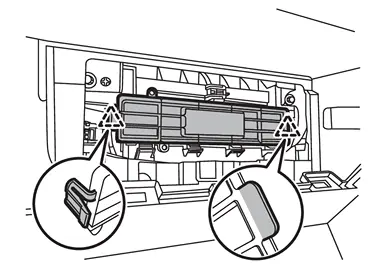
 |
: Pawl |
Remove in-cabin microfilter.
INSTALLATION
Note the following items, and then install in the reverse order of removal.
CAUTION:
-
If the filter is deformed/damaged when removing, replace it with a new one. Deformed/damaged filter may deteriorate the dust collecting performance.
-
When installing, handle the filter with extreme care to avoid deforming/damaging.
Replacement
Replace in-cabin microfilter. Refer to Removal and Installation.
 NOTE:
NOTE:
-
Replace in-cabin microfilter according to replacement interval. Refer to In-cabin microfilter.
-
Even before the replacement interval, if the air conditioner is not working or the window becomes cloudy, replace it.
Other materials
Basic information
WARNING
Never operate the push-button ignition switch in your Nissan Armada while
the vehicle is in motion, except in an emergency. Pressing the ignition switch three
consecutive times or holding it for more than 2 seconds will stop the engine. If
the engine shuts off while driving, this may ...
Maintenance precautions
When performing inspection or maintenance tasks on your Nissan Armada, always
take appropriate precautions to prevent injury and avoid damaging the vehicle.
The following safety guidelines should always be observed when working on your
Nissan Armada:
WARNING
Park the Nissan Armada on a lev ...
Oil Pump
Exploded View
Oil pump drive chain
Oil pump sprocket
Oil pump drive sprocket
Oil pump drive chain tensioner
Oil pump assembly
O-ring
Oil pump seal
O-ring
Oil strainer
Comply with the installation procedure when tightening. Refer to Removal and Installation
&nb ...