
Nissan Armada 2025-2026 Owner's Manual: Locking with power door lock switch
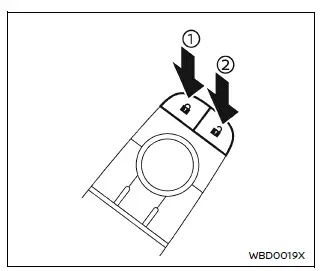
Driver's armrest
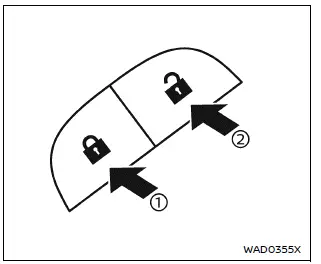
Front passenger's armrest
Basic information
The Nissan Armada power door lock system allows centralized locking and unlocking of all doors using switches located on both the driver’s and front passenger’s doors.
To lock all doors, press the switch to the lock position 1 while the doors are open, then close them.
Always double-check that the Nissan Armada Intelligent Key is not inside the vehicle before locking the doors.
To unlock all doors, press the switch to the unlock position 2.
Lockout protection
The Nissan Armada is equipped with a lockout protection system designed to prevent the Intelligent Key from being accidentally locked inside the vehicle.
If a door is open, the doors are locked, and the Intelligent Key is detected inside, the Nissan Armada will automatically unlock the doors and emit a warning chime.
NOTE:
The Nissan Armada doors may not lock properly if the Intelligent Key is held in the same hand that operates the door handle request switch. Place the key in another hand, pocket, or bag.
CAUTION
The Nissan Armada lockout protection system may not function correctly under certain conditions:
- If the Intelligent Key is placed on the dashboard.
- If the Intelligent Key is inside the glove compartment.
- If the Intelligent Key is stored in door pockets.
- If the Intelligent Key is located near metallic objects or materials.
Automatic door locks
- In the Nissan Armada, all doors automatically lock when the vehicle reaches approximately 15 MPH (24 km/h).
- All doors will automatically unlock when the ignition is switched OFF or when the gear selector is shifted to the P (Park) position, depending on system settings.
NOTE:
The Nissan Armada automatic door unlock function can be customized through the "Vehicle Settings" menu in the vehicle information display.
Child safety rear door lock
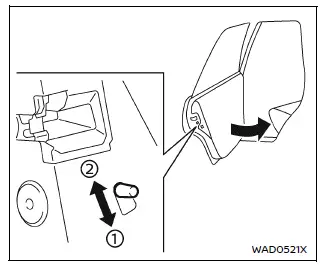
The Nissan Armada child safety rear door lock system is designed to prevent rear doors from being opened from the inside, providing additional safety for children.
When the lever is set to the lock position 1, rear doors can only be opened from outside the Nissan Armada.
To deactivate this function, move the lever to the unlock position 2.
This feature enhances safety and gives Nissan Armada drivers greater peace of mind when traveling with passengers in the rear seats.
 Basic information
WARNING
In the Nissan Armada, always keep the doors securely locked while driving.
Combined with proper seat belt use, this significantly enhances passenger safety
by reducing the risk of ej ...

Other materials:
Basic information
Example
The vehicle information display in the Nissan Armada is centrally positioned
within the instrument cluster and serves as a key interface for driver information
and system notifications. It provides real-time data and customizable settings for
enhanced driving awareness.
The Nissa ...
Intelligent Around View Monitor system operation
The Nissan Armada Intelligent Around View Monitor utilizes multiple strategically
positioned cameras 1, including units mounted in the front grille, beneath the outside
mirrors, and above the rear license plate, to create a comprehensive multi-angle
view of the vehicle surroundings.
Basic ...
Spark plugs
Basic information
WARNING
Ensure the engine is off, the ignition is switched off, and the parking brake
is securely engaged before servicing spark plugs in your Nissan Armada.
CAUTION
Always use the correct socket when removing spark plugs from your Nissan Armada
to avoid damaging the compon ...

0.0046