
Nissan Armada 2025-2026 Owner's Manual: Basic information
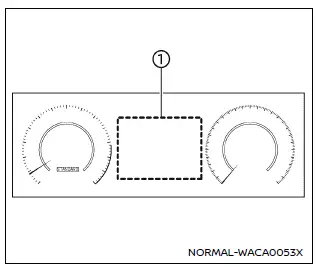
Example
The vehicle information display in the Nissan Armada is centrally positioned within the instrument cluster and serves as a key interface for driver information and system notifications. It provides real-time data and customizable settings for enhanced driving awareness.
The Nissan Armada display may include the following features, depending on equipment level:
- Tachometer
- Speedometer
- Vehicle settings
- Trip computer information
- Driver Assistance systems
- ProPILOT Assist status
- Intelligent Key operation details
- Audio system information
- Navigation turn-by-turn directions
- Warning and indicator alerts
- Tire pressure monitoring data
- Additional system information
Additional note: The Nissan Armada vehicle information display allows drivers to personalize their driving experience by adjusting layouts and accessing critical data quickly, improving both convenience and safety on the road.

 How to use the vehicle information display
Type A
Type B
The vehicle information display in the Nissan Armada is designed to provide the
driver with clear, customizable, and real-time information. It can be easily controlled
usin ...
Other materials:
Resetting the seat positions
Basic information
The Nissan Armada is equipped with a memory system for 3rd row power seats, allowing
them to retain their original positions. However, under certain conditions such
as power interruption, the stored position may be lost and require recalibration.
WARNING
During the reset pro ...
Wiper and washer switch
Basic information
WARNING
In the Nissan Armada, using the washer system in freezing temperatures may
cause the fluid to freeze on the windshield, significantly reducing visibility.
Always warm the glass using the defroster before activating the washer system to
ensure safe driving conditions ...
How to enable/disable the TSR system
Vehicle information display
Steering-wheel-mounted controls (right side)
To configure the Nissan Armada TSR system, follow these steps:
1. Press the
button until "Settings" appears on the vehicle information display. Then press the
scroll dial.
2. Navigate to "Driv ...

0.0054