Basic information
WARNING
- In the Nissan Armada, always keep the doors securely locked while driving. Combined with proper seat belt use, this significantly enhances passenger safety by reducing the risk of ejection during an accident and preventing unauthorized access from outside.
- Before opening any door in the Nissan Armada, carefully check for approaching vehicles, cyclists, or pedestrians to avoid potential collisions.
- To reduce the risk of injury or fatal incidents in the Nissan Armada,
never leave children, individuals requiring assistance, or pets unattended inside
the vehicle.
Interior temperatures in a closed Nissan Armada can rise rapidly, especially in warm weather, creating dangerous and life-threatening conditions.
Locking with key
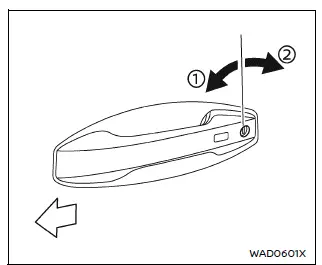
To lock the driver’s door in the Nissan Armada, insert the key into the door cylinder and turn it toward the rear of the vehicle 2.
To unlock, rotate the key toward the front of the Nissan Armada 1.
For unlocking all doors, refer to the Nissan Armada power door lock switch, Intelligent Key system, or remote keyless entry functions.
Locking with inside lock knob
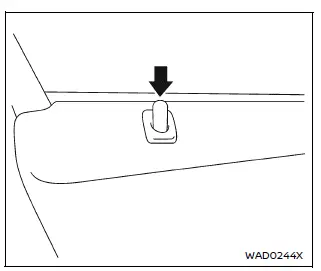
To lock a door from inside the Nissan Armada, push down the lock knob located on the door panel.
Always ensure the Nissan Armada Intelligent Key is not left inside the vehicle when locking doors manually.
Unlocking with inside handle
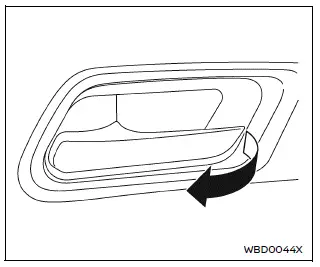
To unlock and open a door in the Nissan Armada, pull the interior handle once to unlock, and pull again to open the door fully.
Locking with power door lock switch
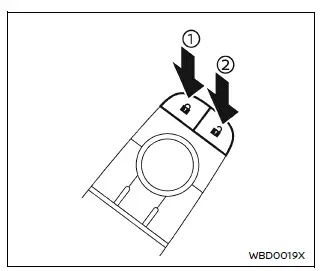
Driver's armrest
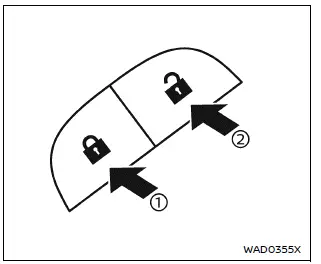
Front passenger's armrest
Basic information
The Nissan Armada power door lock system allows centralized locking and unlocking of all doors using switches located on both the driver’s and front passenger’s doors.
To lock all doors, press the switch to the lock position 1 while the doors are open, then close them.
Always double-check that the Nissan Armada Intelligent Key is not inside the vehicle before locking the doors.
To unlock all doors, press the switch to the unlock position 2.
Lockout protection
The Nissan Armada is equipped with a lockout protection system designed to prevent the Intelligent Key from being accidentally locked inside the vehicle.
If a door is open, the doors are locked, and the Intelligent Key is detected inside, the Nissan Armada will automatically unlock the doors and emit a warning chime.
NOTE:
The Nissan Armada doors may not lock properly if the Intelligent Key is held in the same hand that operates the door handle request switch. Place the key in another hand, pocket, or bag.
CAUTION
The Nissan Armada lockout protection system may not function correctly under certain conditions:
- If the Intelligent Key is placed on the dashboard.
- If the Intelligent Key is inside the glove compartment.
- If the Intelligent Key is stored in door pockets.
- If the Intelligent Key is located near metallic objects or materials.
Automatic door locks
- In the Nissan Armada, all doors automatically lock when the vehicle reaches approximately 15 MPH (24 km/h).
- All doors will automatically unlock when the ignition is switched OFF or when the gear selector is shifted to the P (Park) position, depending on system settings.
NOTE:
The Nissan Armada automatic door unlock function can be customized through the "Vehicle Settings" menu in the vehicle information display.
Child safety rear door lock
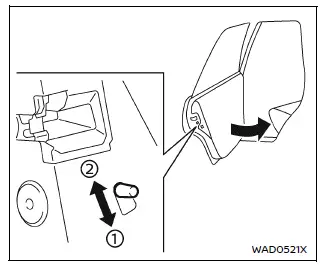
The Nissan Armada child safety rear door lock system is designed to prevent rear doors from being opened from the inside, providing additional safety for children.
When the lever is set to the lock position 1, rear doors can only be opened from outside the Nissan Armada.
To deactivate this function, move the lever to the unlock position 2.
This feature enhances safety and gives Nissan Armada drivers greater peace of mind when traveling with passengers in the rear seats.
Other materials
Electric Water Pump
Exploded View
Refer to Exploded View.
Removal and Installation
REMOVALDrain engine coolant from cooling system. Refer to ENGINE COOLANT : Draining.
Disconnect electric water pump harness connector .
Disengage fixing clip, and then move electric water pump harness to secure work space.
: Clip
...
Front Door Assembly
Removal and Installation
CAUTION:
Perform work with 2 workers, because it is heavy weight.
Support door with a proper material and use protective tape or shop cloth to protect door and body from falling and damage when removing and installing door assembly.
REMOVALRemove front door check link m ...
Diagnosis and Repair Work Flow
Work Flow
OVERALL SEQUENCEDETAILED FLOWGET INFORMATION FOR SYMPTOM
Get detailed information from the customer about the symptom (the condition and the environment when the incident/malfunction occurs).
Check operation condition of the function that is malfunctioning.
>>
GO TO 2.
CHECK ...