Basic information
Passing Assist in the Nissan Armada is an advanced feature of ProPILOT Assist 2.1, engineered to support safer and more efficient overtaking maneuvers on highways. Before using this function, it is strongly recommended to review the full ProPILOT Assist section to fully understand system behavior, controls, and limitations.
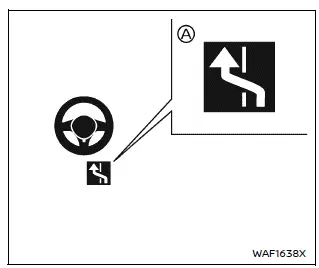
When ProPILOT Assist is active and the Nissan Armada system indicator A is illuminated in blue (hands-off mode), Passing Assist enhances driving convenience by helping the driver overtake slower vehicles in a controlled and predictable manner.
The Nissan Armada Passing Assist system operates in two coordinated stages:
1. The system detects a slower vehicle ahead and, when conditions allow, notifies the driver with a suggestion to pass on the left if no vehicles are present in the blind spot.
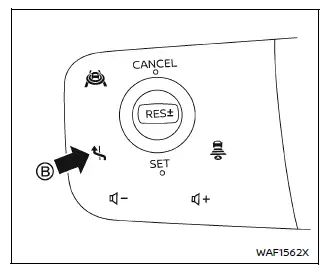
2. Once the driver confirms the maneuver using the Lane Change Assist switch B on the steering wheel, the Nissan Armada activates Lane Change Assist to help guide the vehicle smoothly into the adjacent lane.
WARNING
The driver of the Nissan Armada remains fully responsible for complying with traffic laws, including returning to the appropriate lane after overtaking.
All conditions must be satisfied for Passing Assist to function properly in the Nissan Armada:
- ProPILOT Assist must be active.
- The Lane Change Assist indicator must be illuminated in blue.
- No vehicle must be detected in the intended lane.
- Lane markings must be clearly visible and detected.
- Vehicle speed must exceed approximately 37 MPH (60 km/h).
- The system must detect the driver’s hands on the steering wheel.
- Passing Assist must be enabled in the system settings.
The Nissan Armada will suggest overtaking when a slower vehicle ahead is detected within specific speed conditions:
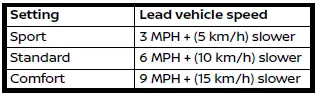
Additionally, the Nissan Armada may recommend returning to the right lane when:
- The vehicle continues traveling in the passing lane.
- The Lane Change Assist indicator
 is illuminated in blue.
 - No vehicles are detected in the right lane.
NOTE:
Driver steering input always takes priority in the Nissan Armada. The system will not override direct driver control.
How to enable/disable Passing Assist:
Vehicle information display
Settings → Driver Assistance → Lane Change Assist → Passing Assist → ON/ OFF
How to adjust Passing Assist mode:
Settings → Driver Assistance → Lane Change Assist → Passing Setting → Sport/Standard/Comfort
System operation
1. When a slower vehicle is detected ahead, the Nissan Armada displays the message "Slow Vehicle Ahead
 Change Lanes Left", prompting the driver to consider overtaking.
2. After confirming that it is safe, hold the steering wheel and press the Lane Change Assist switch. The turn signal will activate immediately.
- If the blind spot is clear, the Nissan Armada proceeds to initiate the maneuver.
- If another vehicle is detected, the system will monitor for a safe gap for
up to approximately 30 seconds.
If no suitable gap appears, the Passing Assist function will cancel automatically.
- If the system does not detect the driver’s hands on the steering wheel, a warning will be issued. If ignored, the Nissan Armada will cancel the maneuver.
3. The Lane Change Assist indicator flashes green, and the Nissan Armada begins steering assistance to move into the adjacent lane.
4. Once the lane change is completed, the turn signal cancels automatically, and normal Steering Assist resumes.
5. Hands-off (blue) mode will resume in the Nissan Armada as soon as all conditions are satisfied again.
To stop Passing Assist operation:
The Passing Assist function will be canceled (and the display will turn off) in the following situations:
- The turn signal is switched in the opposite direction.
- The driver actively turns the steering wheel.
- A vehicle enters the target lane after the maneuver begins.
- Lane markings are no longer clearly detected.
- Vehicle speed drops below approximately 37 MPH (60 km/h).
- The driver’s hands are not detected on the steering wheel.
- ProPILOT Assist or ICC is canceled.
- The vehicle being overtaken accelerates or changes lanes.
- An obstacle is detected near the lane boundary.
The turn signal will also cancel automatically when Passing Assist stops. If the Nissan Armada interrupts the maneuver before completion, the system may assist in guiding the vehicle back to the center of the original lane to maintain stability and safety.
Additional note: For optimal performance of Passing Assist in the Nissan Armada, ensure sensors and cameras remain clean and unobstructed, and always remain attentive to traffic conditions.
Other materials
Diagnosis and Repair Work Flow
Work Flow
DETAILED FLOWINTERVIEW FROM THE CUSTOMER
Clarify customer complaints before inspection. First of all, perform an interview utilizing Diagnostic Work Sheet and reproduce symptoms as well as fully understand it. Ask customer about his/her complaints carefully. Check symptoms by driving vehic ...
Rear A/c Control
Exploded View
Refer to Exploded View.
Removal and Installation
REMOVALRemove front center console rear finisher assembly. Refer to Removal and Installation.
Remove fixing screws , and then remove rear A/C control assembly.
Remove fixing screws , and then remove rear A/C control from rear A/C contr ...
Diagnosis and Repair Work Flow
Work Flow
OVERALL SEQUENCEDETAILED FLOWINTERVIEW FOR MALFUNCTION
It is also important to clarify the customer concerns before starting the inspection. Interview the customer about the concerns carefully and understand the symptoms fully.
NOTE:
The customers are not professionals. Never assume that â ...