
Nissan Armada 2025-2026 Service and Repair Manual: Removal and Installation
REMOVAL
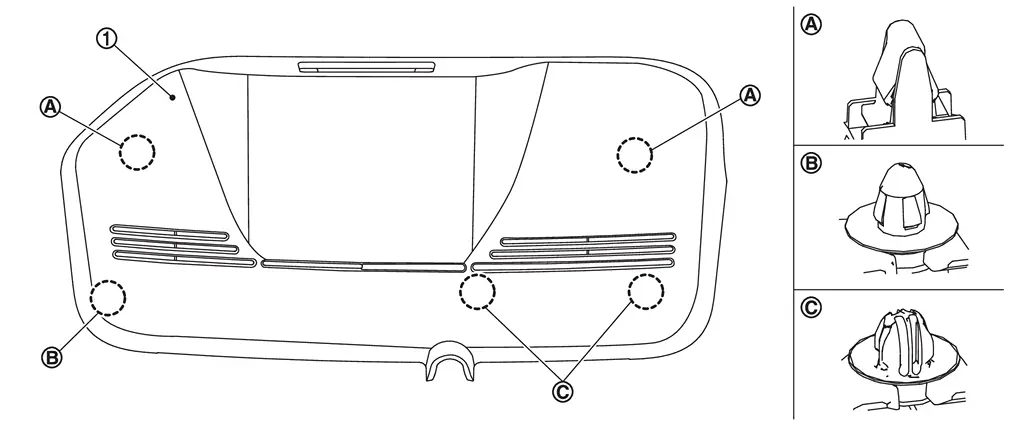
Using a suitable tool, release clips  , and remove cover
  .
.
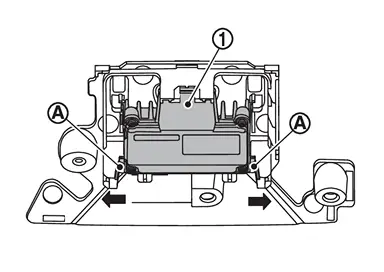
Disconnect front camera unit harness connector.
Release pawls  of bracket, and remove front camera unit from bracket.
INSTALLATION
Installation is in the reverse order of removal.
CAUTION:
Do not touch or shock the front camera unit lens area or drop the front camera unit.
To operate the system normally, perform the following operations when the front camera unit is replaced or removed.
Be sure to perform "ADDITIONAL SERVICE WHEN REPLACING FRONT CAMERA UNIT" when replacing front camera unit. Refer to Work Procedure.
Perform camera aiming every time the front camera unit is removed and installed. Refer to Work Procedure.
 Exploded View
Bracket Front camera unit Cover ...

Other materials:
Work Procedure
CHECK CAMERA LENS AND WINDSHIELD
Are camera lens and windshield contaminated with foreign materials?
YES (When the camera lens is contaminated with foreign materials.)>>
Replace front camera unit �Refer to Removal and Installation (Without ProPILOT Assist 2.1) or Removal and Installation (W ...
Work Procedure
If the front grille upper is removed or replaced, perform the simplified confirmation by birds-eye view screen.
CAUTION:
This procedure should only be performed if the front grille upper has been removed or replaced.
Perform camera calibration when removing or replacing each camera, removing the cam ...
Car phone or CB radio
When installing a car phone or CB radio system in your Nissan Armada, it is essential
to follow proper installation guidelines. Incorrect installation may interfere with
the vehicle’s electronic control modules and wiring systems, potentially affecting
performance and safety.
WARNING
Us ...

0.1422