
Nissan Armada 2025-2026 Service and Repair Manual: Removal and Installation
REMOVAL
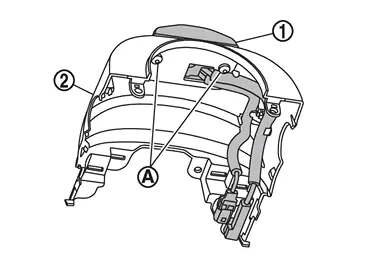
Remove the steering column cover upper. Refer to Removal and Installation.
Disconnect the driver monitor camera connector.
Remove the driver monitor camera mounting screws  , and remove the driver monitor camera
  from the steering column cover upper
  .
.
INSTALLATION
Installation is in the reverse order of removal.
CAUTION:
Make sure that check that the value of "Face" in "DATA MONITOR" of "Driver Monitor Camera" is "In range" after replacing or removing the driver monitor camera.
 Exploded View
Driver monitor camera Steering column cover upper ...

Other materials:
Work Procedure
SYSTEM INITIALIZATION
NOTE:
System initialization is required for each seat.
System initialization can perform by power window main switch or power window switch on each seat.
Close the door.
Ignition switch ON.
Operate power window switch UP, and then release the switch after door glass to the ful ...
FUEL SYSTEM : Inspection
WARNING:
Inspect fuel lines, fuel filler cap and fuel tank for improper attachment, leakage, cracks, damage, loose connections, chafing or deterioration.
: Engine : Fuel line : Fuel tank
If necessary, repair or replace damaged parts.
...
Information About Identification or Model Code
IDENTIFICATION NUMBER
Vehicle identification number plate Air conditioner specification label Emission control information label FMVSS certification label
(For USA )
CMVSS certification label
(For Canada)
Tire placard Vehicle identification number
(Chassis number on the frame)
VEHICLE IDENTIF ...

0.0052