Basic information
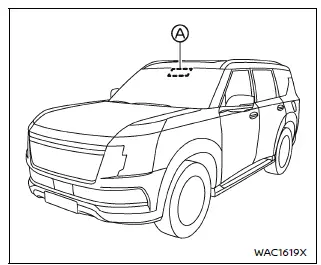
The Nissan Armada Traffic Sign Recognition (TSR) system is designed to enhance driver awareness by identifying and displaying the most recently detected road signs, particularly speed limits. Using the advanced multi-sensing front camera unit positioned near the interior mirror, the Nissan Armada captures real-time road sign data and presents it clearly in the vehicle information display.
For Nissan Armada models equipped with a navigation or map locator system, the displayed speed limit may be determined by combining live camera input with digital map data, ensuring greater accuracy. TSR information can be viewed both in the vehicle information display and in the Head-Up Display (HUD), if available, allowing drivers to stay informed without diverting attention from the road.
WARNING
The Nissan Armada TSR system is intended as a driver support feature only. It does not replace the driver's responsibility to observe road conditions, traffic signs, or driving regulations. The system cannot prevent accidents caused by inattention or unsafe driving behavior. Always remain alert and drive responsibly.
System operation
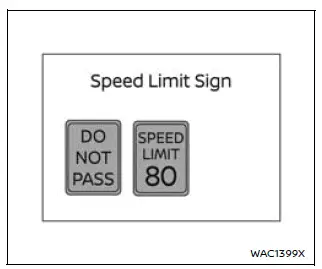
The Nissan Armada TSR system is capable of recognizing and displaying key traffic signs, including the following:
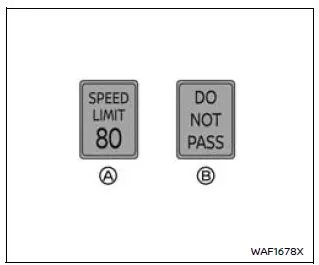
- Latest detected speed limit
- No passing zone indication
CAUTION
- The TSR system in the Nissan Armada is designed to assist, not replace, attentive driving. Always observe road signs directly and follow current traffic laws.
- The Nissan Armada TSR system may not operate correctly under certain
conditions, such as:
- When road signs are damaged, obscured, or difficult to read due to weather or lighting conditions.
- When dirt, snow, or moisture covers the windshield area in front of the camera.
- When headlights are dim or improperly adjusted.
- When strong sunlight directly hits the camera (e.g., sunrise or sunset).
- When entering or exiting tunnels or areas with rapid brightness changes.
- When driving in regions not supported by the navigation/map system.
- When navigation data is outdated or inaccurate.
- When passing vehicles displaying speed stickers (e.g., trucks or buses).
- The TSR system in the Nissan Armada may occasionally display incorrect or irrelevant signs. For example, it may detect a sign intended for another vehicle type or display a speed limit that differs from the actual limit.
How to enable/disable the TSR system
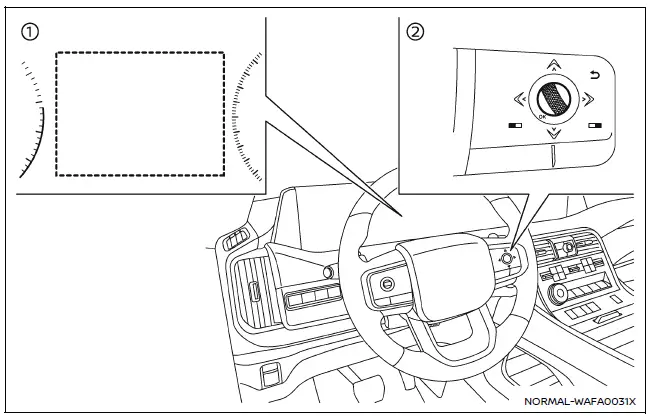
- Vehicle information display
- Steering-wheel-mounted controls (right side)
To configure the Nissan Armada TSR system, follow these steps:
1. Press the
 button until "Settings" appears on the vehicle information display. Then press the
scroll dial.
button until "Settings" appears on the vehicle information display. Then press the
scroll dial.
2. Navigate to "Driver Assistance" using the scroll dial and confirm selection.
3. Select "Traffic Sign Assist", then choose either "Speed Limit Sign" or "Speed Limit Warning" (if equipped). Toggle the desired setting ON or OFF using the scroll dial.
System temporarily unavailable
Under certain conditions, such as when the Nissan Armada is parked under direct sunlight in high temperatures (above approximately 104ºF / 40ºC), the TSR system may automatically deactivate. In this case, a warning message such as "Unavailable Camera Temperature High" will appear.
Action to take:
Once the interior temperature of the Nissan Armada decreases, the TSR system will resume normal operation automatically.
System malfunction
If the TSR system in the Nissan Armada detects a malfunction, it will deactivate automatically and display a "Malfunction See Owner's Manual" warning message.
Action to take:
If this message appears, safely stop the vehicle, turn off the engine, and restart it. If the warning persists, the Nissan Armada should be inspected by an authorized dealer.
System maintenance
The Nissan Armada TSR system shares its multi-sensing front camera with other driver assistance technologies such as Lane Departure Warning (LDW). This camera is mounted near the interior mirror and must be kept clean and unobstructed to ensure optimal system performance. Regular inspection and maintenance are essential for reliable operation of the Nissan Armada TSR system. :contentReference[oaicite:0]{index=0}
Other materials
Low Tire Pressure Warning Lamp Does Not Turn Off
Description
The low tire pressure warning lamp does not turn OFF after several seconds is passed after engine starts.
Diagnosis Procedure
CHECK TIRE PRESSURE
Ignition switch ON.
CAUTION:
Never start the engine.
Check the tire pressure for all wheels and adjust to the specified value. Refer to TI ...
Location of Plastic Parts
Precautions for Plastics
Abbreviation Material name Heat resisting temperature °C (°F)
Resistance to gasoline and
solvents Other cautions
PE
Polyethylene
60 (140)
Gasoline and most solvents are harmless if applied for a very short time (wipe out quickly).
Flammable
ABS
Acrylon ...
Precautions
Precaution for Supplemental Restraint System (SRS) "AIR BAG" and "SEAT BELT PRE-TENSIONER"
The Supplemental Restraint System such as “AIR BAG� and “SEAT BELT PRE-TENSIONER�, used along with a front seat belt, helps to reduce the risk or severity of injury to the driver and front passenger fo ...