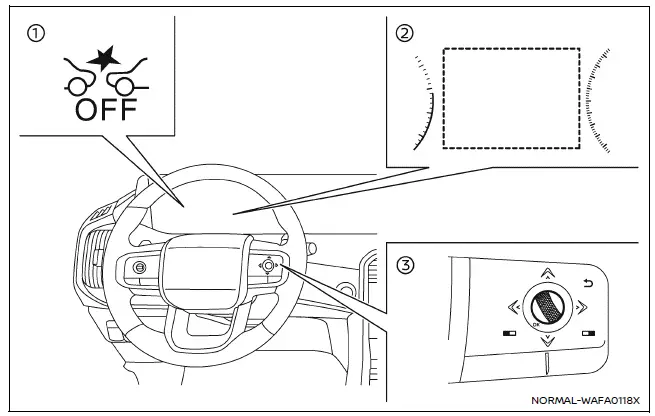
- AEB system OFF warning light (on the meter panel)
- Vehicle information display
- Steering-wheel-mounted controls (right side)
In the Nissan Armada, the Automatic Emergency Braking (AEB) with Pedestrian Detection system can be enabled or disabled through the vehicle information display. This allows the driver to manage advanced safety features according to driving conditions and preferences.
Follow these steps to turn the Nissan Armada AEB with Pedestrian Detection system ON or OFF:
1. Press the
 button repeatedly until the "Settings" menu appears on the vehicle information display,
then press the scroll dial to confirm.
button repeatedly until the "Settings" menu appears on the vehicle information display,
then press the scroll dial to confirm.
Use the scroll dial to navigate to "Driver Assistance," and press the dial again to enter the submenu.
2. Select "Emergency Brake" and press the scroll dial to toggle the Nissan Armada AEB system ON or OFF.
When the Nissan Armada AEB with Pedestrian Detection system is switched OFF, the AEB OFF warning indicator will illuminate on the instrument cluster to inform the driver.
NOTE:
- The Nissan Armada AEB with Pedestrian Detection system automatically reactivates when the engine is restarted, ensuring safety features are restored for every drive.
- The Intelligent Forward Collision Warning (I-FCW) system is integrated with the AEB system in the Nissan Armada. Disabling AEB will also disable the I-FCW system, as they function together as part of the same safety architecture.
- The Nissan Armada does not allow activation or deactivation of the AEB system while the vehicle is in motion. Adjustments must be made when the vehicle is stationary.
Additional recommendation: For maximum safety in the Nissan Armada, it is strongly advised to keep the AEB with Pedestrian Detection system enabled at all times unless specific conditions require temporary deactivation.
Other materials
Memory Function Does Not Operate
All Component
Diagnosis Procedure
CHECK MANUAL OPERATION
Check manual operation.
Does it operate normally?
YES>>
GO TO 2.
NO>>
Repair or replace the malfunctioning parts.
PERFORM MEMORY STORING
Perform MEMORY STORING. Refer to Description.
Check memory function operation.
Does i ...
Repairing High Strength Steel
High Strength Steel (HSS) and Ultra High Strength Steel (UHSS)
High strength steel and ultra high strength steel are used for body panels in order to reduce vehicle weight.Accordingly, precautions in repairing automotive bodies made of high strength steel are described below:UNDERBODY COMPONENT PART ...
Precautions
Precaution for Supplemental Restraint System (SRS) "AIR BAG" and "SEAT BELT PRE-TENSIONER"
The Supplemental Restraint System such as “AIR BAG� and “SEAT BELT PRE-TENSIONER�, used along with a front seat belt, helps to reduce the risk or severity of injury to the driver and front passenger fo ...