
Nissan Armada 2025-2026 Owner's Manual: Vehicle Dynamic Control (VDC) OFF switch
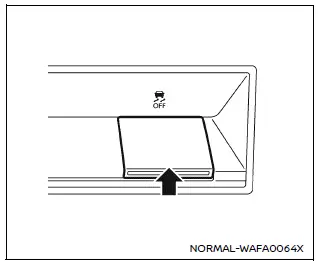
The Nissan Armada should normally be driven with the Vehicle Dynamic Control (VDC) system enabled, as it helps maintain vehicle stability and traction.
In situations such as being stuck in mud, snow, or sand, the Nissan Armada VDC system may reduce engine power to limit wheel spin. This can make it harder to free the vehicle.
If maximum engine power is required, the Nissan Armada allows you to temporarily disable the VDC system.
To turn off the VDC system, press the VDC OFF switch. The
 indicator will illuminate on the instrument panel.
To restore normal operation, press the VDC OFF switch again or restart the Nissan Armada engine.
This system plays a crucial role in maintaining control during challenging driving conditions, making it an essential safety feature of the Nissan Armada.
 Steering Assist switch
The Steering Assist switch in the Nissan Armada allows the driver to temporarily
enable or disable the Steering Assist function.
Additionally, the system can be controlled through the "Dri ...
 Hill descent control switch
WARNING
In the Nissan Armada, never rely exclusively on the hill descent control
system to regulate vehicle speed on steep downhill slopes. Always maintain full
control of the vehicle an ...
Other materials:
Engine compartment
The engine compartment of the Nissan Armada houses the powerful VR35DDTT engine
and essential service components. Regular inspection of these elements helps maintain
optimal performance and long-term reliability.
Window washer fluid reservoir
Fuse/fusible link holder
Engine oil fille ...
Fog light switch
Front fog lights
Front fog lights (example)
In the Nissan Armada, the front fog lights are designed to improve visibility
in challenging weather conditions such as fog, rain, or snow by illuminating the
road surface at a lower angle.
To activate the fog lights in the Nissan Armada, first ...
Tire pressure
Tire Pressure Monitoring System (TPMS)
The Nissan Armada is equipped with an advanced Tire Pressure Monitoring System
(TPMS) designed to continuously track the air pressure in all tires except the spare.
When the tire pressure drops significantly below the recommended level, the low
tire press ...

0.0038