
Nissan Armada 2025-2026 Owner's Manual: Hill descent control switch
WARNING
- In the Nissan Armada, never rely exclusively on the hill descent control
system to regulate vehicle speed on steep downhill slopes. Always maintain full
control of the vehicle and be prepared to apply the brake pedal when necessary.
Extra caution is required when driving on icy, muddy, or extremely steep terrain.
Failure to properly manage vehicle speed in the Nissan Armada may result in loss of control, potentially leading to serious injury or fatal accidents.
- The hill descent control system in the Nissan Armada may not maintain
speed consistently under all road, load, or traction conditions.
Drivers must remain attentive and ready to intervene using the brakes at any time to ensure safe operation.
CAUTION
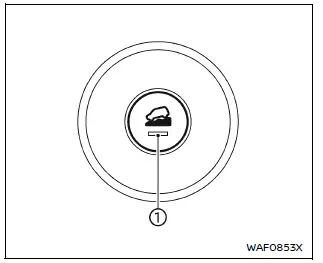
If the Nissan Armada hill descent control system is used continuously for an extended period, the VDC system temperature may increase, causing temporary system deactivation (indicator light 1 will blink). If the indicator does not stabilize, discontinue use until the system cools down.
The Nissan Armada hill descent control system is engineered to reduce driver workload when descending steep slopes by automatically controlling vehicle speed, allowing the driver to focus on steering and maintaining direction.
To activate the hill descent control system in the Nissan Armada:
- The transmission must be in a forward or reverse gear,
- The 4WD system must be set to 4L and vehicle speed must be below 20 MPH (30 km/h), or
- The 4WD system must be in 4H with speed below 20 MPH (30 km/h), and
- The hill descent control switch must be turned ON.
When activated, the Nissan Armada hill descent control indicator light will illuminate. The system will also automatically apply braking force, causing the stop/tail lights to activate.
If the accelerator or brake pedal is pressed, the Nissan Armada system will temporarily pause operation. Once the pedal is released and conditions are met again, the system resumes automatically.
The indicator light will blink if activation conditions are not satisfied or if the system disengages.
To deactivate the hill descent control system in the Nissan Armada, simply switch it OFF.
 Vehicle Dynamic Control (VDC) OFF switch
The Nissan Armada should normally be driven with the Vehicle Dynamic Control
(VDC) system enabled, as it helps maintain vehicle stability and traction.
In situations such as being stuck in mud, ...
 Differential lock mode switch
The rear differential lock (DIFF-LOCK) in the Nissan Armada is designed to evenly
distribute engine torque between the left and right rear wheels, improving traction
in low-grip conditions.
T ...
Other materials:
Resetting the seat positions
Basic information
The Nissan Armada is equipped with a memory system for 3rd row power seats, allowing
them to retain their original positions. However, under certain conditions such
as power interruption, the stored position may be lost and require recalibration.
WARNING
During the reset pro ...
Trip computer
Example
Basic information
In the Nissan Armada, the trip computer is controlled using intuitive switches
located directly on the steering wheel, allowing the driver to navigate menus without
distraction.
Scroll dial - in the Nissan Armada this control enables smooth navigation
throu ...
Intelligent Key operating range
The Nissan Armada Intelligent Key system functions only when the key is located
within the defined operating range of the request switches 1 and 2 (if equipped).
For optimal performance, the Nissan Armada Intelligent Key must be within approximately
80 cm (31.50 in) of each request switch.
...

0.0044