Warning/indicator lights (red)
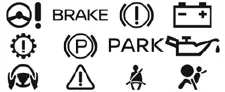
Warning/indicator lights (yellow)
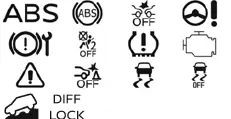
Warning/indicator lights (other)
 ( white )
 (
green )
(
green )
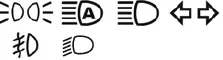
Checking lights
In the Nissan Armada, the warning and indicator light system is designed to immediately inform the driver about the vehicle’s condition, safety systems, and operational status. To properly verify system readiness, ensure that all doors are securely closed, engage the parking brake, fasten all seat belts, and turn the ignition switch to the ON position without starting the engine.
Under these conditions, the following warning and indicator lights in the Nissan Armada (if equipped) should illuminate as part of the initial system check:
 ,
,
 ,
,
 or
or
 ,
,
 ,
,
 ,
,

These lights confirm that the monitoring systems of the Nissan Armada are functioning correctly at startup.
Additionally, the following indicator lights (if equipped) in the Nissan Armada should briefly illuminate and then turn off, confirming normal operation of their respective systems:
 ,
,
 ,
,
 ,
,
 ,
,
 or
or
 ,
,
 ,
,
 or
or
 ( red) ,
 (yellow),
 .
.
This startup sequence is an essential diagnostic feature of the Nissan Armada, ensuring that all warning systems, sensors, and onboard electronics are operating as intended before driving.
If any warning or indicator light in the Nissan Armada fails to illuminate during this check, remains on unexpectedly, or behaves differently than described, this may indicate a malfunction, sensor issue, or even a simple bulb failure.
For safety and reliability, it is strongly recommended to have the Nissan Armada inspected by an authorized NISSAN dealer to diagnose and resolve any potential issues.
Regular monitoring of the dashboard indicators in the Nissan Armada helps ensure safe driving conditions and allows early detection of potential mechanical or electronic problems.
Other materials
General Information Tools and Preparation
Special Service Tools
Tool number
Tool name Description
KV99112600
Crimping Pliers
Crimping terminals
Commercial Service Tools
Tool name Description
Industrial dryer
Heating heat shrinkable tube
Repair Parts
Part name Description
Harness repair kit
A: Heat shrinkable tube ...
Suspension Arm
Exploded View
Frame
Stopper rubber
Suspension arm
Axle housing
: Always replace after every disassembly.
: N·m (kg-m, ft-lb)
Removal and Installation
REMOVALWithout Dynamic Digital Suspension and Electronic Air SuspensionRemove tires. Refer to ROAD WHEEL TIRE : Removal &a ...
Console Box Lamp
Exploded View
Console box lamp is integrated structure with front center console box. For exploded view of front center console assembly, refer to Exploded View.
Replacement
CAUTION:
Disconnect the battery negative terminal or remove power circuit fuse when performing the operation for preventing e ...