
Nissan Armada 2025-2026 Service and Repair Manual: Work Flow
OVERALL SEQUENCE
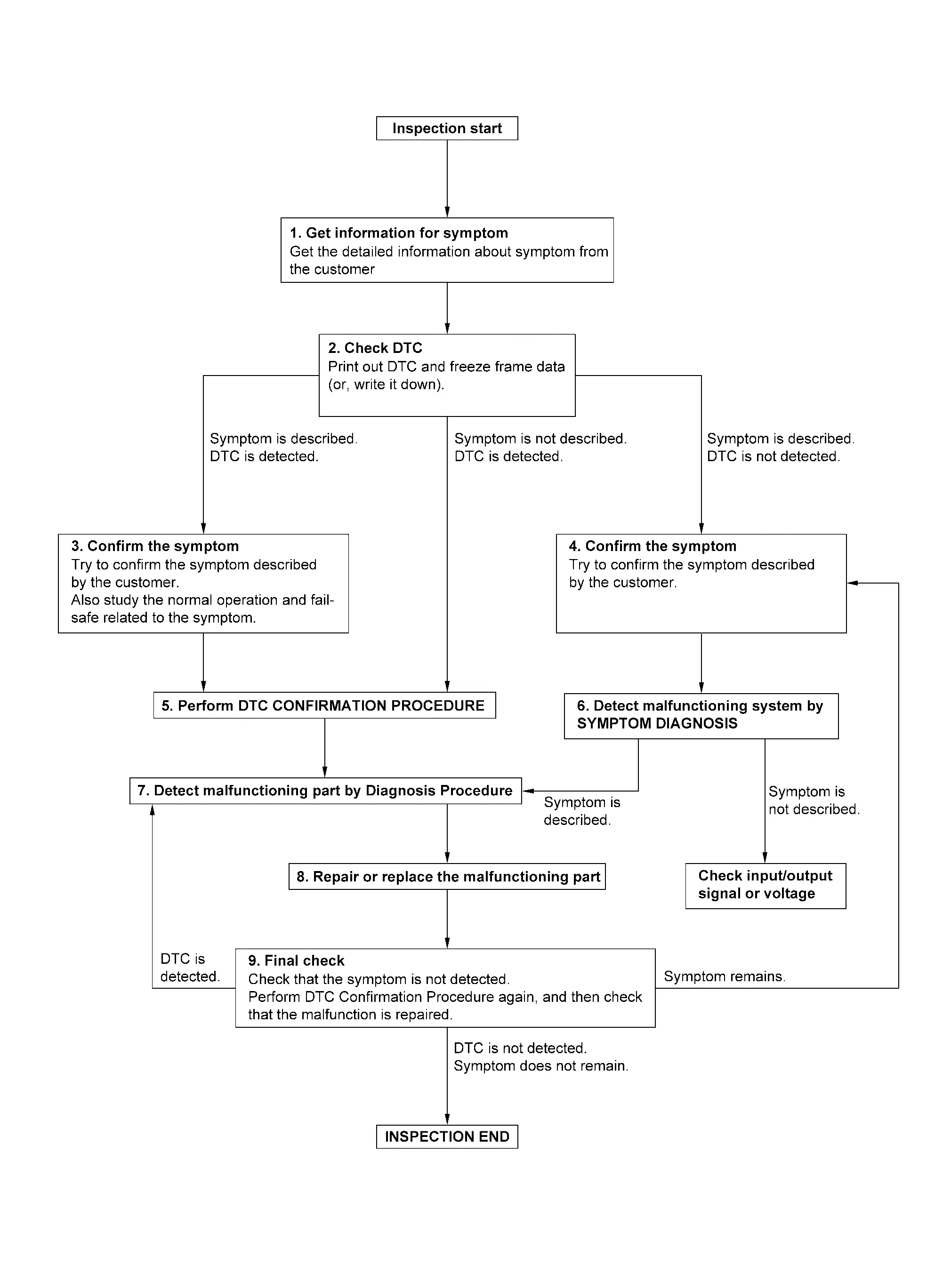
DETAILED FLOW
GET INFORMATION FOR SYMPTOM
- Get detailed information from the customer about the symptom (the condition and the environment when the incident/malfunction occurs).
- Check operation condition of the function that is malfunctioning.
GO TO 2.
CHECK DTC
- Check DTC.
- Perform the following procedure if DTC is detected.
- Record DTC and freeze frame data (Print them out using CONSULT.)
- Erase DTC.
- Study the relationship between the cause detected by DTC and the symptom described by the customer.
Are any symptoms described and any DTC detected?
Symptom is described, DTC is detected>>GO TO 3.
Symptom is described, DTC is not detected>>GO TO 4.
Symptom is not described, DTC is detected>>GO TO 5.
CONFIRM THE SYMPTOM
Try to confirm the symptom described by the customer.
Also study the normal operation and fail-safe related to the symptom.
>>GO TO 5.
CONFIRM THE SYMPTOM
Try to confirm the symptom described by the customer.
>>GO TO 6.
PERFORM DTC CONFIRMATION PROCEDURE
 NOTE:
NOTE:
- Freeze frame data is useful if the DTC is not detected.
Is DTC detected?
YES>>GO TO 7.
NO>>Refer to Intermittent Incident.
DETECT MALFUNCTIONING SYSTEM BY SYMPTOM DIAGNOSIS
Is the symptom described?
YES>>GO TO 7.
NO>>DETECT MALFUNCTIONING PART BY DIAGNOSIS PROCEDURE
Inspect according to Diagnosis Procedure of the system.
Is malfunctioning part detected?
YES>>GO TO 8.
NO>>Refer to Intermittent Incident.
REPAIR OR REPLACE THE MALFUNCTIONING PART
- Repair or replace the malfunctioning part.
- Reconnect parts or connectors disconnected during Diagnosis Procedure again after repair and replacement.
- Check DTC. If DTC is detected, erase it.
GO TO 9.
FINAL CHECK
Is DTC detected and does symptom remain?
YES-1>>DTC is detected: GO TO 7.
YES-2>>Symptom remains: GO TO 4.
NO>>Before returning the vehicle to the customer, always erase DTC.

 Additional Service When Replacing Third Seat Control Unit Rh
When after replacing third seat control unit RH, third seat RH position initialization must be performed. For details, refer to Work Procedure. ...
Other materials:
Configuration (bcm)
Vehicle specification needs to be written with CONSULT because it is not written after replacing the BCM.
The configuration requires network connection. CONSULT connects to network and then it downloads the configuration data from the server. Then CONSULT writes the vehicle specification to the BCM. ...
Symptom Table
NOTE:
Symptom Possible cause Inspection item Headlamp (HI) is not turned ON One side Front combination lamp
LED [Headlamp (HI)]
LED headlamp control module (LO)
Harness
Replace front combination lamp
Refer to Removal and Installation. Both sides Symptom diagnosis
“BOTH SIDE HEADLAMPS (HI) ...
Precaution for Brake System
WARNING:
Brake fluid use refer to Fluids and Lubricants.
Never reuse drained brake fluid.
Always confirm the specified tightening torque when installing the brake pipes.
After pressing the brake pedal more deeply or harder than normal driving, such as air bleeding, check each item of brake pedal. Ad ...

0.0059