
Nissan Armada 2025-2026 Service and Repair Manual: Work Flow
OVERALL SEQUENCE
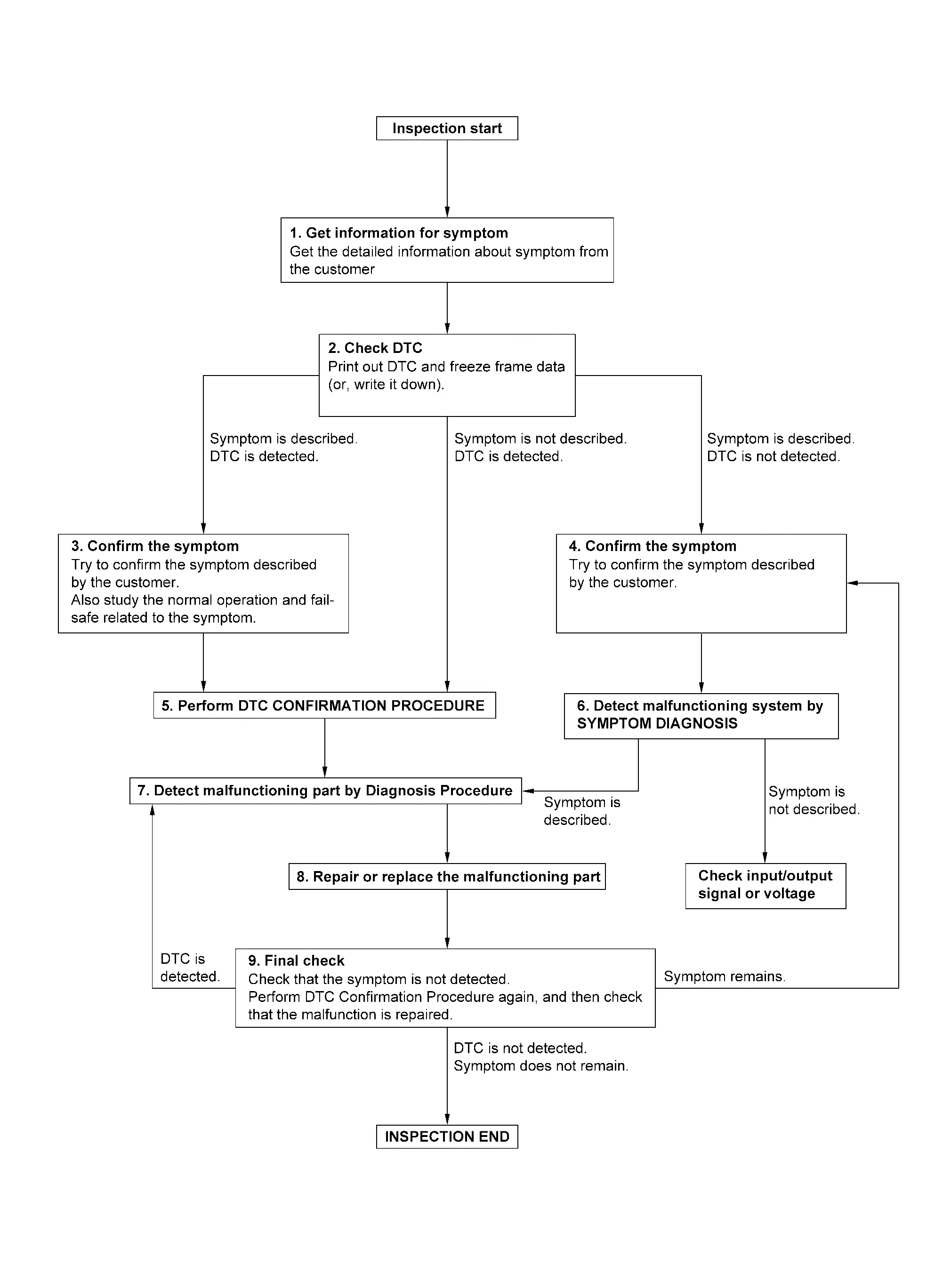
DETAILED FLOW
GET INFORMATION FOR SYMPTOM
Check operation condition of the function that is malfunctioning.
GO TO 2.
CHECK DTC
Check DTC.
Perform the following procedure if DTC is detected.
Record DTC and freeze frame data (print them out using CONSULT).
Erase DTC.
Are any symptoms described or any DTC detected?
Symptom is described, DTC is displayed>>GO TO 3.
Symptom is described, DTC is not displayed>>GO TO 4.
Symptom is not described, DTC is displayed>>GO TO 5.
CONFIRM THE SYMPTOM
Confirm the symptom described by the customer.
Also study the normal operation and fail-safe related to the symptom.
>>GO TO 5.
CONFIRM THE SYMPTOM
Try to confirm the symptom described by the customer.
>>GO TO 6.
PERFORM DTC CONFIRMATION PROCEDURE
Perform DTC CONFIRMATION PROCEDURE for the detected DTC, and then check that DTC is detected again. At this time, always connect CONSULT to the vehicle, and check diagnostic results in real time.
If two or more DTCs are detected, refer to DTC Inspection Priority Chart (Intelligent Key unit), DTC Inspection Priority Chart (automatic back door control unit) or DTC Inspection Priority Chart (BCM), and determine trouble diagnosis order.
 NOTE:
NOTE:
Freeze frame data is useful if the DTC is not detected.
Is DTC detected?
YES>>GO TO 7.
NO>>Refer to Intermittent Incident.
DETECT MALFUNCTIONING SYSTEM BY SYMPTOM DIAGNOSIS
Is the symptom described?
YES>>GO TO 7.
NO>>DETECT MALFUNCTIONING PART BY DIAGNOSIS PROCEDURE
Inspect according to Diagnosis Procedure of the system.
Is malfunctioning part detected?
YES>>GO TO 8.
NO>>Check according to Intermittent Incident.
REPAIR OR REPLACE THE MALFUNCTIONING PART
Repair or replace the malfunctioning part.
Check for DTC. If DTC is displayed, erase it.
GO TO 9.
FINAL CHECK
When DTC is detected in step 2, perform DTC CONFIRMATION PROCEDURE again, and then check that the malfunction is completely repaired.
Is DTC detected and does symptom remain?
YES-1>>DTC is detected: GO TO 7.
YES-2>>Symptom remains: GO TO 4.
NO>>Before returning the vehicle to the customer, always erase DTC.

 Additional Service When Replacing Intelligent Key Unit
CAUTION:
When replacing the Intelligent Key unit, always replace it with a new one. The functions controlled by the Intelligent Key unit does not operate properly in case of reuse of the Intelligent K ...
Other materials:
Removal and Installation
REMOVAL
Fully close rear door glass.
Remove rear door woofer. Refer to Removal & Installation.
Remove rear door check link mounting bolt of vehicle body side.
Remove rear door check link mounting bolts of rear door panel, and then take rear door check link out from the hole of rear door panel.
I ...
Work Procedure
REPLACE INTELLIGENT KEY UNIT
Replace Intelligent Key unit. Refer to Removal and Installation.
>>
GO TO 2.
WRITING Vehicle SPECIFICATION
CONSULT Configuration
Perform configuration. Refer to Description.
>>
GO TO 3.
REGISTER INTELLIGENT KEYS
CAUTION:
If perform Intelligent Key registr ...
Removal and Installation
CAUTION:
Never damage the body panel.
REMOVAL
CAUTION:
Remove luggage side lower finisher. Refer to Removal and Installation.
Apply protective tape (A) on rear pillar finisher to protect it from damage.
Disengage seat belt finisher fixing pawls using a remover tool (A).
: Pawl
Apply protectiv ...

0.005