
Nissan Armada 2025-2026 Service and Repair Manual: Work Flow
OVERALL SEQUENCE
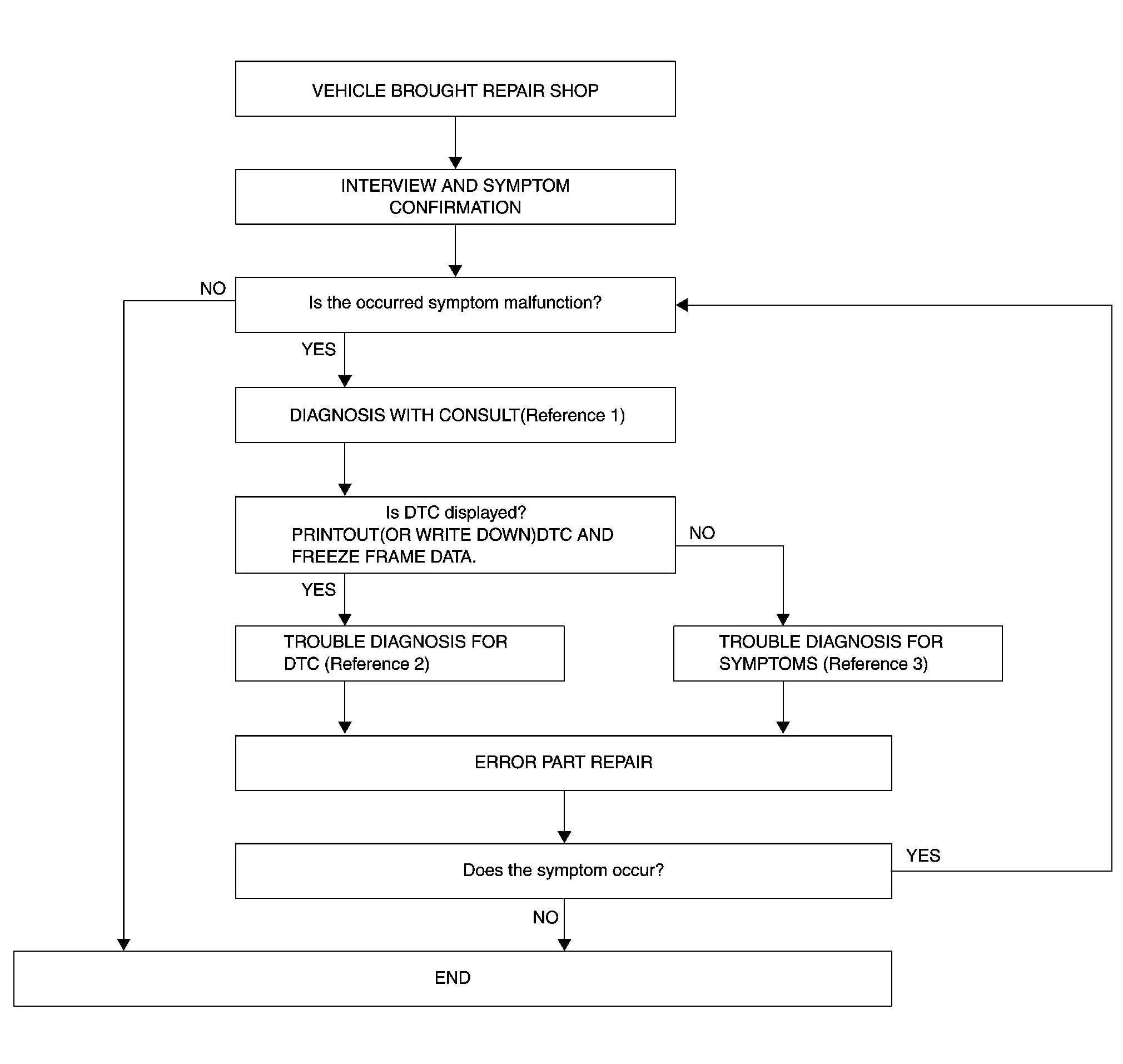
Reference 1··· Refer to Consult Function.
Reference 2··· Refer to DTC Index.
Reference 3··· Refer to Symptom Table.
DETAILED FLOW
INTERVIEW AND SYMPTOM CONFIRMATION
Check the malfunction symptoms by performing the following items.
Check the symptom.
Is the occurred symptom malfunction?
YES>>GO TO 2.
NO>>INSPECTION END
DIAGNOSIS WITH CONSULT
Connect CONSULT and perform a self-diagnosis for “AROUND VIEW MONITOR�. Refer to Consult Function.
 NOTE:
NOTE:Skip to step 4 of the diagnosis procedure if “AROUND VIEW MONITOR� is not displayed.
When DTC is detected, follow the instructions below:
Record DTC and Freeze Frame Data.
Is DTC displayed?
YES>>GO TO 3.
NO>>GO TO 4.
TROUBLE DIAGNOSIS FOR DTC
Check the DTC indicated in the “Self-Diagnosis Results�.
Perform the relevant diagnosis referring to the DTC Index. Refer to DTC Index.
GO TO 5.
TROUBLE DIAGNOSIS FOR SYMPTOMS
Perform the relevant diagnosis referring to the diagnosis chart by symptom. Refer to Symptom Table
>>GO TO 5.
ERROR PART REPAIR
Repair or replace the identified malfunctioning parts.
Perform a self-diagnosis for “AROUND VIEW MONITOR� with CONSULT.
NOTE:Erase the stored self-diagnosis results after repairing or replacing the relevant components if any DTC has been indicated in the “Self-Diagnosis Results�.
Check that the symptom does not occur.
Does the symptom occur?
YES>>GO TO 1.
NO>>INSPECTION END

 Additional Service When Replacing Around View Monitor Control Unit
CAUTION:
When replacing the around view monitor control unit, always replace it with a new one. Around view monitor system does not operate properly in case of reuse of the around view monitor control ...
Other materials:
Engine Can Not Start
Engine does not start when push-button ignition switch is pressed.
SYMPTOM TABLE (BOTH INTELLIGENT KEYS HAVE THE SAME SYMPTOMS)
Door lock operation (remote keyless entry) Door lock operation (request switch of front/rear door) or trunk/back door open operation (opener switch of trunk/back door pan ...
Inspection
NOTE:
The parts (finisher, garnish, headlining, etc.) that into contact with the body side welt is describing as trim.
Check that the lip of body side welt covers onto each trim .
If the lip of body side welt does not cover onto each trim, operate installation step 3. Refer to Removal and Instal ...
Rear Door Alert
In the Nissan Armada, the Rear Door Alert system is designed as a helpful reminder
feature that alerts the driver when there may be an item or passenger left in the
rear seats. Always check the rear seating area before exiting the Nissan Armada
to ensure safety.
The Rear Door Alert system in ...

0.0051