
Nissan Armada 2025-2026 Service and Repair Manual: Work Flow
Without ProPILOT Assist 2.1
OVERALL SEQUENCE
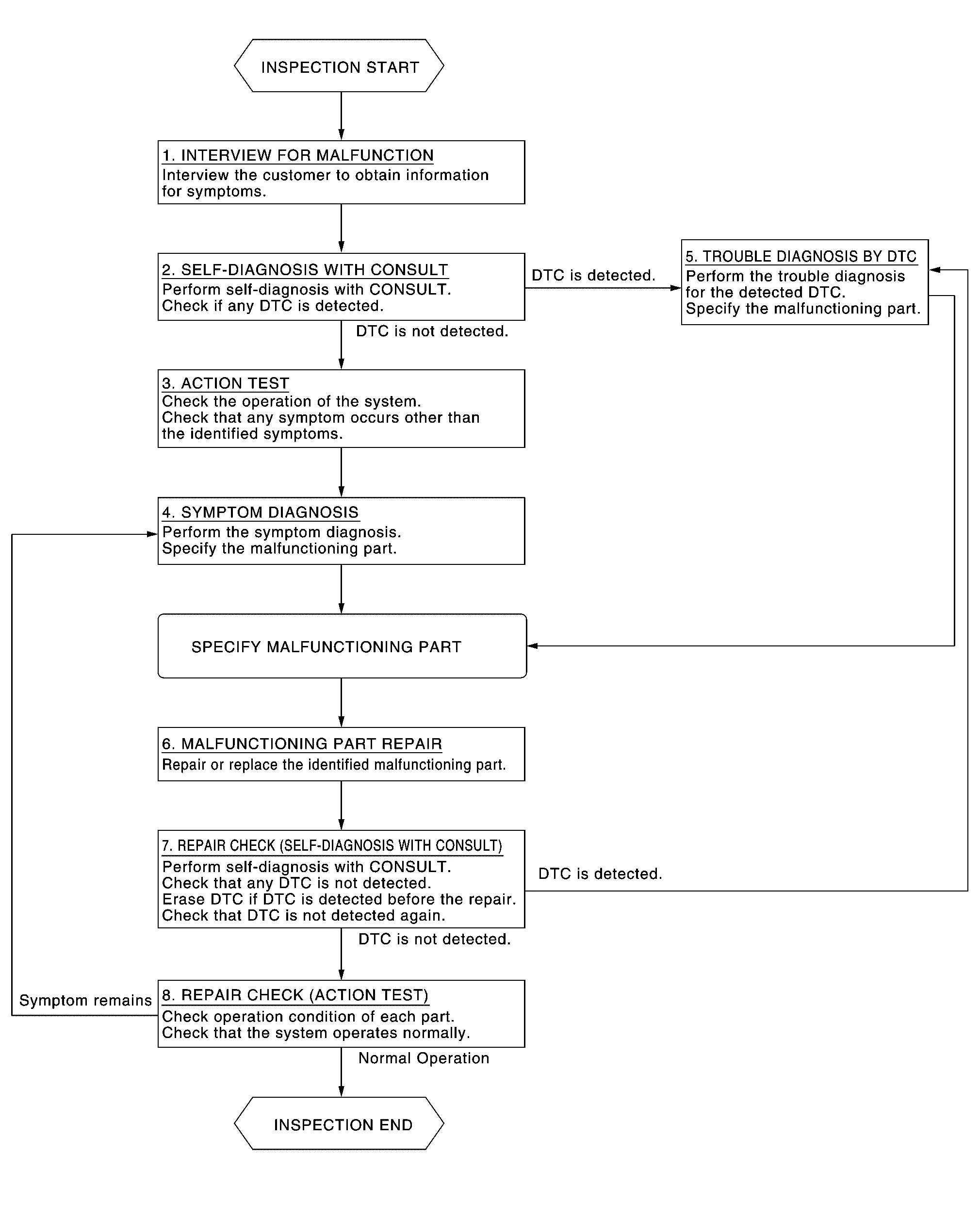
DETAILED FLOW
INTERVIEW FOR MALFUNCTION
It is important to clarify the customer’s concerns before starting the inspection. Interview the customer about the concerns carefully and understand the symptoms fully.
 NOTE:
NOTE:
The customers are not professionals. Never assume that “maybe the customer means...” or “maybe the customer mentioned this symptom”.
>>GO TO 2.
SELF-DIAGNOSIS WITH CONSULT
 CONSULT
Perform “All DTC Reading” mode.
Check if the DTC is detected in the “Self Diagnostic Result” of the following:
“ICC/ADAS 2”
“LASER/RADAR”
“LANE CAMERA”
“Side radar (Rear left)”
“Side radar (Rear right)”
Is any DTC detected?
YES>>Record or print self-diagnosis results and freeze frame data (FFD).GO TO 5.
NO>>GO TO 3.
ACTION TEST
Perform the system action test to check the operation status of the following:
LDW: Refer to Work Procedure.
I-LI: Refer to Work Procedure.
BSW: Refer to Work Procedure.
I-BSI: Refer to Work Procedure.
TSR: Refer to Work Procedure.
RCTA: Refer to Work Procedure.
I-DA: Refer to Work Procedure.
GO TO 4.
SYMPTOM DIAGNOSIS
>>GO TO 6.
TROUBLE DIAGNOSIS BY DTC
CONSULT
Erase self-diagnostic results.
Ignition switch OFF → ON.
CAUTION:
Be sure to wait of 10 seconds after turning ignition switch OFF or ON.
Check the DTC in the “Self Diagnostic Result”.
Perform trouble diagnosis for the following detected DTC:
“ICC/ADAS 2”: Refer to DTC Index.
“LASER/RADAR”: Refer to DTC Index.
“LANE CAMERA”: Refer to DTC Index.
“Side radar (Rear left)”: Refer to DTC Index.
“Side radar (Rear right)”: Refer to DTC Index.
NOTE:
If Network-DTC is detected, first diagnose the CAN communication system.
>>GO TO 6.
MALFUNCTIONING PART REPAIR
Repair or replace the identified malfunctioning parts.
>>GO TO 7.
REPAIR CHECK (SELF-DIAGNOSIS WITH CONSULT)
Erase “Self Diagnostic Result”.
Perform “All DTC Reading” mode after repairing or replacing the specific items.
Check if any DTC is detected in self-diagnosis results of the following:
“ICC/ADAS 2”
“LASER/RADAR”
“LANE CAMERA”
“Side radar (Rear left)”
“Side radar (Rear right)”
Is any DTC detected?
YES>>GO TO 5.
NO>>GO TO 8.
REPAIR CHECK (ACTION TEST)
Perform the following system action test. Check that the malfunction symptom is solved or no other symptoms occur.
Is there a malfunction symptom?
YES>>GO TO 4.
NO>>Inspection End.
With ProPILOT Assist 2.1
OVERALL SEQUENCE
DETAILED FLOW
INTERVIEW FOR MALFUNCTION
It is important to clarify the customer’s concerns before starting the inspection. Interview the customer about the concerns carefully and understand the symptoms fully.
NOTE:
The customers are not professionals. Never assume that “maybe the customer means...” or “maybe the customer mentioned this symptom”.
>>GO TO 2.
SELF-DIAGNOSIS WITH CONSULT
CONSULT
Perform “All DTC Reading” mode.
Check if the DTC is detected in the “Self Diagnostic Result” of the following:
“ICC/ADAS 2”
“LASER/RADAR”
“LANE CAMERA”
“Side radar (Rear left)”
“Side radar (Rear right)”
“Side radar (Front left)”
“Side radar (Front right)”
"HD MAP"
"Driver Monitor Camera"
Is any DTC detected?
YES>>Record or print self-diagnosis results and freeze frame data (FFD).GO TO 5.
NO>>GO TO 3.
ACTION TEST
Perform the system action test to check the operation status of the following:
LDW: Refer to Work Procedure.
I-LI: Refer to Work Procedure.
BSW: Refer to Work Procedure.
I-BSI: Refer to Work Procedure.
TSR: Refer to Work Procedure.
RCTA: Refer to Work Procedure.
I-DA: Refer to Work Procedure.
Check if any other malfunctions occur.
GO TO 4.
SYMPTOM DIAGNOSIS
>>GO TO 6.
TROUBLE DIAGNOSIS BY DTC
CONSULT
Erase self-diagnostic results.
Ignition switch OFF → ON.
CAUTION:
Be sure to wait of 10 seconds after turning ignition switch OFF or ON.
Check the DTC in the “Self Diagnostic Result”.
Perform trouble diagnosis for the following detected DTC:
“ICC/ADAS 2”: Refer to DTC Index.
“LASER/RADAR”: Refer to DTC Index.
“LANE CAMERA”: Refer to DTC Index.
“Side radar (Rear left)”: Refer to DTC Index.
“Side radar (Rear right)”: Refer to DTC Index.
“Side radar (Front left)”: Refer to DTC Index.
“Side radar (Front right)”: Refer to DTC Index.
"HD MAP": Refer to DTC Index.
"Driver Monitor Camera": Refer to DTC Index.
NOTE:
If Network-DTC is detected, first diagnose the CAN communication system.
>>GO TO 6.
MALFUNCTIONING PART REPAIR
Repair or replace the identified malfunctioning parts.
>>GO TO 7.
REPAIR CHECK (SELF-DIAGNOSIS WITH CONSULT)
Erase “Self Diagnostic Result”.
Perform “All DTC Reading” mode after repairing or replacing the specific items.
Check if any DTC is detected in self-diagnosis results of the following:
“ICC/ADAS 2”
“LASER/RADAR”
“LANE CAMERA”
“Side radar (Rear left)”
“Side radar (Rear right)”
“Side radar (Front left)”
“Side radar (Front right)”
"HD MAP"
"Driver Monitor Camera"
Is any DTC detected?
YES>>GO TO 5.
NO>>GO TO 8.
REPAIR CHECK (ACTION TEST)
Perform the following system action test. Check that the malfunction symptom is solved or no other symptoms occur.
Is there a malfunction symptom?
YES>>GO TO 4.
NO>>Inspection End.


Other materials:
Rear Panel
WARNING:
: Vehicle front : Weld the parts onto the back of the component part. : Welding method, the number of welding points, and the tightening torque apply to both sides of the vehicle. : N•m (kg-m, in-lb) Replacement part • Rear end crossmember assembly ...
Removal and Installation
REMOVAL
Remove rear fillet molding rear fixing clips and screws .
Apply protective tape (A) on the part to protect it from damage.
Insert a remover tool (A) between rear fillet molding rear and rear fender panel, and then cut double-sided tape using a cutter (B) while lifting rear fillet moldin ...
Inspection
WARNING:
COMPONENT PART
Make sure that the mounting conditions (looseness, backlash) of each component and component conditions (wear, damage) are normal.
WHEEL HUB ASSEMBLY (BEARING-INTEGRATED TYPE)
Check the following items, and replace the part if necessary.
Move wheel hub and bearing assembly in ...

0.0062