
Nissan Armada 2025-2026 Service and Repair Manual: Work Procedure
Perform action test to verify the customer's concern.
Perform action test and check the system operation after system diagnosis.
WARNING:
CAUTION:
Fully understand the following items well before the road test;
System description: System Description
Handling precaution: Handling Precaution
CHECK LDW SYSTEM SETTING
Start the engine, and then wait for 30 seconds or more.
Check that the LDW system setting can be enabled/disabled on the information display.
Turn OFF the ignition switch and wait for 5 seconds or more.
Check that the previous setting is saved when the engine starts again.
GO TO 2.
ACTION TEST FOR LDW
Turn LDW system ON.
Check the LDW operation according to the following table.
Condition Action Display on information display Buzzer LDW OFF — 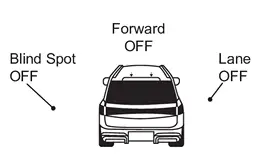
OFF LDW ON Vehicle speed is less than approx. 60 km/h (37 MPH) — LDW system indicator : White
Speaker icon : White
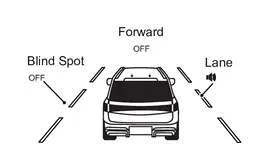
OFF Vehicle speed is approx. 60 km/h (37 MPH) or more Vehicle closes to lane marker Turn signal is OFF or ON (Opposite to the deviate side) — Yellow (Blink)

Beep LDW system indicator : Yellow (Blink)
Speaker icon : White
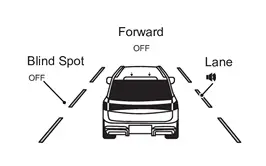
Turn signal is ON(Deviate side) — LDW system indicator : White
Speaker icon : White
OFF  NOTE:
NOTE:After the operating conditions of warning are satisfied, the warning continues until the vehicle speed reaches approximately 55 km/h (34 MPH). Refer to System Description.
INSPECTION END
 Ldw
Ldw
...
 I-Li
I-Li
...
Other materials:
Work Procedure
WRITING VEHICLE SPECIFICATION
With CONSULT
Perform writing vehicle specification to combination meter following "Automatic Configuration" procedure of "Configuration" according to CONSULT Operation Manual.
NOTE:
Log in the network according to CONSULT guidance.
>>
WORK END ...
Disassembly and Assembly
CAUTION:
OUTSIDE SEAT CUSHION FINISHER OUTER
Disassembly
Disengage fixing pawls, and then remove reclining knob cap.
: Pawl
Disengage fixing portion using a remover tool (A) according to numerical order 1→2 indicated by arrows as shown in the figure, and then remove reclining knob.
Remove ...
Motion-activated liftgate
Example
Example
Basic information
The Nissan Armada features a convenient motion-activated liftgate system that
allows hands-free operation using a simple foot gesture beneath the rear bumper.
The kick motion sensor a is positioned on the left side under the rear bumper.
When you per ...

0.005