Basic information
The third row seating area in the Nissan Armada is engineered to deliver both flexibility and safety, ensuring that passengers benefit from comfort while maintaining proper restraint system performance. Correct usage of the 3rd row seats in the Nissan Armada is essential for minimizing injury risks and maximizing passenger protection in all driving situations.
WARNING
- Never allow anyone to ride in the cargo area or on the rear seat when
it is folded down in the Nissan Armada.
Using these areas without proper restraints can lead to severe injury or even death during sudden stops or collisions.
- When returning the seatbacks of the Nissan Armada to the upright position,
always ensure they are fully latched and securely locked.
If the seatbacks are not properly secured, passengers may be seriously injured in an accident.
- Always secure cargo properly inside the Nissan Armada to prevent shifting.
Avoid stacking cargo above seatback height, as unsecured items may become dangerous during sudden braking or impact.
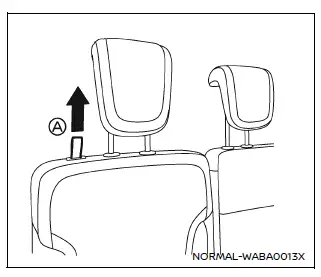
Manual seat adjustment (if so equipped)
Reclining:
Pull the strap A and adjust the seatback of the Nissan Armada to the desired angle. Release the strap once the correct position is reached.
The reclining function allows passengers of different sizes to achieve proper seat belt positioning and increased comfort during travel in the Nissan Armada.
The seatback may also be reclined when the Nissan Armada is parked, providing additional relaxation for passengers.
WARNING
- Do not ride in a moving Nissan Armada when the seatback is reclined.
This position reduces seat belt effectiveness. In a collision, the occupant may be thrown forward, resulting in neck or serious bodily injuries.
Sliding under the lap belt may also occur, increasing the risk of internal injuries.
- For maximum safety in the Nissan Armada, always keep the seatback upright while driving. Sit properly with your back against the seat and both feet on the floor, and ensure the seat belt is correctly fastened.
- After adjusting the seat, always confirm that it is securely locked in place.
Power seat adjustment (if so equipped)
NOTE:
To prevent battery discharge in the Nissan Armada, avoid operating the power seat adjustments for extended periods when the engine is not running.
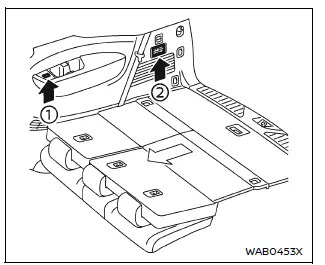
Example
The 3rd row power seat controls in the Nissan Armada are conveniently located on the cup holder console (1) for both driver and passenger sides. Additional folding controls are positioned on the rear quarter trim panel (2) behind the third row seats.
Before operating the 3rd row seats in the Nissan Armada:
- Move the corresponding 2nd row seat forward to avoid interference with the 3rd row seat.
- Lower the 3rd row head restraints fully to ensure smooth operation.
- Disconnect and secure the center seat belt and latch plates into the retractor
base.
- Reconnect the center seat belt when returning the seat to the upright position.
- Ensure that no objects are placed on the seatback or cushion.
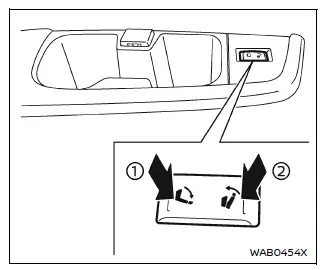
Reclining:
Press and hold the rear side of switch 1 located near the 3rd row cup holders to recline the seatback to the desired angle. To return the seatback forward, press and hold the front side of switch 2 until the preferred position is achieved.
WARNING
- Do not ride in a moving Nissan Armada when the seatback is reclined.
This can significantly reduce seat belt effectiveness and increase the risk of severe injuries in an accident.
Sliding under the lap belt may also result in internal injuries.
- For optimal protection, always keep the seatback upright while the Nissan Armada is in motion and ensure the seat belt is properly adjusted.
Armrest
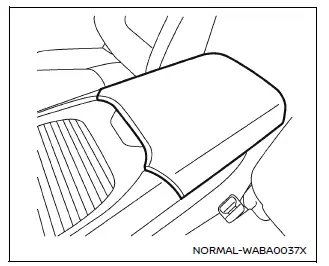
Front seats
In the Nissan Armada, the console box lid can be used as a comfortable armrest, enhancing convenience for front occupants during long drives.
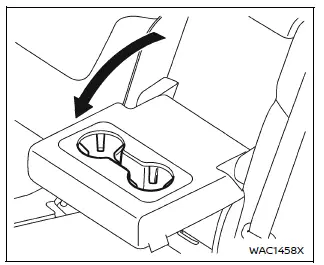
2nd row seat (if so equipped)
The 2nd row center seatback in the Nissan Armada can also be folded down to function as an armrest, providing additional comfort and utility for rear passengers.
Other materials
Lifting Point
Pantograph Jack
WARNING:
Jacking up or lifting up the vehicle may the vehicle height to go down which cause a personal injury and/or damage to the air suspension component parts. Refer to Precaution for when Jacking and Lifting Up the vehicle with Electronic Air Suspension System (With electronic ...
Interior Lighting System Symptoms
Symptom Table
NOTE:
Perform the self-diagnosis with CONSULT before the symptom diagnosis. Perform the trouble diagnosis if any DTC is detected. Symptom Possible cause Inspection item
All the following lamps does not turn ON.
Map lamp
Personal lamp
Rear room lamp
Luggage room lamp
Front ...
Distance Sensor Alignment
Work Procedure
Always perform the radar alignment after removing and installing or replacing the distance sensor. Application Notice Type Description
TYPE 1
When using KV99112700 for radar alignment. Refer to Description.
TYPE 2
When using 1-20-2851-1 for radar alignment. Refer to Descript ...