Basic information
The flexible seating system in the Nissan Armada is designed to deliver exceptional versatility, allowing you to quickly adapt the interior layout for passengers or cargo. Whether transporting people or maximizing storage space, the Nissan Armada ensures both safety and convenience when using its foldable seating configurations.
WARNING
- Never allow anyone to ride in the cargo area or on the rear seats when
they are folded down in the Nissan Armada.
In the event of a collision or sudden stop, occupants without proper restraints in these areas face a significantly higher risk of serious injury or death.
- Do not permit passengers to occupy any area of the Nissan Armada that
is not equipped with proper seating and seat belts.
Always ensure that every occupant is seated correctly and using a seat belt as intended.
- Do not fold down the rear seats while passengers are seated in the rear area or when cargo is placed on the seats.
- Head restraints must always be correctly adjusted in the Nissan Armada,
as they provide crucial protection in the event of an accident.
If removed, they must be properly reinstalled and adjusted before driving.
- If head restraints are removed, store them securely to prevent them from causing injury or damage during sudden braking or a collision.
- Always secure cargo properly in the Nissan Armada to prevent shifting.
Avoid placing cargo higher than the seatbacks, as unsecured items may become hazardous during sudden stops.
- When folding the bench seat seatback for maximum cargo capacity in the
Nissan Armada, ensure that the seat base is securely latched by gently rocking
it (for manual seats if equipped).
If not properly secured, cargo placed on a folded seatback may become a dangerous projectile.
CAUTION
- When folding the 2nd row seat for increased cargo space in the Nissan Armada, ensure that cargo does not come into contact with the center console of captain’s seats (if equipped), as this may cause damage.
- When folding or returning seats to the upright position in the Nissan
Armada, always follow safety precautions:
- Ensure that the seat path is completely clear before moving the seat.
- Keep hands and feet away from moving parts to prevent pinching injuries.
- Before operating the seat folding mechanism, make sure the rear head restraints are fully lowered.
NOTE:
Before adjusting seats in the Nissan Armada, move the seat in front of the one being operated to a position where it will not interfere with the movement.
Manual folding (if so equipped)
WARNING
When returning the seatbacks of the Nissan Armada to the upright position, always ensure they are fully locked and secured. Failure to do so may result in passenger injury during sudden braking or a collision.
The 2nd and 3rd row seats in the Nissan Armada can be folded flat to significantly increase cargo capacity, making it ideal for transporting large or bulky items.
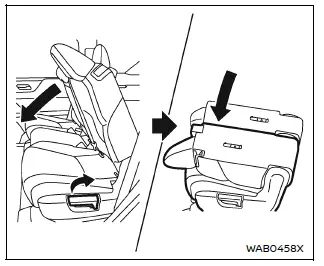
2nd row seats
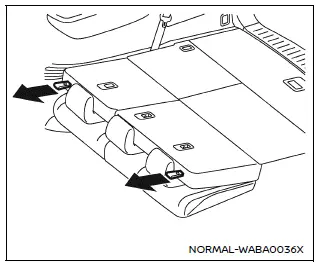
3rd row seats
To fold the seats in the Nissan Armada, pull the lever located on the 2nd row seat or the strap on the 3rd row seat to release and lower the seatback smoothly.
This flexible seating configuration allows the Nissan Armada to transform from a passenger-focused SUV into a highly practical cargo carrier within seconds.
Power folding (if so equipped)
The Nissan Armada may also feature power-operated seat folding, allowing you to adjust the interior layout effortlessly using conveniently located controls. This enhances usability and provides a premium experience when managing cargo and passenger space.
The 2nd (if so equipped) and 3rd (if so equipped) row seats in the Nissan Armada can be folded completely flat to significantly expand cargo capacity, allowing the vehicle to easily accommodate large or bulky items while maintaining the versatility expected from a full-size SUV like the Nissan Armada.
WARNING
Before initiating any seat folding operation in the Nissan Armada, always ensure that no passengers or objects are present on the rear seats. Never leave the vehicle unattended until the folding or unfolding process has been fully completed.
CAUTION
- When operating the rear power seatback return in the Nissan Armada, make sure the vehicle is completely stopped and the transmission is set to the P (Park) position.
- The auto-reverse safety function may not activate in all cases, depending on the shape, size, or position of obstacles.
NOTE:
- Before starting any seat operation in the Nissan Armada, confirm that the vehicle is fully stationary. If the vehicle begins moving during the folding or unfolding process, the system will automatically stop.
- If the battery voltage is low, seat operation may not complete properly, especially when other electrical systems are being used while the engine is off.
- In low ambient temperatures or when battery voltage is reduced, simultaneous operation of multiple seats in the Nissan Armada may not be possible. In such cases, it is recommended to start the engine.
- If the system detects that an object or body part is pinched, the seat will briefly reverse direction and emit an audible warning signal. If the obstruction remains, the system will stop completely.
- The operation will automatically stop under the following conditions:
- The Nissan Armada begins to move.
- Any seat control switch or key is activated during operation.
- The auto-reverse safety function is triggered.
- If the 3rd row seat in the Nissan Armada does not fully fold or return to its original position, check for obstructions or system limitations.
- After charging or replacing the vehicle battery, verify that the seat system operates correctly (stops at proper positions and does not reverse unexpectedly) before using the power folding feature.
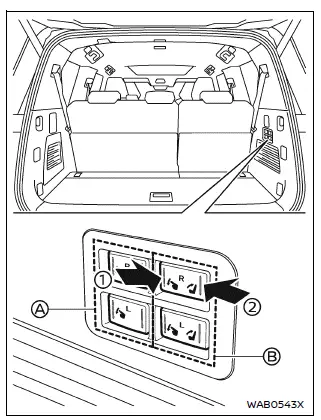
Example
Using cargo room switches:
The Nissan Armada is equipped with conveniently located cargo area switches that allow quick adjustment of rear seats without entering the cabin.
The switches positioned at the front side of the cargo area (A) are used to control the 2nd row seats (if so equipped).
The switches located at the rear side of the cargo area (B) are dedicated to the 3rd row seats.
Press the front side of switch 1 to automatically fold down the corresponding seatback (R: right side, L: left side) in the Nissan Armada.
Press the rear side of switch 2 (if so equipped) to automatically return the seatback to its upright position.
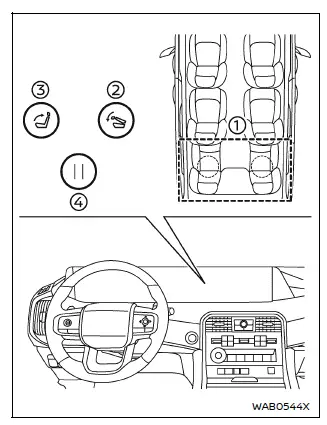
Using touch screen display:
The Nissan Armada also allows seat control via the touchscreen interface, providing a modern and convenient way to manage interior configurations.
Refer to the "Touch screen display" section or the separate NissanConnect Owner’s Manual for detailed instructions on system operation.
When the Nissan Armada is completely stopped, touch
 on the display, then select the "Vehicle" menu.
Next, select the "Seat" option, followed by "Power Folding Rear Seats". Choose the desired seat(s) (1), then press the fold button (2). The selected seats will automatically fold flat.
If all seats are selected, all 3rd row seats in the Nissan Armada will fold simultaneously.
To return the seats to their normal position, press the return button (3).
Press button (4) at any time to immediately stop seat movement.
This intelligent system in the Nissan Armada enhances usability and allows drivers to adapt the interior layout quickly, making it ideal for both daily use and transporting larger cargo.
Other materials
SAND mode
WARNING
When SAND mode is activated in the Nissan Armada, the Vehicle Dynamic Control
(VDC) system operates with reduced intervention. As a result, the system may not
react in the same way as it does in STANDARD mode. To minimize the risk of accidents,
always drive the Nissan Armada with caut ...
Road Wheel Tire
Exploded View
Tire
Air valve
Wheel
: For non-reusable parts, refer to the TPMS configuration diagram.
Refer to TIRE PRESSURE SENSOR : Exploded View.
: N·m (kg-m, ft-lb)
Removal & Installation
WARNING:
Jacking up or lift up the vehicle may the vehicle height to go down which ...
Normal Operating Condition
Description
SHIPPING MODE
Shipping mode inhibits battery power consumption during transportation or storage of the vehicle. Vehicle is set to shipping mode before being shipped from the factory.
When ignition switch is OFF, BCM operates shipping mode.
For shipping mode cancel operation, refer t ...