Basic information
The automatic climate control system in the Nissan Armada is designed to provide maximum comfort and convenience for both driver and passengers. You can operate the system either through the dedicated front air conditioner control panel or directly via the touchscreen climate control interface, depending on your preference and driving situation.
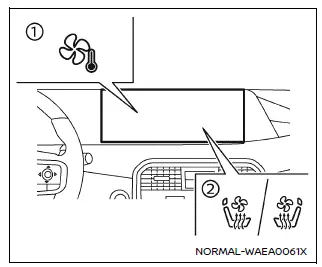
Example
To access the climate control interface in the Nissan Armada, simply tap the
"
 "
key 1 on the touchscreen display.
"
key 1 on the touchscreen display.
You can also quickly adjust selected climate settings without opening the full
climate menu by pressing the "
 "
or "
"
or "
 "
icons (if equipped), even while other screens are displayed.
"
icons (if equipped), even while other screens are displayed.
When the air conditioning system in the Nissan Armada is active, the currently set temperature is displayed at the bottom of the screen. You can conveniently adjust it by touching the temperature display area directly.
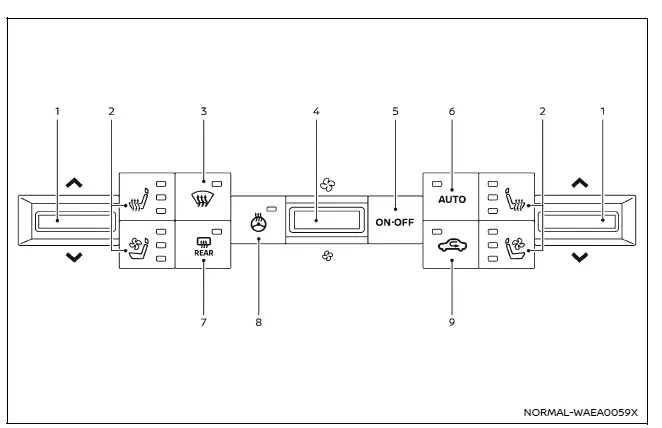
Front air conditioner control panel (example)
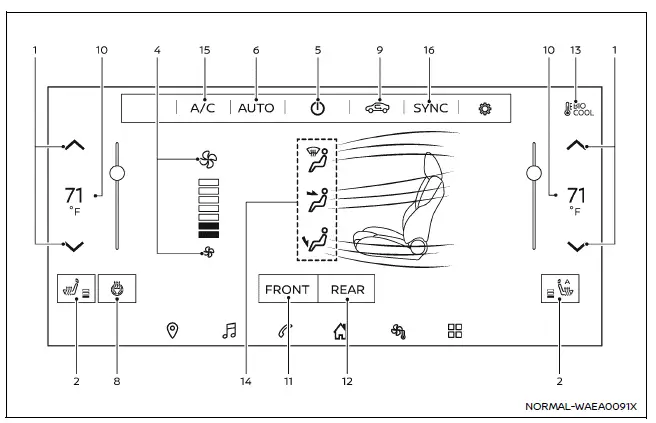
Climate control screen (example)
- Temperature adjustment controls
- Front ventilated/heated seats controls (if equipped)
-
 front defroster control
 - Fan speed adjustment controls
- System ON/OFF button
- AUTO mode activation button
-
 rear window defroster control
 - Heated steering wheel control (if equipped)
- Air intake mode control
- Temperature display
- FRONT climate zone control
- REAR climate zone control
- BIO COOL system indicator (if equipped)
- Air distribution (airflow) control
- A/C activation control
- SYNC temperature synchronization control
Automatic operation
Cooling and/or dehumidified heating (AUTO):
The Nissan Armada automatic mode is ideal for year-round use. Once activated, the system intelligently maintains your selected cabin temperature by automatically adjusting airflow distribution and fan speed for optimal comfort.
1. Press the AUTO button or key (the indicator will illuminate and the key color will change to orange).
2. Adjust the desired temperature using the temperature control switches or touchscreen controls.
- When the SYNC indicator is white, the Nissan Armada allows independent temperature control for the driver and front passenger zones.
In hot and humid conditions, you may notice a light mist coming from the vents. This is a normal result of rapid cooling and does not indicate a malfunction.
Heating (A/C OFF):
Use this mode when only heating is required without activating the air conditioning system in your Nissan Armada.
1. Activate AUTO mode.
2. Tap the "A/C" key to deactivate cooling (key turns white).
3. Set your preferred temperature.
- Independent temperature adjustment is available when SYNC is inactive.
- The Nissan Armada will automatically regulate airflow and fan speed to maintain cabin temperature.
NOTE:
- Avoid setting the cabin temperature lower than the outside temperature, as this may reduce system efficiency.
- This mode is not recommended when windows are fogging.
Dehumidified defrosting or defogging:
1. Press the
 button (indicator illuminates).
2. Adjust the temperature as needed.
- For faster defrosting, increase fan speed to maximum.
- After clearing the windshield, return to AUTO mode for normal operation.
Manual operation
Fan speed control:
You can manually control fan speed in your Nissan Armada using physical controls or touchscreen settings for precise airflow adjustment.
Air intake control:
The air intake mode cycles each time the control is activated.
- Recirculation mode (indicator ON, orange) keeps air inside the Nissan Armada.
- Fresh air mode (indicator OFF, white) allows outside air into the cabin.
- When the "
 "
icon is displayed, intake is controlled automatically.
"
icon is displayed, intake is controlled automatically.
Air flow control:
The Nissan Armada allows manual selection of airflow direction:
 - Air directed to center and side vents.
 - Air directed to footwell and partially to windshield.
 - Air directed mainly to windshield defroster.
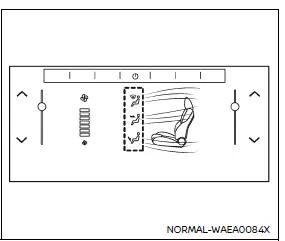
The airflow distribution can be monitored and adjusted individually on the Nissan Armada touchscreen. Swipe gestures allow you to control airflow intensity dynamically.
Temperature color indicators reflect the selected setting, not the actual air temperature.
Synchronize temperature settings:
Press the "SYNC" key to activate synchronized climate control in the Nissan Armada. When active (orange), one control adjusts all zones simultaneously.
If individual zone temperatures are changed, SYNC will partially or fully deactivate depending on the adjustments.
Turning the system on/off
Use the ON·OFF button or touchscreen key to power the system.
Advanced Climate Control System (if equipped)
The Nissan Armada Advanced Climate Control System enhances cabin air quality using ionization technology and intelligent air intake management.
Exhaust gas detection sensor:
This system automatically detects harmful exhaust gases such as gasoline or diesel fumes. When detected, the Nissan Armada switches from outside air intake to recirculation mode to protect occupants.
The system operates under the following conditions:
- Airflow is not set to defroster mode.
- Outside temperature is approximately 0°C (32°F) or higher.
Remote engine start logic
When remote engine start is activated in the Nissan Armada, the climate system automatically selects heating or cooling based on ambient and cabin temperatures. During this time, controls may be temporarily unavailable until ignition is switched to ON.
In colder conditions, the rear window defroster may also activate automatically, ensuring optimal visibility and comfort from the moment you enter your Nissan Armada.
Other materials
Evap Leak Check
EVAP CANISTER : Leak Check
CAUTION:
Never use compressed air or a high pressure pump.
Never exceed 4.12 kPa (0.042 kg/cm2, 0.6 psi) of pressure in EVAP system.
NOTE:
Never start engine.
Improper installation of EVAP service port adapter to the EVAP service port may cause a leak.
WITH CONSU ...
Precautions
Precaution for Supplemental Restraint System (SRS) "AIR BAG" and "SEAT BELT PRE-TENSIONER"
The Supplemental Restraint System such as “AIR BAG� and “SEAT BELT PRE-TENSIONER�, used along with a front seat belt, helps to reduce the risk or severity of injury to the driver and front passenger fo ...
Rear Disc Brake
Brake Pad
Inspection and Adjustment
WARNING:
Jacking up or lift up the vehicle may the vehicle height to go down which cause a personal injury and/or damage to the air suspension component parts. Refer to Precaution for when Jacking and Lifting Up the vehicle with Electronic Air Suspension System ...